The best robot programming software, compared by what it is best for
There is no single best robot programming or simulation software — the right one depends on your goal. This is a fair, category-by-category guide: free tools for learning, brand and integrator tools for production offline programming, research simulators, and enterprise digital twins. We make one of the tools below — a free browser simulator for learning the fundamentals — and we will tell you plainly where the others are the better choice.
Honest note: our simulator is the best pick for LEARNING robot programming free. It is not a production offline-programming suite and does not generate real robot programs — for that, see the brand and integrator tools below.
How to read this list
Pick by your goal, not by a leaderboard.
We make one of the tools on this list, so here is the straight version: each tool below is excellent at a different job. If you are learning the fundamentals, a free browser simulator (ours) is the easiest start. If you are shipping programs to real hardware, you want a brand or integrator tool. If you are doing research, you want a physics-rich research simulator. If you are modelling a whole production line, you want an enterprise digital-twin platform. We never disparage the other tools — most learners will end up using more than one over time.
First, the hardware
The robot geometries this software programs
Before you pick software, it helps to know what it has to drive. Most robot programming and simulation tools target these configurations. The motion fundamentals are shared across all of them — which is exactly why learning them first, on any one tool, pays off whichever software you settle on.
The shortlist
Robot programming & simulation software
Each entry has an honest “best for” and a one-line description of what it actually is — so you can jump to the category that matches what you are trying to do.
1. Our browser robot simulator
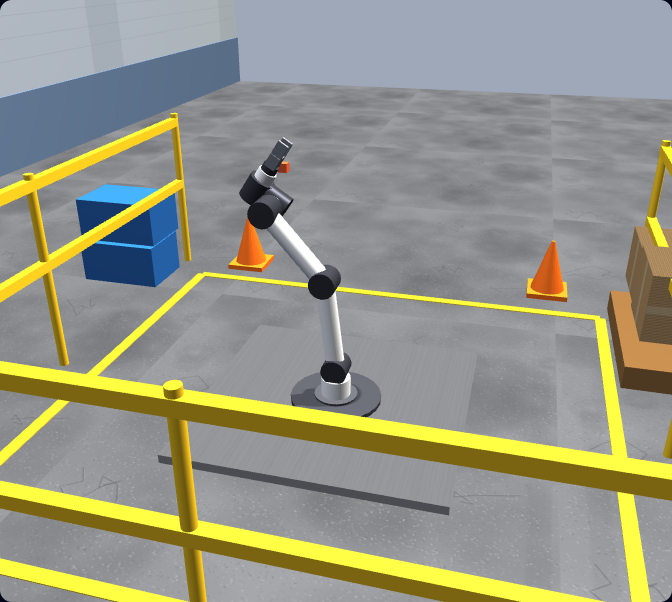
Best for: Learning robot programming, free, with no installA browser-based simulator where you write real URScript on a simulated six-axis arm, run auto-graded lessons, and earn a certificate — built to teach the fundamentals rather than generate production code.
2. RoboDK
Best for: Multi-brand offline programming & production code generationA commercial desktop application for offline programming and simulation across a large library of robot brands, generating real, deployable robot programs through post-processors.
3. ABB RobotStudio
Best for: ABB offline programming with a virtual controllerABB's own offline-programming and simulation suite, built around a virtual controller that runs the same software as real ABB robots so programs behave like they will on the floor.
4. FANUC RoboGuide
Best for: FANUC offline programming & cell simulationFANUC's offline-programming and simulation environment for designing, testing, and validating FANUC robot cells and programs before deploying to real FANUC hardware.
5. Siemens Tecnomatix / Visual Components
Best for: Full digital-twin & production-line simulationEnterprise simulation platforms (Siemens Tecnomatix Process Simulate and Visual Components) used to model entire work cells and lines as digital twins — robots, conveyors, and processes together.
6. CoppeliaSim (formerly V-REP)
Best for: Robotics research & education with physics + scriptingA versatile robotics simulator with physics engines and scriptable scenes, widely used in research and education to prototype robots, sensors, and control algorithms.
7. Gazebo
Best for: ROS robotics research & simulationAn open-source robotics simulator commonly paired with ROS, used to simulate robots, sensors, and environments with physics for research and algorithm development.
8. Vendor teach-pendant software
Best for: Programming the real robot on the floorEach robot brand ships its own teach-pendant interface (for example UR PolyScope on Universal Robots) for jogging, teaching waypoints, and programming the physical robot directly at the cell.
At a glance
Comparison table
A quick read on focus, install, and cost. Vendor tiers and pricing change, so treat the cost column as a category, not a quote — always confirm current terms on each vendor’s own site.
| Software | Best for | Install | Free? |
|---|---|---|---|
| Our browser robot simulator | Learning robot programming, free, with no install | None — runs in any modern browser | Free to start; Pro for the full course |
| RoboDK | Multi-brand offline programming & production code generation | Desktop app (Windows, macOS, Linux) | Paid licence (trial available) |
| ABB RobotStudio | ABB offline programming with a virtual controller | Desktop app (Windows) | Vendor software (free and paid tiers — check ABB) |
| FANUC RoboGuide | FANUC offline programming & cell simulation | Desktop app (Windows) | Vendor software (paid licence — check FANUC) |
| Siemens Tecnomatix / Visual Components | Full digital-twin & production-line simulation | Desktop / enterprise software | Commercial / enterprise licensing |
| CoppeliaSim (formerly V-REP) | Robotics research & education with physics + scripting | Desktop app (Windows, macOS, Linux) | Free educational edition; paid editions available |
| Gazebo | ROS robotics research & simulation | Desktop (Linux-first; ROS ecosystem) | Free and open source |
| Vendor teach-pendant software | Programming the real robot on the floor | Runs on the robot controller / pendant | Included with the robot |
We do not list competitor prices because they change and vary by region and licence type. Where a tool has free and paid tiers, the table notes the category and points you to the vendor for current details.
Decision guide
Which should you choose?
The honest way to choose is to start from what you are trying to do. Here is the short version.
Learning the fundamentals
Start in the browser, free, with our simulator — frames, TCP, motion types, I/O, pick-and-place, payload, and safety, with auto-graded lessons and a certificate. No install, no real robot needed.
Production offline programming
Use a brand or integrator tool: RoboDK for multi-brand offline programming and code generation, ABB RobotStudio for ABB, FANUC RoboGuide for FANUC. These generate the programs real robots run.
Research & algorithms
Reach for a physics-rich research simulator: CoppeliaSim for scriptable scenes and sensors, or Gazebo for open-source simulation in the ROS ecosystem.
Whole-line digital twins
For modelling entire cells and lines, enterprise platforms like Siemens Tecnomatix Process Simulate and Visual Components are built for that scale. To program the physical robot directly, use its vendor teach-pendant software on the floor.
Start free
The fundamentals you build in the browser
Whichever production or research tool you end up using, these are the concepts every robot programmer relies on. In our simulator you do not just read about them — you write real URScript, run it on a simulated six-axis arm under physics, and get graded against a goal, for free.
Frames & coordinate systems
World, base, and tool frames decide where the robot thinks it is — the foundation every robot tool builds on.
Tool Centre Point (TCP)
Define the working point of your gripper or tool so the robot moves the right spot to the right place.
Joint vs linear motion
movej moves fast through joint space; movel keeps the tool on a straight Cartesian line — knowing when to use each is core everywhere.
Waypoints & sequencing
Approach, act, retract — chaining points into a smooth, safe path is the same skill on any controller.
Digital I/O & grippers
Read inputs and set outputs to drive a gripper or signal a PLC — universal, only the instruction names change.
Payload, reach & safety
Configure payload, respect reach limits, and avoid collisions and over-force contact — the discipline production tools assume you have.
Keep exploring
More robot programming resources
- Robot programming course — the full graded path from first jog to a working pick-and-place cell.
- Robot arm simulator — practise six-axis arm motion and kinematics in the browser.
- Universal Robots programming — learn URScript and the UR workflow our simulator is built around.
- Robot simulator — the home of our browser-based robot programming trainer.
- RoboDK alternative — how a free learning simulator compares to RoboDK’s production OLP.
- RobotStudio alternative — learning ABB-style programming concepts before the vendor suite.
- RoboGuide alternative — build the fundamentals before FANUC offline programming.
Best robot programming software FAQ
Learn the fundamentals first — free, in your browser.
Write real robot code in a tab — frames, TCP, motion, I/O, pick-and-place, and safety. No install, no robot, free to start. Then take those skills to whichever production or research tool fits your work.