PLC Course in India — Honest Guide Before You Pay
How Indian PLC institutes are structured, what fee ranges are commonly advertised, the questions you should ask before enrolling, and where online practice fits alongside classroom training.
Join 1300+ learners practicing PLC programming
Browser-based. No hardware required. Create a free account to save your progress.

The landscape
How PLC training is structured in India
PLC training in India sits across two broad categories: private automation institutes (by far the largest segment) and NSDC-affiliated vocational programs. Understanding what each offers — and where they fall short — helps you choose where your money actually goes.
Private automation institutes
These are the dominant channel. Cities including Pune, Hyderabad, Chennai, Bengaluru, Mumbai, and Delhi have dozens of institutes offering PLC training, usually packaged as short-duration courses (1–6 months) covering one or two PLC brands. The typical structure is classroom instruction in the morning with lab sessions on physical hardware in the afternoon. Batch sizes vary from 6 to 30+ students — the panel-to-student ratio is one of the most important things to ask about, because a 1:15 ratio means most learners get very little hands-on programming time.
The curriculum usually covers PLC basics, ladder logic, I/O wiring, timers and counters, and some scenario programming (conveyor, motor control). Advanced institutes add SCADA/HMI, VFD (variable-frequency drives), and fieldbus communication. The quality varies significantly — a well-equipped institute with a CompactLogix or S7-1200 trainer set up on a working panel teaches very different skills from one running ladder diagrams on a demo laptop with a simulator board.
NSDC and government vocational programs
The National Skill Development Corporation (NSDC) and PMKVY (Pradhan Mantri Kaushal Vikas Yojana) schemes fund sector-specific training through approved partners. Automation and instrumentation courses fall under the Electronics Sector Skills Council of India (ESSCI). These programs are typically subsidised or free for eligible candidates, with a fixed curriculum aligned to National Occupational Standards. The depth of PLC content varies by approved trainer — ask to see the full course outline rather than relying on the marketing brochure.
Engineering college placements and add-on programs
Many EEE and ECE departments in Indian engineering colleges offer PLC labs as part of the industrial electronics or automation elective. Final-year students often supplement with a short private-institute course before placements. This is an effective path: college gives theoretical grounding, the add-on course gives hands-on hours, and a browser-based simulator lets you practise daily without consuming lab time.
Fee ranges
What PLC courses commonly cost in India
The following ranges are commonly advertised by private institutes as of 2025–26. Actual fees depend on city, duration, hardware quality, brand focus, and whether placement assistance is included. Verify all figures directly with the institute before paying.
Short foundation course (1–4 weeks)
₹5,000 – ₹20,000Typically covers PLC basics and one brand. Lab time limited. Suited to electrical technicians who already understand relay logic and want to add PLC fundamentals.
Standard automation course (1–3 months)
₹15,000 – ₹45,000Covers 1–2 PLC brands, SCADA overview, and basic HMI. This is the most common offering. Wide variation in quality — a ₹15,000 course and a ₹40,000 course may cover identical topics on different hardware.
Comprehensive industrial automation diploma (3–6 months)
₹40,000 – ₹80,000Adds VFD, fieldbus (Profibus/Profinet/Modbus), SCADA, advanced HMI, and more. Often includes a project. Best suited to fresh graduates targeting controls engineer roles.
NSDC/PMKVY-subsidised program
Free to ₹5,000 (if eligible)Available through approved training partners. Check the NSDC portal for current empanelled institutes. Curriculum is standardised; hardware quality varies by centre.
Note: These are commonly advertised ranges — not benchmarks or endorsements. Real fees vary by institute, city, and intake. Always get a written fee structure before the counselling session ends.
Due diligence
Questions to ask before paying for a PLC course
Most institute counsellors are sales staff. The answers to these questions reveal whether the course delivers real value or a glossy brochure.
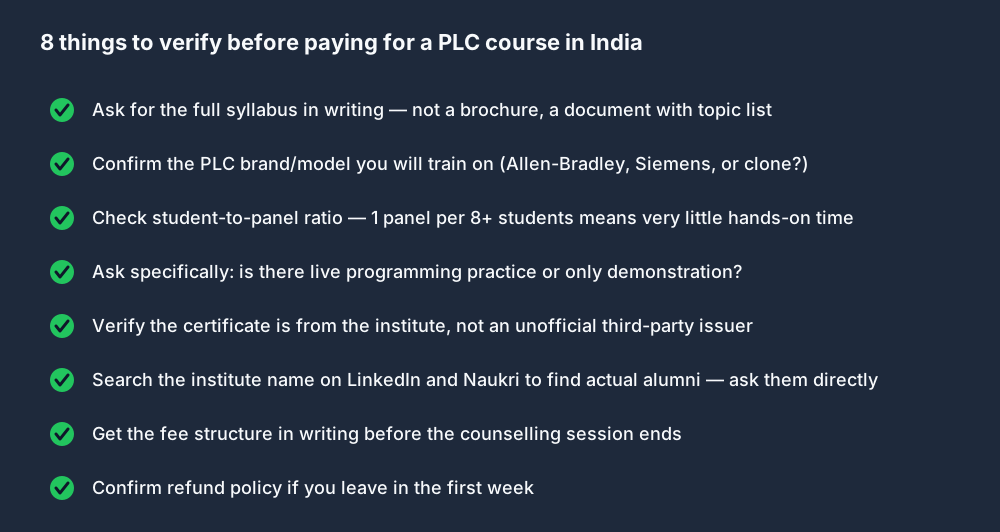
What is the student-to-panel ratio in lab sessions?
Why it matters: If there are 12 students sharing one PLC trainer, each student gets a few minutes of hands-on time per session. A ratio above 4:1 substantially reduces actual programming practice.
Exactly which PLC model will I program? (Not just brand — the specific model.)
Why it matters: Allen-Bradley MicroLogix 1100 and CompactLogix L33ER use different software (RSLogix 500 vs Studio 5000). Siemens S7-300 and S7-1200 use different TIA Portal versions. This matters for software you download and practise on after class.
Is the lab time for live programming on a physical panel, or mostly watching demonstrations?
Why it matters: Some institutes count instructor-demonstration time as "lab time". Ask whether students individually write and download programs, or whether the instructor programs while students observe.
Can I see the full written syllabus — topic by topic?
Why it matters: A brochure says "PLC training". A syllabus says "Lesson 5: TON/TOF/TP timer instructions, preset and accumulator registers, practical: bottle-filling timer sequence". If you cannot get a written syllabus before paying, that is a warning sign.
Are placement claims verifiable? (LinkedIn profiles of recent alumni, not testimonials.)
Why it matters: Many institutes advertise "100% placement assistance". This often means CV forwarding to a list of companies. Ask for the names of 3 alumni from the last batch who got placements and their LinkedIn profiles. If the counsellor cannot or will not provide this, weight the placement claim accordingly.
What is the refund policy if I leave within the first two weeks?
Why it matters: A full no-refund policy on a 3-month course with no trial period is a red flag. Reputable institutes offer a reasonable cancellation window.
Is the certificate from your institute, or from a third party? What does it say on the certificate?
Why it matters: Some institutes claim affiliation with national bodies that amounts to printing a partner logo on their own certificate. Ask to see a sample certificate with the issuing body clearly identified.
What happens if the course hardware is unavailable? (Power outages, equipment faults.)
Why it matters: Hardware breaks. Find out whether make-up sessions are provided and whether there is backup equipment. This is a practical question that reveals how the institute handles operational disruption.
Honest comparison
Institute vs online: what each actually provides
Neither is universally better. Each serves different constraints. The table below is honest about where each falls short.
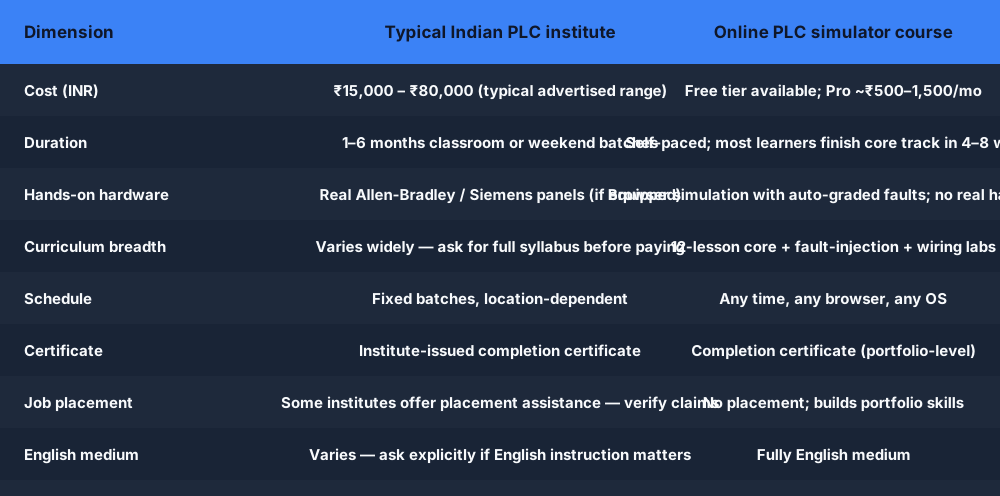
| Dimension | Typical Indian institute | Online simulator (this site) |
|---|---|---|
| Cost | ₹15,000 – ₹80,000 (commonly advertised; verify before paying) | Free tier available; Pro plan ~₹500–1,500/month |
| Hardware access | Real Allen-Bradley / Siemens panels (if equipped; check ratio) | Browser simulation — no real hardware |
| Schedule | Fixed batches; requires travel to institute | Any time, any browser, any OS; no commute |
| Curriculum depth | Varies widely — ask for written syllabus | 12-lesson core + wiring labs + fault-injection scenarios |
| Hands-on programming | Depends on student-to-panel ratio (ask explicitly) | Every lesson has live exercises with auto-graded pass/fail |
| Certificate | Institute-issued completion certificate | Online completion certificate (portfolio-level) |
| Job placement | Some offer placement assistance — verify claims with alumni | No placement; builds verifiable portfolio skills |
| Language of instruction | Varies — ask explicitly if English medium matters | Fully English medium |
| Best for | Learners who need real hardware touch-time and can travel | Learners building programming fluency before or alongside hardware |
Where it fits
Where browser-based practice fits in the Indian learning path
We are honest about what online simulation does and does not replace. A browser simulator cannot teach you to wire a 24V DC output to an output module terminal, diagnose a blown fuse with a multimeter, or feel the difference between a jog button wired normally-open versus normally-closed. Those skills require hardware.
What it does well: programming fluency. Writing ladder logic, understanding scan cycle behaviour, diagnosing faults in auto-graded scenarios, and building the mental model of how a PLC program executes. These are skills you can practise for free, at midnight, from any device, without waiting for lab time or booking an institute session.
The most effective pattern many Indian engineers use: start free on the simulator to learn the language, take an institute course for hardware exposure, and then return to the simulator for daily practice on the 120+ scenario library. The institute course is more productive when you arrive already knowing ladder logic.
Learn contacts, coils, timers, and counters on the simulator. Arrive at your institute already fluent — your lab time goes into hardware, not re-learning the basics.
The auto-graded fault scenarios (30+ faults to diagnose) extend your practice beyond institute lab hours. Useful if your batch has a high student-to-panel ratio.
For learners in smaller cities without a quality institute nearby, the simulator provides programming skills free. Add hardware access through a community polytechnic, ITI lab, or employer when available.
What the free curriculum covers
A visual map of the online PLC course
The free curriculum builds these core concepts in order — what a browser PLC simulator is, the IEC 61131-3 languages, ladder symbols and rungs, the scan cycle, and timers and counters. Every diagram below is something you write and run yourself in the browser, then get auto-graded on — no hardware, no institute booking, English medium.
Follow it all in the free curriculum, or jump into the browser PLC simulator.
For engineering students
Final-year engineering students: simulator for your project
EEE, ECE, and Mechatronics final-year students frequently need a PLC-based project that can be demonstrated and documented without depending on a lab booking. The browser simulator is designed for exactly this use.
- →120+ auto-graded scenarios — conveyor sorting, traffic-light sequencing, tank-level control, motor star-delta starting, car-wash sequence, and more. Each runs live in the browser with auto-graded pass/fail verification.
- →Export your ladder diagram — capture screenshots of your running program for your project report. A live browser demo in your viva is more convincing than a static diagram.
- →Custom ladder logic editor — write your own program for a custom project topic. The editor supports contacts, coils, timers, counters, and compare instructions — enough for most final-year automation projects.
- →Free tier is enough for most projects — the free account covers beginner and intermediate scenarios including most popular project topics. No credit card required.
See the full PLC projects library for topic ideas with worked scenarios.
For working electricians
Working electricians upskilling to PLC
India's manufacturing sector is automating rapidly — automotive, pharmaceuticals, FMCG packaging, textiles. Electricians who can read and modify a PLC program are substantially more valuable than electricians who cannot. The transition from relay-logic thinking to PLC programming is well-supported by the simulator because it mirrors the relay-logic concepts you already understand.
Ladder logic is intentionally designed to look like a relay schematic drawn left to right. A normally-open contact in ladder logic behaves exactly like a normally-open relay contact. If you can read a control circuit drawing, you can learn ladder logic in a weekend of focused practice.
Electrician-to-PLC programmer path
- 1.Complete the free beginner lessons (contacts, coils, seal-in circuits) — about 2 hours.
- 2.Work through the free wiring labs — reading wiring diagrams and multimeter use extends your existing electrical skills into PLC context.
- 3.Practice on 10–15 beginner scenarios until you can write and pass them without hints.
- 4.Take a short institute course for hands-on hardware exposure (wiring, I/O card commissioning, downloading a program to a real PLC).
- 5.Return to the simulator for daily practice on the full scenario library and fault-injection troubleshooting tracks.
The PLC training overview and the free PLC training guide have more detail on what the free tier covers.
For institutions & training providers →
For ITIs, polytechnics, engineering colleges & training institutes in India
If you run a programme rather than enrol in one, the hardest constraint is the same everywhere: you cannot afford one PLC trainer per student, so lab time is shared and most learners get only minutes of hands-on programming. A browser-based simulator removes that constraint — every student gets a full PLC environment on the lab PCs you already have (and on their own phones and laptops), with no per-machine install, no admin rights, and no imported software licence.
No lab hardware to fund
A full IEC 61131-3 ladder environment in any browser — Chrome, Firefox, Edge — on shared lab PCs, Chromebooks, or students’ own devices. Nothing for your IT team to install per machine.
Cohort seats, reassignable
Individual student logins with cohort progress reporting, so an instructor can assign work and see who is behind before a practical. Seats are reassignable if a student leaves mid-batch.
Org-private scenario builder
Build scenarios that mirror your own assessment tasks; they stay private to your institute and never appear in the public library. Export per-student portfolio PDFs.
Honest on credentials
The platform is not an NSDC/BIS-accredited programme and we make no such claim — accreditation sits with your institute. We supply the practice environment, cohort tracking, and an evidence trail.
Set up PLC training for your institute or college
Tell us about your ITI, polytechnic, engineering college, or training institute and your cohort size. We’ll come back with institutional pricing — and we’ll be straight about what the platform does and doesn’t do (no accreditation claims).
Start the free beginner track now.
No hardware required. No institute. No commute. Browser-based, English medium, free to start.
PLC course India — FAQ
Related
Related resources
- Free PLC training guide — what is genuinely free vs paid; honest breakdown.
- PLC projects library — 120+ auto-graded scenarios for final-year projects and daily practice.
- PLC programming course — full curriculum overview including Allen-Bradley and Siemens dialect tracks.
- PLC classes — structured beginner-to-advanced lesson modules.
- PLC simulator for students — how engineering students use the simulator for coursework and viva preparation.
- PLC technician certificate — what the online completion certificate covers and how it is assessed.
Learn PLC programming before your next interview.
Browser-based. Free to start. No hardware or institute required.