Free PLC Training Online — Learn PLC Programming and Earn Your Certificate
Real lessons. Real simulator. Real practice problems. The beginner curriculum is free — no credit card, no download. The full course and certificate are paid, and we say so plainly.
Join 1300+ learners practicing PLC programming
Why most free courses fall short
What is free PLC training?
Search for "free PLC training" and you will find two categories. The first is YouTube videos and PDF manuals — useful for concepts, but passive. You watch someone else program. You read about ladder logic. You do not actually write any code, which means the knowledge rarely sticks when you sit in front of a real controller.
The second category is platforms like Alison that label themselves "free" courses. Many of these give you the video content at no cost, then charge for the certificate at the end — often $9 to $23 — after you have invested hours in the course. The bait-and-switch is well-documented. The result is eroded trust and learners who feel misled.
Good free PLC training does three things. First, it teaches concepts clearly — what a contact is, what a coil does, why the scan cycle matters. Second, it gives you a live environment to practice in: a real PLC simulator that runs your code against real machine behaviour. Third, it is honest about what is free and what is not, so you can plan accordingly.
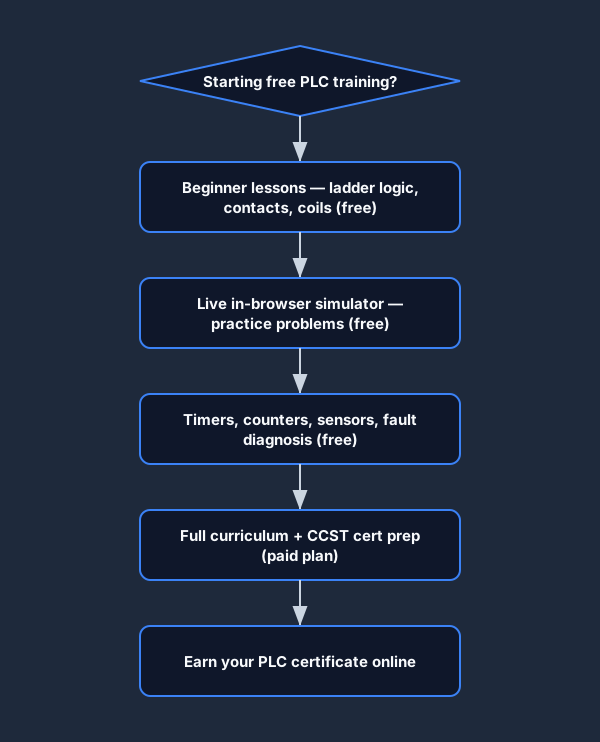
This platform gives you the beginner curriculum at no cost — lessons, quizzes, embedded practice problems, and the in-browser simulator. The full curriculum and the completion certificate are behind a paid plan, and we tell you that on this page, before you create an account. Reading versus doing is the gap that most free PLC training never closes. We close it in the free tier.
Curriculum overview
What you will learn
The curriculum covers everything an entry-level PLC technician or controls electrician needs to be productive on the job — from first contact to fault diagnosis to exam preparation.
Ladder logic fundamentals
Contacts, coils, sealing-in, branching, and the scan cycle. The building blocks that every PLC program is built from, explained with interactive diagrams and practice rungs.
Timers and counters
TON on-delay, TOF off-delay, and TP pulse timers. CTU up-counters and CTD down-counters. Real timing diagrams, not just theory — you run them in the simulator and see the accumulator tick.
Fault diagnosis
Systematic troubleshooting methodology: divide-and-conquer, half-split, voltage checks, continuity checks. Seven beginner fault scenarios with progressive hints.
Sensors and wiring
Limit switches, proximity sensors, photoelectric sensors, and pressure switches. How to wire them correctly, read their wiring diagrams, and verify them with a multimeter.
Free PLC training software
Free PLC training with a live in-browser simulator
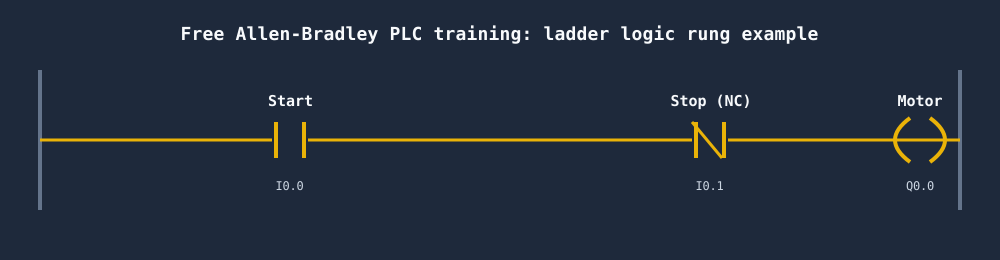
The simulator is the part that makes this different from every other free PLC training course online. Instead of watching a video of someone else writing ladder logic, you open the browser, drag contacts and coils onto a rung, and click Run. The machine — a traffic light, a motor, a conveyor — responds to your code exactly as it would respond to a real PLC.
The free tier uses Allen-Bradley-style ladder logic syntax: XIC for normally-open contacts, XIO for normally-closed contacts, OTE for output coils. The same instruction mnemonics you will see in RSLogix and Studio 5000. No download, no Windows licence, no ControlLogix hardware required.
Every beginner lesson embeds a practice problem directly in the page. You do not finish a lesson and then hunt for an exercise. The exercise is there, in context, immediately after the concept is explained. This tight loop — read, understand, do — is how technical skills actually form.
How the free tier works
- Create a free account — no credit card, no trial clock
- Work through all beginner lessons in order, or jump to a topic
- Complete the embedded practice problem in each lesson
- Run beginner scenarios in the live simulator
- Track your quiz scores and lesson completions on your dashboard
- Decide whether to upgrade when you reach the paid modules
Practice scenarios
Start with a real scenario — not a contrived example
Switch and Light
FreeYour first rung: a single contact energises an output coil. Covers XIC, output coil, and the scan cycle.
Try this scenario →Button and Light
FreeMomentary push-button vs. a latching coil. Introduces the difference between a maintained input and a sealed-in rung.
Try this scenario →CCST Cert Prep — Problem 1
ProFirst problem from the CCST certification pack. Timed, auto-graded, with a detailed solution walkthrough.
Try this scenario →PLC certificate online
PLC certificate online — what you earn and how
The completion certificate confirms you finished every module in the full curriculum and passed all the graded exercises. It is not an industry-accredited credential like the ISA CCST — we state that plainly, because the distinction matters. An accredited certification is administered by an industry body and carries formal weight in hiring. A completion certificate confirms you did the work and can demonstrate the skills. Both are legitimate, and they serve different purposes.
For electricians transitioning into controls roles, a completion certificate backed by graded machine scenarios is often more persuasive in an interview than a video-course certificate with no verifiable exercises. You can point to specific scenarios you passed, the score you earned, and the skills each problem tested. That evidence is harder to fake than a completion badge from a passive video course.
The honest breakdown — free vs. paid
Free — always, no card needed
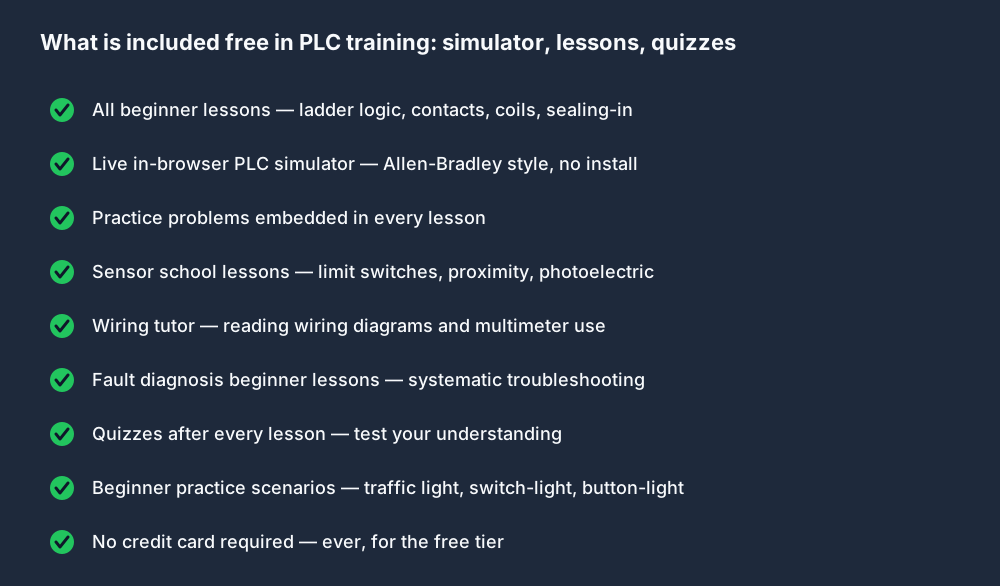
- All beginner lessons (ladder logic, contacts, coils, sealing-in)
- Practice problems embedded in every lesson
- Quizzes after every lesson
- Sensor school — limit switches, proximity, photoelectric
- Wiring tutor — reading diagrams, multimeter use
- Fault diagnosis beginner lessons
- Beginner practice scenarios in the live simulator
- Allen-Bradley-style in-browser simulator — no download
Paid plan — full curriculum
- All 40 auto-graded machine scenarios
- Allen-Bradley dialect track (RSLogix-style mnemonics)
- Siemens TIA Portal dialect track
- CCST exam preparation pack
- Structured Text and advanced instructions
- Interview prep tracks with timed exercises
- Downloadable PDF completion certificate
- Access to all future curriculum additions
The lessons, practice problems, and in-browser simulator are free — no credit card, no install. The full curriculum and certificate are unlocked with a paid plan. See pricing →
How this compares to Alison, Coursera, and AutomationDirect
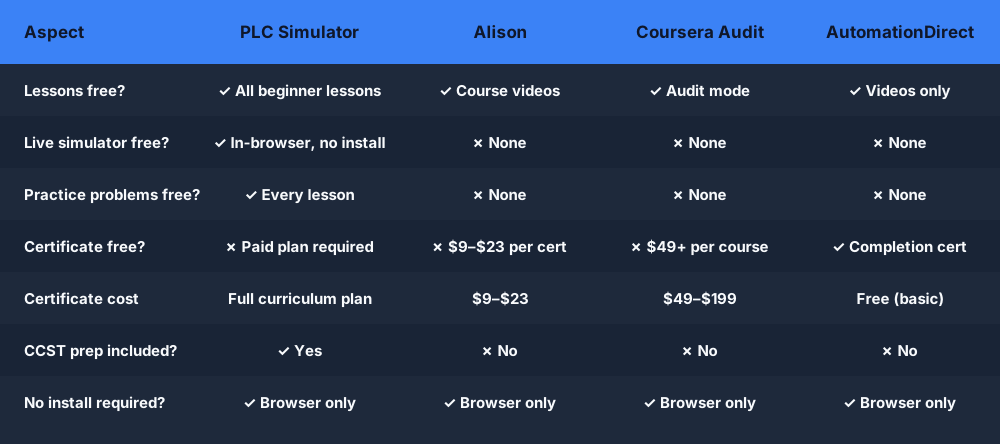
Alison's free PLC courses give you video content, then charge $9–$23 for a certificate at the point of completion. Coursera audit mode gives you course videos without a certificate — the certificate costs $49–$199 per course. AutomationDirect offers free training videos with a basic completion certificate, but no interactive simulator. None of these platforms include practice problems or auto-graded scenarios in their free tier.
This platform includes a live in-browser PLC simulator and embedded practice problems in the free tier — things none of the above offer for free. The paid plan costs are on the pricing page. We do not inflate the free tier's value to trick you, and we do not hide the cost of the certificate until the last step.
Full curriculum
Full curriculum breakdown
Twelve modules from first contact to completion certificate. Free modules are available immediately with a free account.
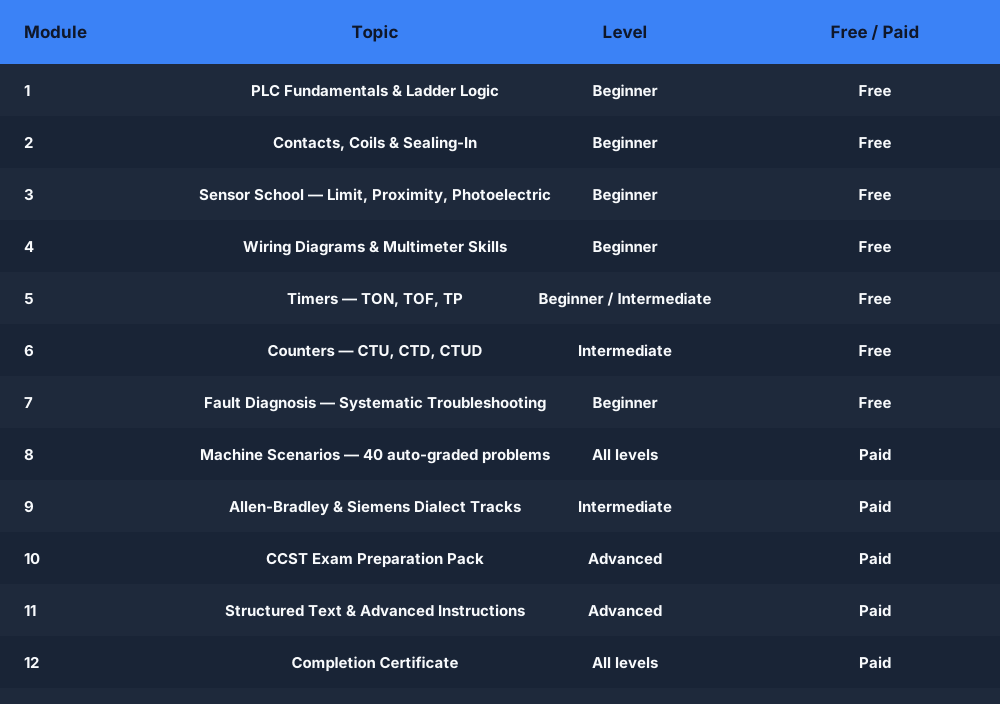
| Module | Topic | Level | Access |
|---|---|---|---|
| 1 | PLC Fundamentals and Ladder Logic | Beginner | Free |
| 2 | Contacts, Coils, and Sealing-In | Beginner | Free |
| 3 | Sensor School — Limit, Proximity, Photoelectric | Beginner | Free |
| 4 | Wiring Diagrams and Multimeter Skills | Beginner | Free |
| 5 | Timers — TON, TOF, TP | Beginner / Intermediate | Free |
| 6 | Counters — CTU, CTD, CTUD | Intermediate | Free |
| 7 | Fault Diagnosis — Systematic Troubleshooting | Beginner | Free |
| 8 | Machine Scenarios — 40 auto-graded problems | All levels | Paid |
| 9 | Allen-Bradley and Siemens Dialect Tracks | Intermediate | Paid |
| 10 | CCST Exam Preparation Pack | Advanced | Paid |
| 11 | Structured Text and Advanced Instructions | Advanced | Paid |
| 12 | Completion Certificate | All levels | Paid |
How to start your free PLC training
Create a free account
No credit card. Takes under a minute. You land directly on the beginner curriculum.
Work through beginner lessons
Each lesson is a short written module with diagrams, embedded practice, and a quiz. Work at your own pace.
Practice in the live simulator
Open any beginner scenario. Write ladder logic. Click Run. The machine responds to your code — motor, traffic light, switch and light.
Upgrade when you are ready
When you finish the free modules, you will know exactly what the paid plan unlocks. No surprise charges, no hidden certificate fee.
Free PLC training software
Free PLC training software vs. downloaded software
Traditional PLC training software — RSLogix 500, Studio 5000 Logix Designer, Siemens TIA Portal — runs on Windows only, requires a licence or a trial download, and needs a PLCSIM environment to simulate machine behaviour. For learners who want to start today, on a Mac or Chromebook, these are real barriers.
Free Allen-Bradley PLC training courses online often reference RSLogix 500 Micro Starter Lite, which is a real free download from Rockwell Automation. It is Windows-only, requires registration, and the trial period expires. TIA Portal trial follows the same pattern. Neither gives you structured graded exercises.
This simulator runs in the browser. There is nothing to download, no operating system restriction, and no licence expiry. The free Allen-Bradley dialect mirrors RSLogix-style instruction mnemonics — XIC, XIO, OTE, TON, CTU — so the terminology you learn here transfers directly to real AB hardware. It is the fastest way to get reps on ladder logic without fighting installation friction first.
Free PLC Training — Frequently Asked Questions
Start your free PLC training today
The lessons, practice problems, and in-browser simulator are free — no credit card, no install. The full curriculum and certificate are unlocked with a paid plan. Start free now, decide later.
Free PLC training — honest, interactive, and in your browser
No install. No credit card for the free tier. No certificate surprise at the last step.
Create free account →