RSLogix 5000 Tutorial for Beginners — Practise Free in Your Browser
RSLogix 5000 (now Studio 5000 Logix Designer) is the dominant Allen-Bradley programming environment. This tutorial walks you through the core skills — tag-based XIC/XIO/OTE ladder, timers, counters — in a free browser simulator, with no Windows VM and no Rockwell licence.
Looking for a tool comparison instead of a tutorial? See the RSLogix simulator page →
Join 1300+ learners practicing PLC programming
Page scope
Tutorial vs simulator — two different pages, on purpose
We deliberately keep this page separate from the RSLogix simulator page. That page answers: what is the simulator and how does it compare to Rockwell software? This page answers: how do I learn RSLogix 5000 as a beginner, step by step? The two serve different search intents and cross-link to each other so you can always find the one you need.
Background
RSLogix 5000 explained — for first-timers
RSLogix 5000 is Rockwell Automation's legacy name for what is now called Studio 5000 Logix Designer. It programs the ControlLogix and CompactLogix controller families — the dominant Allen-Bradley hardware on modern manufacturing and process plants.
The key difference from the older RSLogix 500 is tag-based addressing: instead of file-and-element addresses like T4:0.DN, you create symbolic tags like Motor_Timer.DN. The ladder instructions are nearly identical — XIC, XIO, OTE, TON, CTU — but tags make programs far more readable and maintainable at scale.
All new Allen-Bradley Logix-platform projects use Studio 5000 (RSLogix 5000) today. If a job posting lists RSLogix 5000 experience as a requirement, they mean Studio 5000 Logix Designer.
Step-by-step tutorial
RSLogix 5000 tutorial — five beginner stages
Stage 1 — XIC, XIO, and OTE
Write your first rung: a normally-open XIC start contact and an OTE output coil. Then add a normally-closed XIO stop contact and watch the logic execute a scan cycle.
Start stage 1 →Stage 2 — Tag-based seal-in circuit
Build the classic three-wire motor circuit: Start_PB (XIC) in series with Stop_PB (XIO), with Motor_Run (OTE) sealing itself in around Start_PB via a parallel XIC branch.
Practise seal-in →Stage 3 — TON on-delay timer
Add a TON timer. Practise reading the .DN done bit (not the .EN enable bit), and understand why the accumulator resets the moment the rung goes false.
Timer lessons →Stage 4 — CTU up-counter
Count parts on a conveyor with a CTU counter. Practise the .ACC accumulator, the .PRE preset, and the .DN done bit that triggers the output.
Counter lessons →Stage 5 — Allen-Bradley dialect + fault diagnosis
Switch the editor to Allen-Bradley mode. Your rungs now use XIC/XIO/OTE notation with tag addresses. Then try a fault scenario to practise systematic troubleshooting.
Fault practice →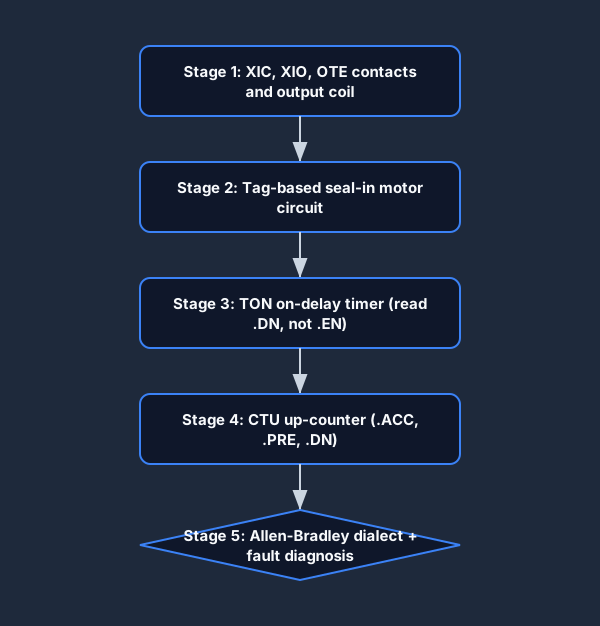
Key concepts
RSLogix 5000 instruction set — beginner reference
| Instruction | Full name | What it does |
|---|---|---|
| XIC | Examine If Closed | Passes power when the bit is TRUE (1). The Allen-Bradley name for a normally-open contact. |
| XIO | Examine If Open | Passes power when the bit is FALSE (0). Normally-closed contact. |
| OTE | Output Energize | Sets the bit TRUE when the rung is TRUE. The coil. |
| OTL / OTU | Output Latch / Unlatch | Retentive set/reset pair. Stays set even after the rung goes FALSE. |
| TON | Timer On Delay | Accumulates time while the rung is TRUE. DN bit turns on at preset. |
| TOF | Timer Off Delay | Accumulates time while the rung is FALSE. DN turns on immediately; goes FALSE at preset. |
| CTU | Count Up | Increments ACC on each rising-edge pulse. DN at preset. |
| CTD | Count Down | Decrements ACC on each pulse. DN when ACC reaches zero. |
No install required
Follow this tutorial with nothing to install
Every other RSLogix 5000 tutorial asks you to download Studio 5000 first — a multi-gigabyte, Windows-only, licensed install before you can write a single rung. This one is different: the practice links above open a browser PLC simulator that speaks the Allen-Bradley XIC/XIO/OTE dialect, so you can build, run, and watch each rung scan on a Mac, a Chromebook, or any machine, then carry the skills straight into the real software when you reach it.
Cross-links
Related on this site
- RSLogix simulator — tool comparison page: what our simulator is and how it fits next to RSLogix 500 and Studio 5000 Emulate.
- Studio 5000 tutorial — the Studio 5000 flavoured companion to this page (same underlying skills, Studio 5000 terminology).
- Allen-Bradley PLC simulator — the broader Allen-Bradley practice surface.
- PLC timers — deep-dive timer lessons (TON, TOF, RTO) with browser practice.
- PLC troubleshooting simulator — fault-finding practice for the wiring, logic, and runtime faults you will encounter on a real Logix controller.
RSLogix 5000 tutorial FAQ
Start your RSLogix 5000 / Studio 5000 learning path today.
No Windows VM. No Rockwell licence. No install. Free to start.