PLC Timers Explained: TON, TOF, TP and RTO (with Live Examples)
The four timer instructions every PLC programmer needs — on-delay, off-delay, pulse and retentive — with timing diagrams, ladder rungs, real application examples, and a browser simulator where you can watch them run.
Join 1300+ learners practicing PLC programming
Foundations
What is a PLC timer?
A PLC timer is a software instruction that measures elapsed time and controls an output bit based on whether the measured time has reached a configured threshold. Unlike a mechanical or electronic timer relay, a PLC timer exists entirely in the controller's memory — there are no physical contacts to wear out, no coil to burn, and the preset value is a number you can change from an HMI or SCADA without rewiring anything.
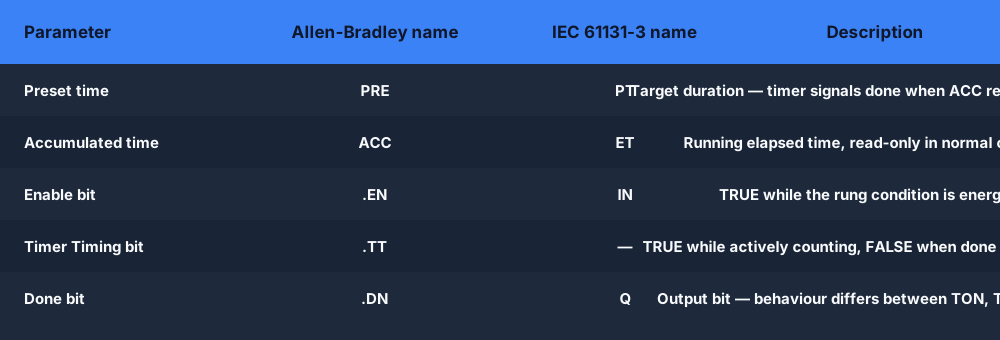
Every PLC timer — regardless of brand or dialect — has at least three parameters: a preset time (PT / PRE), an accumulated time (ET / ACC), and one or more status bits. Understanding these three elements is the foundation for everything else.
Preset time (PT / PRE). The target duration. When ACC reaches PRE, the timer signals completion. You enter PT in time units — milliseconds, seconds, or tenths of a second depending on the PLC's timebase. In Allen-Bradley Logix, PT is specified in milliseconds (e.g. T#5s or 5000 ms). In Siemens TIA Portal, you use IEC time literals (T#5S). In RSLogix 500 / SLC-500, PRE is an integer in timebase ticks.
Accumulated time (ET / ACC). The running total of time the timer has been enabled. The PLC's operating system increments ACC every scan cycle while the enable rung is TRUE. Reading ACC in your logic lets you create sub-preset triggers — for example, start a warning light at 80 % of the preset before the final done signal.
Status bits. The bits you actually use in your logic to act on the timer's state. The standard set is:
- .EN / EN — Enable bit. TRUE whenever the rung condition is TRUE and the timer is running (or done).
- .TT / TT — Timer Timing bit. TRUE while the timer is actively counting, FALSE once DN is set or once the rung goes FALSE.
- .DN / Q — Done bit (Allen-Bradley .DN; IEC Q). The bit your output logic usually reads. Behaviour differs between timer types — this is the key difference between TON, TOF, TP, and RTO.
- .PRE / PT — Readable preset value. You can address this to compare or modify the preset dynamically.
- .ACC / ET — Readable accumulator. Use it to display progress or create cascaded timing logic.
Timebase matters for inter-operability. Most modern PLCs use a 1 ms or 10 ms system timebase for timers, but legacy platforms (Mitsubishi FX, Omron CPM) use 100 ms timers as the default. Always check your hardware manual: a PRE of 50 on a 100 ms timebase is 5 seconds, but 50 ms on a 1 ms timebase. The IEC 61131-3 standard avoids this ambiguity by requiring time literals (T#5S, T#500MS) rather than raw integers.
On-delay timer
TON — on-delay timer
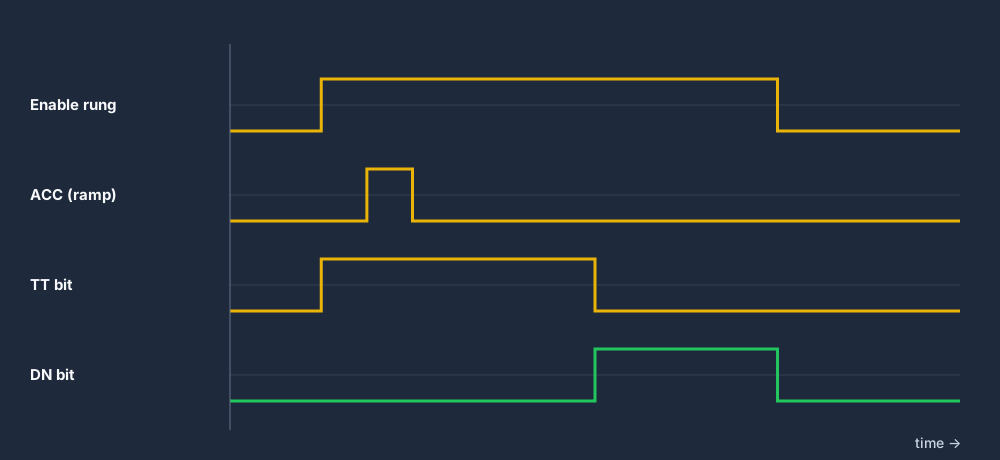
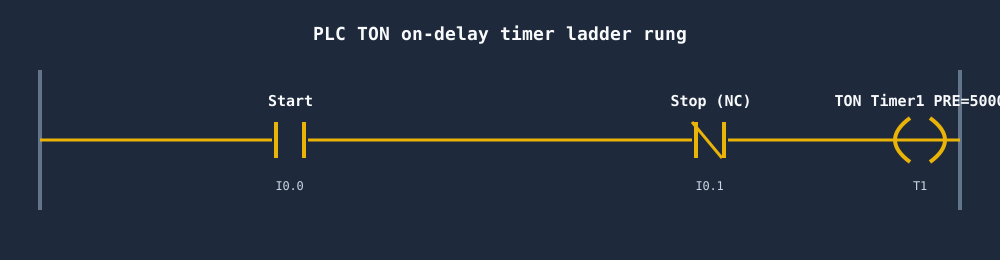
The TON (on-delay timer) is the most common PLC timer instruction. It delays the activation of an output — the done bit does not turn on until the rung has been continuously TRUE for the full preset duration.
How it works, step by step. When the enable rung goes TRUE, EN is set, TT is set, and ACC begins incrementing from zero each scan. When ACC reaches PRE, DN is set and TT is cleared. If the rung goes FALSE at any point before ACC reaches PRE, EN, TT and ACC all reset to zero immediately — the timer has no memory of partial timing. If the rung goes FALSE after DN is already set, DN also clears and ACC resets.
This "forgets immediately if interrupted" behaviour is the defining characteristic of TON — and the key reason you use RTO instead when run time must accumulate across interruptions.
Real-world uses of the TON timer
Motor start delay. Large motors draw high inrush current at startup. A TON of 3–5 seconds between energising the contactor and enabling downstream equipment (conveyors, pumps, fans) gives the motor time to reach running speed and current to stabilise before load is applied. This is one of the most common TON applications in manufacturing.
Input debounce. Mechanical push-buttons and proximity sensors produce contact bounce — rapid toggling between 0 and 1 that lasts a few milliseconds. A short TON (5–50 ms) on the sensor input, with only the DN bit driving subsequent logic, ignores transient noise and only responds to a signal that has been stable for the full preset. This is software debouncing in ladder logic.
Alarm delay. Rather than alarming the moment a temperature or pressure goes out of range (which generates nuisance alarms on brief spikes), a TON gate ensures the condition must persist for, say, 10 seconds before an alarm is raised. This dramatically reduces false alarms in process control.
Sequence step timeout. In a multi-step machine sequence, a TON started at the beginning of each step can generate a fault if the step has not completed within its expected window. The TT bit lets you detect "step is running" and the DN bit lets you detect "step has overrun".
Try it live
See a TON timer run in the browser
Drop a TON instruction on a rung, set the preset, energise the input — watch ACC count and DN fire.
Off-delay timer
TOF — off-delay timer
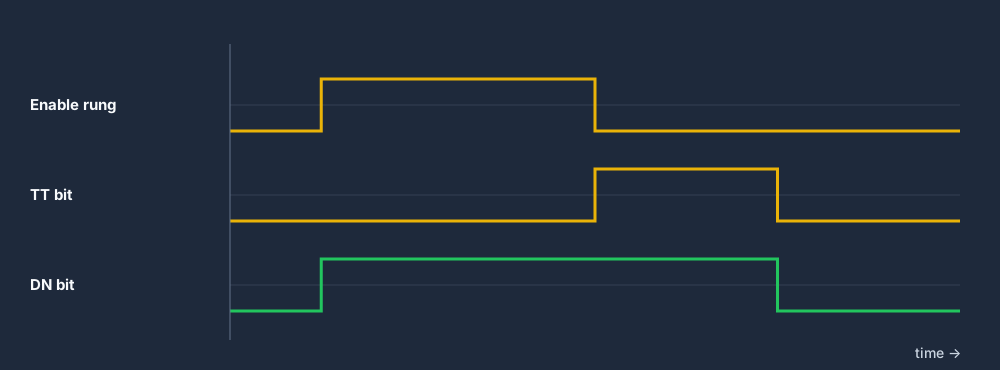
The TOF (off-delay timer) is the mirror of TON. Where TON delays the turn-on of an output, TOF delays the turn-off. The done bit (DN / Q) is TRUE whenever the enable rung is energised, and stays TRUE for the preset duration after the rung goes FALSE. Only then does DN drop.
How it works. When the enable rung goes TRUE, EN and DN are set immediately — there is no delay on the leading edge. When the rung goes FALSE, EN clears, TT sets, and ACC begins counting. When ACC reaches PRE, TT clears and DN clears. If the rung goes TRUE again before ACC reaches PRE, ACC resets to zero and DN remains TRUE — the timer is retriggerable from the off-edge perspective.
A common point of confusion: the TOF done bit is TRUE during normal operation and only drops after the delay. This means you use the DN bit to keep equipment running, not to start it — the opposite polarity to how you use a TON.
Real-world uses of the TOF timer
Fan run-on (motor cooling). After a motor stops, its windings retain heat. A cooling fan driven by a TOF keeps running for 60–300 seconds after the motor de-energises, preventing heat soak that shortens winding insulation life. The motor-run bit enables the TOF; the TOF DN bit keeps the fan on.
Door-seal alarm. A door-open sensor starts a TOF when the door closes. If the door opens again within the preset window, the timer resets — the system assumes the door is in normal use. Only if the door stays open past the preset does DN drop and trigger an alarm. This prevents nuisance alarms from brief access events.
Lubrication purge. After a conveyor stops, a lubrication pump continues running for a fixed period to flush debris from the lube lines. The TOF done bit keeps the pump on; when it drops, the pump stops.
Signal debounce on the falling edge. Where TON debounces the rising edge, TOF can debounce the falling edge — ignoring brief dropout events on a sensor that may flicker off momentarily during vibration. The DN bit stays TRUE through the flicker, only dropping if the sensor is consistently off for the preset duration.
Pulse timer
TP — pulse timer
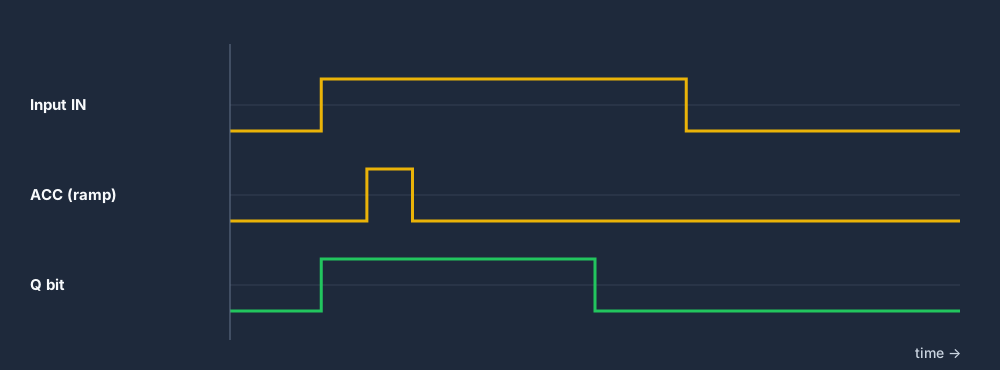
The TP (pulse) timer fires a fixed-duration output pulse on the rising edge of its enable input. Once triggered, the output Q remains TRUE for exactly the preset duration — it cannot be shortened by removing the input, and it cannot be extended by holding or re-applying the input during the pulse.
How it works. On a rising edge of the enable rung, Q is immediately set TRUE and ACC begins counting. The rung input is ignored until ACC reaches PT. When ACC reaches PT, Q is cleared and ACC resets — only at that point can a new rising edge retrigger the pulse. This non-retriggerable behaviour is the defining characteristic that separates TP from TON.
In Allen-Bradley ladder logic, TP is part of the IEC 61131-3 instruction set available in the Logix function block palette. Some legacy AB programs achieve the same result by combining a TON with a one-shot (OSR) contact, but the native TP instruction is cleaner and more readable.
How TP differs from TON
The critical difference is input control during timing. With a TON, dropping the input before PRE is reached cancels the timer and resets ACC. With a TP, the input is locked out during the pulse — the output runs for the full preset regardless. This makes TP better for:
- Solenoid pulse actuation. Energising a solenoid for exactly 500 ms to actuate a cylinder, regardless of how long the operator holds the button.
- Glue or paint gun burst. Dispensing a fixed volume of adhesive or paint on each part, triggered by a part-present sensor. The pulse length sets the dispense volume.
- Single-shot alarm acknowledgement delay. After an alarm is acknowledged, disable re-acknowledgement for a fixed window to prevent accidental rapid acknowledgement of subsequent faults.
- Heartbeat generation. A TP can generate a periodic pulse when combined with a self-resetting logic structure, though a dedicated clock bit is cleaner in practice.
Retentive on-delay timer
RTO / TONR — retentive on-delay timer
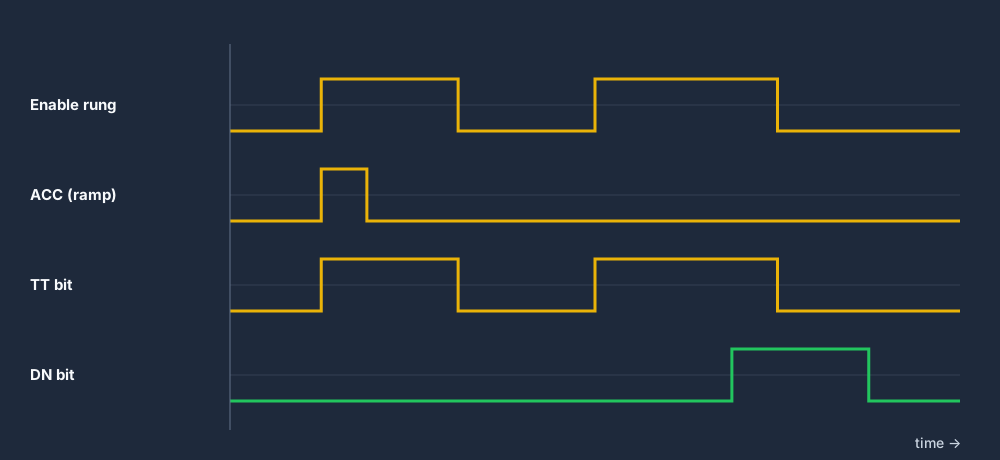
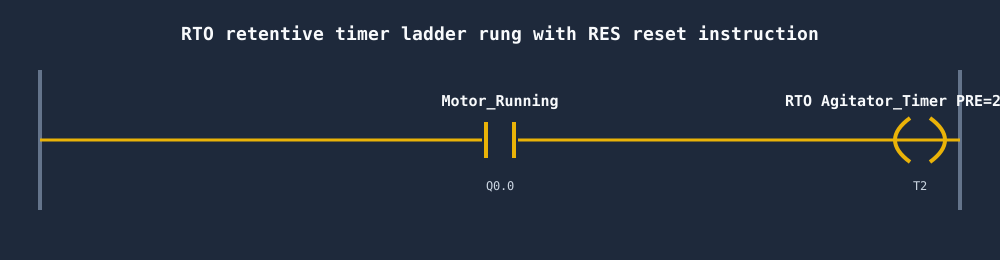
The RTO (retentive on-delay, also called TONR in IEC 61131-3) behaves like a TON in the forward direction — it counts while the rung is TRUE — but unlike a TON, it retains its accumulated value when the rung goes FALSE. The accumulator only resets when a dedicated RES (reset) instruction is explicitly triggered on a separate rung.
How it works. When the enable rung goes TRUE, EN is set, TT is set, and ACC increments. When the rung goes FALSE, EN and TT clear, but ACC holds its value. When the rung goes TRUE again, timing resumes from the held ACC value. When ACC finally reaches PRE, DN is set and TT clears. A separate RES rung — typically connected to a reset push-button or an automatic reset condition — clears ACC and DN, allowing the cycle to begin again.
This "memory across power loss" characteristic (on PLCs with battery-backed memory or retentive data) makes RTO suitable for long-term accumulation across multiple machine cycles or shift changes.
When to use RTO instead of TON
Use RTO whenever you need to accumulate runtime across interruptions. Common applications:
- Motor run-time maintenance counter. Track total motor operating hours across all start/stop cycles since the last service. When ACC reaches PRE (e.g. 2,000 hours), a maintenance-required bit triggers a service reminder on the HMI.
- Batch processing time. Accumulate total agitator run time across pauses for ingredient additions. The batch recipe requires exactly 45 minutes of mixing — even if the mix is paused for 10-minute ingredient loading steps.
- Shift production timer. Accumulate actual production time within a shift, excluding planned downtime. The RES is triggered at shift end to reset for the next shift.
- Filter service life. Count total airflow time through a filter. Reset at filter change. Trigger a change reminder when accumulated time exceeds the manufacturer's service interval.
The common thread: whenever the total accumulated time matters more than any single continuous run, choose RTO over TON.
Side-by-side
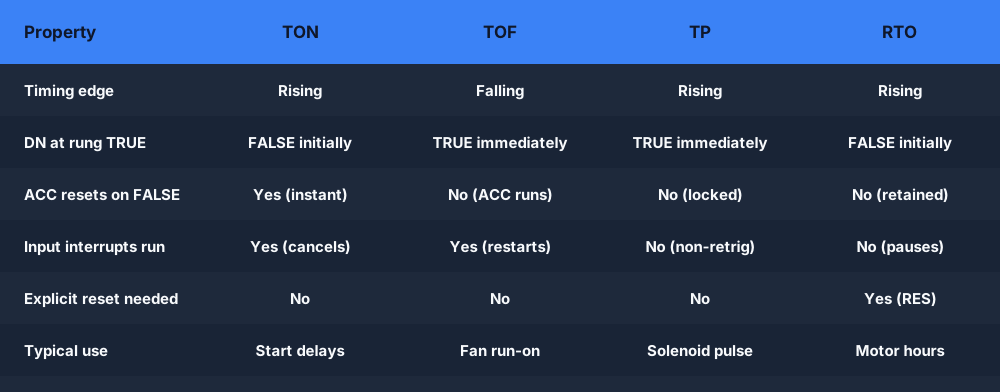
PLC timer types comparison: TON vs TOF vs TP vs RTO
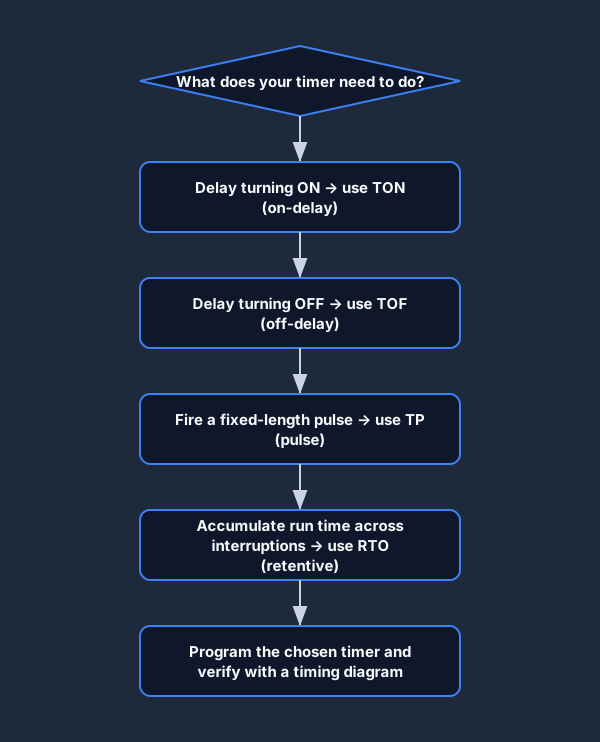
The four standard PLC timer types differ on exactly three axes: which edge triggers timing, whether the accumulator is retained when the input drops, and whether the input can interrupt an in-progress timing cycle.
TON — On-delay
- Delays the ON of the output
- EN rung TRUE → ACC counts up
- DN sets when ACC = PRE
- ACC resets immediately when rung goes FALSE
- Use for: motor start delays, debounce, alarm delays
TOF — Off-delay
- Delays the OFF of the output
- DN is TRUE immediately on enable
- Timing starts when rung goes FALSE
- DN drops when ACC = PRE after rung is FALSE
- Use for: fan run-on, door alarms, purge cycles
TP — Pulse
- Fixed-duration output pulse
- Rising edge triggers; input locked during pulse
- Q cannot be shortened or extended mid-pulse
- ACC resets automatically at end of pulse
- Use for: solenoid pulses, dispense bursts
RTO — Retentive on-delay
- Accumulates time across interruptions
- ACC holds value when rung goes FALSE
- Requires an explicit RES rung to reset ACC
- DN holds after preset reached until RES
- Use for: motor hours, batch time, filter life
Naming conventions
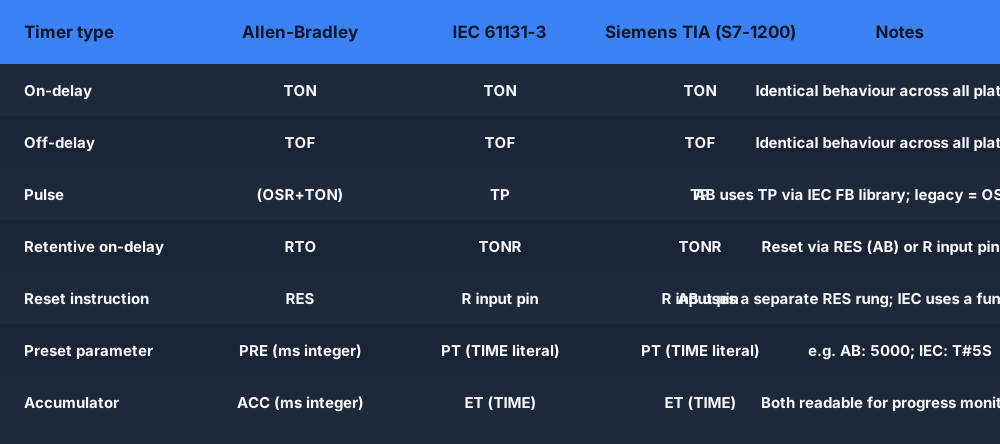
Allen-Bradley vs IEC 61131-3 timer naming
The PLC industry never standardised on a single instruction name for timers, so the same logical behaviour carries different mnemonics depending on your vendor. The IEC 61131-3 standard (published in 1993 and revised in 2013) attempted to unify naming, and modern platforms largely follow it — but Allen-Bradley's legacy naming from the RSLogix era remains widely used in North American industry.
The practical impact: if you can program a TON in Allen-Bradley, you can program a TON in Siemens TIA Portal, Codesys, OpenPLC, and Mitsubishi GX Works with nothing more than a naming lookup. The underlying scan-cycle logic, the preset/accumulator model, and the status bits are identical across vendors.
Allen-Bradley (RSLogix / Studio 5000)
- TON — on-delay timer. Parameters: PRE (ms), ACC (ms), bits: EN, TT, DN.
- TOF — off-delay timer. Same parameters and bits as TON.
- RTO — retentive on-delay. Same parameters; ACC survives rung FALSE; needs RES to reset.
- RES — reset instruction. Used with RTO (and counters) to clear ACC and DN.
- TP pulse timer is available via the IEC Function Block instructions in Studio 5000 Logix.
IEC 61131-3 (Siemens, Codesys, OpenPLC)
- TON — on-delay. Parameters: IN (BOOL), PT (TIME); outputs: Q (BOOL), ET (TIME).
- TOF — off-delay. Same interface as TON.
- TP — pulse. Same interface; non-retriggerable fixed-duration pulse.
- TONR — retentive on-delay (IEC equivalent of AB's RTO). Reset via R input pin.
- Siemens uses IEC-compliant names in TIA Portal (S7-1200/1500). Older S7-300/400 used legacy S5 timer types (SD, SE, SS, SF, SP) — now deprecated.
LD X0 / OUT T1 K50 (T1, 5.0 seconds on a 100 ms timebase). Timer numbers determine the timebase: T0–T199 are 100 ms; T200–T245 are 10 ms on many FX series models. The concept is identical to IEC TON; only the syntax differs.PLC timer programming examples
PLC timer programming examples
The following examples cover the four most common timer applications in industrial ladder logic. Each maps to a specific timer type and explains why that type is the right choice.
1. Conveyor start delay (TON)
A packaging conveyor must not start instantly when the operator presses Run. The downstream accumulation table needs 3 seconds to clear before the conveyor loads it with product. A TON with a 3,000 ms preset handles this cleanly.
Rung 1: XIC RunPB — XIC OL_OK — TON Conveyor_Start_Timer PRE=3000 ms
Rung 2: XIC Conveyor_Start_Timer.DN — OTE Conveyor_Motor
The Run push-button energises the TON. After 3 seconds of continuous Run input (operator did not release early), DN fires and the motor output energises. If the operator releases and re-presses before 3 seconds, ACC resets — the delay restarts. This is intentional: the full 3-second window must elapse from the last press.
2. Fan run-on after motor stop (TOF)
A motor-driven pump generates heat. A cooling fan must continue running for 90 seconds after the pump stops to prevent heat soak in the motor windings. A TOF on the motor-run bit provides this automatically.
Rung 1: XIC Pump_Motor — TOF Cooling_Fan_Timer PRE=90000 ms
Rung 2: XIC Cooling_Fan_Timer.DN — OTE Cooling_Fan
When Pump_Motor is TRUE, the TOF DN is immediately TRUE and the fan runs. When Pump_Motor goes FALSE, TOF begins timing. The fan continues running (DN stays TRUE) for 90 seconds, then DN drops and the fan stops. If the pump restarts within the 90-second window, ACC resets and DN stays TRUE — the fan never stopped, which is correct behaviour.
3. Alarm acknowledgement pulse (TP)
When an operator acknowledges an alarm, a one-second pulse should flash the panel acknowledge light and momentarily silence the horn. The pulse must be exactly one second regardless of how long the operator holds the acknowledge button.
Rung 1: XIC Ack_PB — TP Ack_Pulse_Timer PT=T#1S
Rung 2: XIC Ack_Pulse_Timer.Q — OTE Ack_Light
Rung 3: XIC Ack_Pulse_Timer.Q — OTE Horn_Silence
The TP fires on the rising edge of Ack_PB. For exactly one second, Q is TRUE, illuminating the light and silencing the horn. After one second, Q drops regardless of whether Ack_PB is still pressed. This prevents the operator from silencing alarms indefinitely by holding the button.
4. Batch agitator total run time (RTO)
A chemical batch process requires 45 minutes of agitation across a multi-step recipe. The agitator is paused for 5-minute ingredient loading steps three times during the batch. A TON would reset each time the agitator pauses — after 45 minutes of wall-clock time, only 30 minutes of actual agitation would have accumulated. An RTO solves this by retaining ACC through the pauses.
Rung 1: XIC Agitator_Running — RTO Agitator_Run_Timer PRE=2700000 ms (45 min)
Rung 2: XIC Agitator_Run_Timer.DN — OTE Batch_Mix_Complete
Rung 3: XIC Batch_Reset — RES Agitator_Run_Timer
ACC accumulates only while Agitator_Running is TRUE, holding its value during each pause. When the total reaches 2,700,000 ms, DN sets, triggering the batch-complete signal. Rung 3 resets everything at batch start or operator reset. This is the quintessential RTO application.
Live browser simulator
Try a live PLC timer — no install, no licence
Drop into a scenario, place a TON or TOF on a rung, set the preset, energise the input — and watch ACC count up in real time. The simulator grades your solution automatically.
TON: Start Delay
Drop a TON on a rung, set a preset, and energise the input — watch ACC count toward DN.
Open scenario →Curriculum: TON timer
A graded curriculum scenario building a motor start-delay circuit with a TON.
Open scenario →Curriculum: TOF timer
Build a fan run-on circuit with a TOF off-delay timer. Auto-graded.
Open scenario →Conveyor Stop Delay
Use a TOF to keep a conveyor running for 5 seconds after the Stop signal arrives.
Open scenario →Why a live simulator beats reading about timers
Practice PLC timers free — in your browser.
Two auto-graded scenarios unlocked immediately. No credit card. No install. Works on Mac, Windows, Linux and Chromebook.
PLC timer FAQ
Watch a TON timer count in your browser today
No licence. No install. No credit card. Just ladder logic.
Create free account →