Learn Robot Programming Online (free, in your browser)
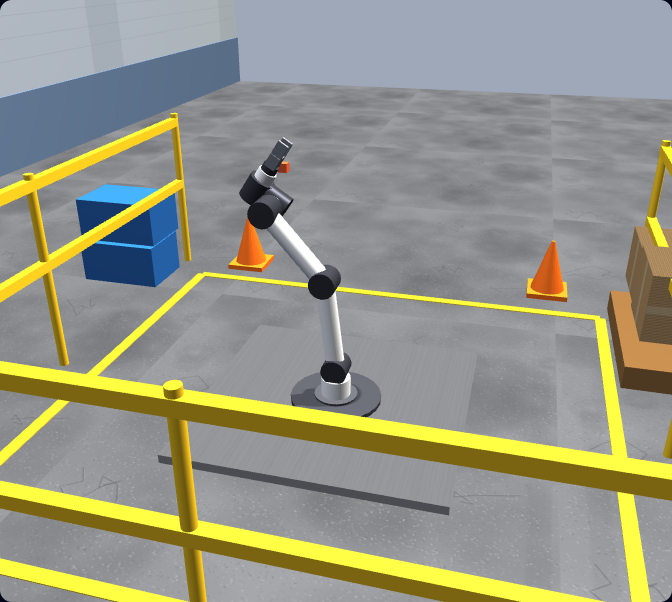
A robot programming course built for beginners. Write real Universal Robots URScript, run it on a simulated six-axis arm with live physics, and learn how to program a robot from zero — frames, jogging, moves, pick-and-place, and safety. No install. No robot. No vendor license.
Basic play is free. Pro unlocks the full graded curriculum and a completion certificate.
The basics
What is robot programming?
Robot programming is the practice of writing the instructions that tell an industrial or collaborative robot how to move and act — where to go, how fast, when to grip or release, and how to respond to inputs from the cell around it. A robot does nothing on its own; every motion, every pick, and every safety stop is something a programmer defined. At its heart, robot programming is about controlling motion in space: telling a robot arm to move its tool to a position, in a particular way, while respecting speed, payload, and safety limits.
That is what makes a simulator such a good place to learn. You write the program, the simulator solves the kinematics and runs the physics, and you see exactly what the arm would do — without owning the robot or risking a real machine while you are still learning. This is a course for robot programming for beginners: it assumes no prior robotics experience and takes you from your first jog to a working, collision-free pick-and-place cell.
Programming methods
The three robot programming methods
There are three main ways to program a robot. Most professionals use a mix of all three, but understanding the difference is one of the first things to learn — and it explains why learning online in a simulator is such an effective starting point.
Online (teach-pendant)
You program on the physical robot using its teach pendant — a handheld touchscreen. You jog the arm to each position, save it as a waypoint, and build the program on the machine itself. It is intuitive and great for simple jobs, but it ties up the real robot and stops production while you work.
Offline (simulation)
You write and test the program on a computer in a simulator or offline-programming software, then deploy the finished program to the controller. Offline programming lets you develop and validate without touching the robot or stopping production — and it is exactly how you learn in a browser simulator.
Text scripting
You write the program as code in the robot’s language — URScript for Universal Robots, RAPID for ABB, KRL for KUKA. Scripting gives the most control: loops, logic, math, and reusable routines. It is the skill this course is built around, because it transfers cleanly to every brand.
This course focuses on offline simulation plus text scripting, because together they let you learn real robot programming software skills from zero — safely, repeatably, and for free — before you ever pick up a teach pendant.
The landscape
Robot types, vendors, and languages
Industrial robots come in a few common forms. Articulated six-DOF arms have six rotary joints and are the workhorses of the factory — flexible enough for welding, assembly, machine tending, and palletising. Collaborative robots (cobots) are articulated arms designed to work safely alongside people, with force limiting and protective stops built in. SCARA robots have a rigid, fast horizontal reach that suits high-speed pick-and-place and assembly. Most of what you learn programming a six-axis arm transfers across all of them, because they share the same core idea: moving a tool to a pose in space.
Each major vendor has its own controller and programming language. The concepts are shared; the syntax differs.
| Vendor | Programming language | Notes |
|---|---|---|
| Universal Robots | URScript | Cobots; the most beginner-friendly language and the largest learner community — the best place to start. |
| FANUC | KAREL / TP | TP (teach pendant) for most jobs, KAREL for advanced text programs; huge installed base in automotive. |
| KUKA | KRL (KUKA Robot Language) | Articulated arms common in automotive and heavy industry; KRL is a structured text language. |
| ABB | RAPID | RAPID is a rich, structured language; ABB arms and RobotStudio are widely used across industries. |
Go deeper on a specific brand: Universal Robots programming, FANUC robot programming, and KUKA robot programming.
The roadmap
How to learn robot programming: a beginner roadmap
You do not learn robot programming by reading the manual — you learn it by writing moves and running them. This is the order that works, and it is the order this course follows. Each step builds on the last, and each is graded against a real goal so you know when you have actually got it.
Frames & TCP
Understand base vs tool frames and how the tool centre point (TCP) is defined. Everything in robot programming is positions in a frame — get this right and the rest follows.
Jogging
Move the arm in joint space and in Cartesian space. Jogging builds your intuition for how the six joints combine to put the tool where you want it.
movej & movel
Your first programmed moves. movej moves fast through joint space; movel keeps the tool on a straight Cartesian line. Knowing when to use each is a core robot-programming skill.
I/O & the gripper
Read and set digital signals, then open and close a gripper to actually pick something up. This is where a program starts doing real work.
Pick-and-place
The backbone of cobot work: approach, grasp, lift, traverse, place, release. Combine moves and I/O into a complete cycle from point A to point B.
Waypoints & blends
Chain waypoints with blend radii for smooth, fast cycles instead of stop-start motion — the difference between a working program and a good one.
Payload
Configure the payload so the arm moves accurately and safely with a part in the gripper. Payload changes reach, accuracy, and safe speed.
Safety & protective stop
Learn collaborative safety: trigger and avoid over-force contacts, respect safety planes and speed limits, and understand the protective stop.
Capstone
Put it all together: palletise parts into a pattern — no collision, under cycle time, within force limits — and earn the pass.
Prefer a guided, staged journey?
The Robotics Path walks you through this roadmap in five stages — concept teaching paired with the exact simulator lessons that practise it, basics to advanced, building to a certificate.
Follow the step-by-step Robotics Path →Safety
Robot safety basics every programmer needs
Safety is part of robot programming, not an afterthought. Industrial robot safety is governed by the ISO 10218 standard (covering robots and robot systems), with the technical specification ISO/TS 15066 giving detailed guidance for collaborative operation — the force and speed limits that let a cobot work safely near people.
The most important concept for a beginner is the protective stop. A collaborative robot continuously monitors the force and torque at its joints; if it detects an unexpected contact — a collision, or a push that exceeds its limit — it stops immediately. In this course you learn to both trigger and avoid protective stops, because a program that keeps tripping the safety system is not a finished program. You also learn to respect safety planes and reduced-speed zones, and to size payload and speed so the arm stays within safe limits. None of this puts a real machine at risk, because it all runs in simulation.
Robot programming software
Learn with a browser simulator that teaches real URScript
You do not need to install heavyweight robot programming software to start. Our browser simulator teaches real URScript — the actual language a Universal Robots controller runs — and auto-grades your programs against a real goal: part placed within tolerance, no collision, under the cycle-time budget, within the force limit. You write the code, the simulator runs the kinematics and physics, and you get specific feedback on what to fix. That goal-based grading is what turns watching into learning.
Nothing to install
The URScript interpreter, the six-axis arm, the gripper, and the work cell all run in a single browser tab on Mac, Windows, Linux, or a Chromebook.
Real, transferable code
You write actual movej, movel, set_digital_out, and gripper commands — the same syntax you use on a physical UR controller and PolyScope.
Graded, not just played
Every task defines success and your program is checked against it, so you always know whether you have actually got it right.
Course outcome
Finish the course, earn a verifiable certificate
The course is structured as ten auto-graded lessons. Start free, go Pro to complete every stage, and once you pass them all your dashboard issues a dated completion certificate with a unique verification code an employer can check at /verify. We are honest about what it is: a verifiable proof of completion, not an accredited or vendor certification.
What you can do after: read and write real URScript, reason in base and tool frames, choose movej vs movel, drive a gripper with digital I/O, set TCP and payload, chain waypoints with blends, keep a cell inside its force limits, and program a complete pick-and-place — skills that transfer to FANUC, KUKA, ABB and other six-axis brands because the motion model is shared. See the full robot programming certificate page for how it is earned and verified.
Keep exploring
Go deeper on robot programming
- Robot simulator — the full simulator that runs real URScript on a simulated UR arm under live physics.
- Robot arm simulator — focus on the six-axis arm: frames, TCP, kinematics, and motion.
- Universal Robots programming — the UR-specific guide to URScript and PolyScope.
- Robot programming languages — URScript, RAPID, KRL, FANUC TP and more, compared with the same move in each.
- Learn URScript — the friendliest robot language, with a full commands reference and a code-to-motion walkthrough.
- Robotics lessons — jump straight into the in-app graded lessons.
- What is URScript? — a plain-language introduction to the Universal Robots language.
- URScript movej vs movel — the move every UR programmer has to understand, explained with examples.
- How to program a Universal Robot — a step-by-step walkthrough of your first UR program.
Robot programming course FAQ
Start your robot programming course now.
Learn robot programming online in your browser — real URScript, graded from zero. Free to start; go Pro for the full course and a certificate.