Codesys Alternative — Free, Browser-Based IEC 61131-3 Practice
Codesys is the industry reference. It is also a Windows desktop IDE that shuts its SoftPLC off after two hours in demo mode. Here is an honest alternative for learners who want scored practice without the install.
Join 1300+ learners practicing PLC programming
Opening honesty
Codesys is legitimately the reference implementation.
If you are planning a career on Beckhoff, WAGO, Schneider, Phoenix Contact, Bosch Rexroth, or any of the dozens of vendors running Codesys under the hood, you will end up in the Codesys IDE sooner or later. This page is about where to start — not where to end.
Background
What Codesys is
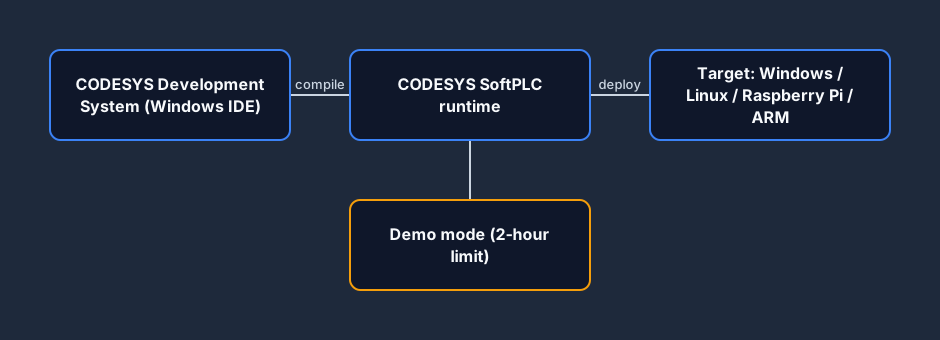
Codesys Development System V3 is the industry-reference IEC 61131-3 development environment, built by Codesys GmbH (Germany) since 1994. The IDE is Windows-only and free to download. It ships with a built-in Windows SoftPLC that lets you execute ladder, structured text, FBD, SFC, and IL code without real hardware — that is the "Codesys simulator" people search for.
Codesys also powers the toolchain of a remarkable number of vendors: Beckhoff TwinCAT, WAGO e!COCKPIT, Phoenix Contact PLCnext, Schneider Machine Expert, Bosch Rexroth ctrlX, Eaton XSoft, Hitachi HX-CODESYS, Festo CECC, and many more. Skills transfer across all of them.
Pricing: IDE free. Runtime: 2-hour demo mode free; production licences typically €50–€500 per target depending on I/O count, fieldbus count, and code size.
By contrast
A browser tool — nothing to install
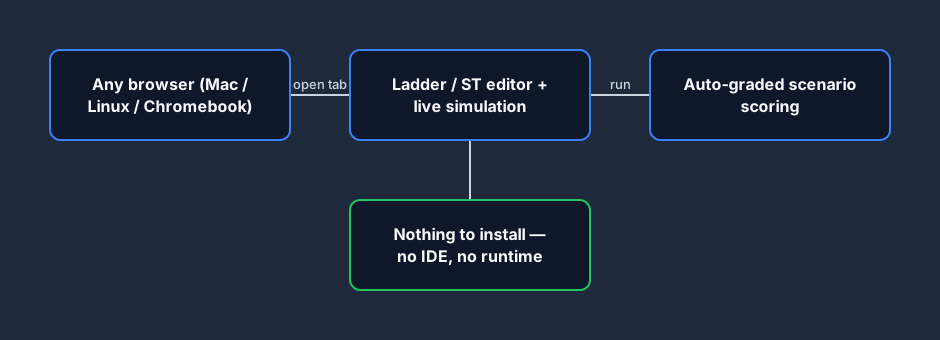
Where CODESYS layers an IDE on top of a runtime on top of a target, a browser-based tool collapses that stack into a single tab. The editor, the live simulation, and the auto-grader all run in the browser — so a learner on a Mac, Linux box, or Chromebook is writing their first rung in seconds, with no install and no demo-mode countdown.
Strengths
What Codesys does well
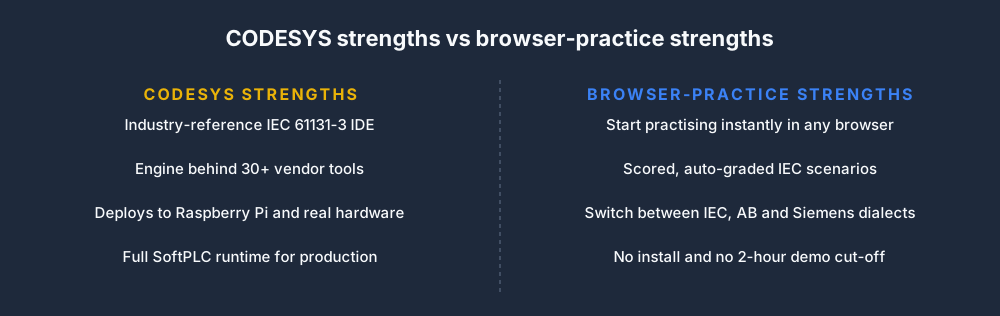
Reference IEC 61131-3
If you want to know what IEC was designed to look like in practice, Codesys is the answer. The instruction set, project structure, and task scheduler are clean expressions of the standard.
Transfers to 30+ vendors
Learning Codesys is not learning one vendor — it is learning the engine behind Beckhoff, WAGO, Schneider, Phoenix Contact, and a long tail of industrial brands.
Real hardware cheap
Codesys SoftPLC runs on Raspberry Pi, BeagleBone, industrial ARM boards, and x86 — genuine real-hardware practice for under $100.
Learner friction
Where Codesys slows a first-time learner
Windows-only IDE
The Codesys IDE does not run on Mac, Linux, or Chromebook natively. The workaround is a Windows VM and its own cost and complexity.
2-hour demo shutdown
The SoftPLC demo mode stops running after two hours. That shuts down a long PID-tuning session or a batch-sequence run that you wanted to leave going.
~4 GB install + ramp
The IDE is not huge but the first few hours are spent configuring targets, tasks, and I/O — not writing ladder. That is great when you are serious; painful when you are trying out the idea.
No scored curriculum
Codesys gives you the workbench, not the syllabus. You decide whether your scenario works — there is no auto-grader.
No dialect switching
Pure IEC. Useful if you will stay in the Codesys ecosystem, limiting if you want to explore Allen-Bradley or Siemens conventions before committing.
No interview-timer / portfolio
Built for professional engineering, not self-paced interview prep or CV-ready portfolios.
Feature comparison
Codesys SoftPLC vs plcsimulationsoftware.com
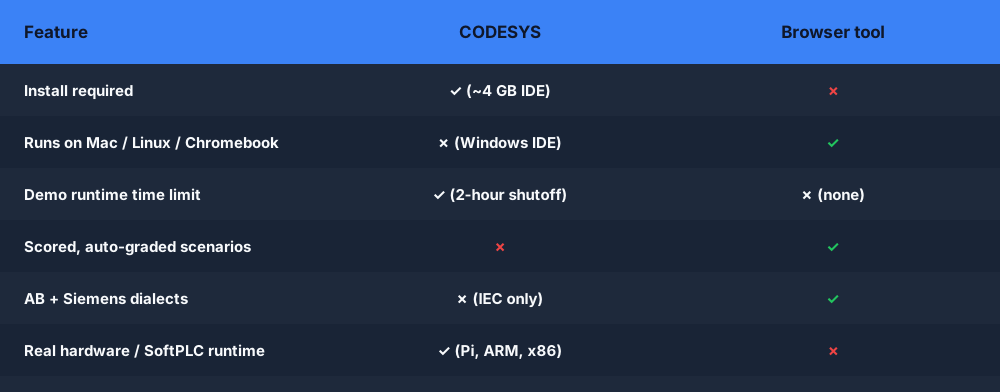
| Feature | Codesys | Ours |
|---|---|---|
| IDE platform | Windows only | Any browser |
| Runtime platform | Windows, Linux, Raspberry Pi, ARM | Browser only |
| IDE price | Free | Free tier + Pro monthly |
| Runtime demo limit | Shuts off after 2 hours | No time limit |
| Install footprint | ~4 GB | Zero |
| Dialect switching | IEC only | IEC + AB + Siemens |
| Scored scenarios | No | 40 auto-graded |
| Interview-timer | No | Yes (Pro) |
| Portfolio PDF export | No | Yes (Pro) |
| Real-hardware targets | Yes (Pi, BeagleBone, etc.) | No |
Use Codesys if…
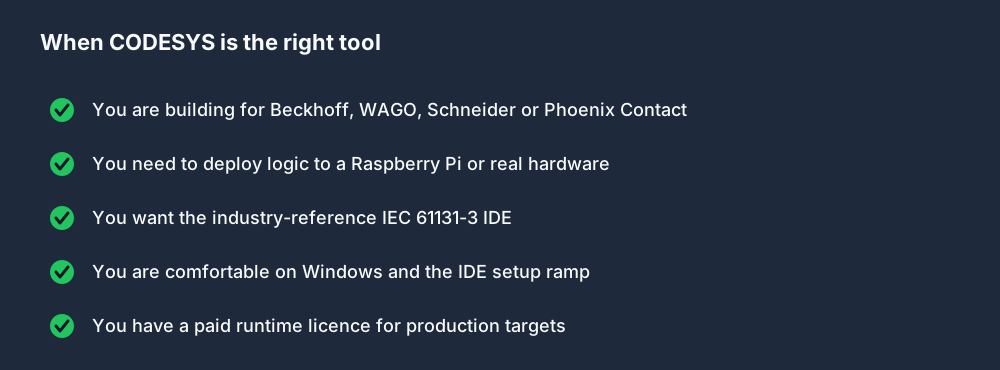
- You want the industry-reference IEC IDE.
- You are planning a Beckhoff, WAGO, Schneider, or similar career.
- You want to deploy to a Raspberry Pi or real hardware.
- You are comfortable with the IDE ramp and Windows requirement.
- You work in sessions shorter than two hours (or have a paid runtime).
Use us if…
- You want an "open-browser-and-practise" experience.
- You are on Mac, Linux, or Chromebook.
- You want scored scenarios with immediate feedback.
- You want to bounce between IEC, AB, and Siemens dialects.
- You are prepping for interviews in the next 4 weeks.
- You want uninterrupted long sessions (no 2-hour cut-off).
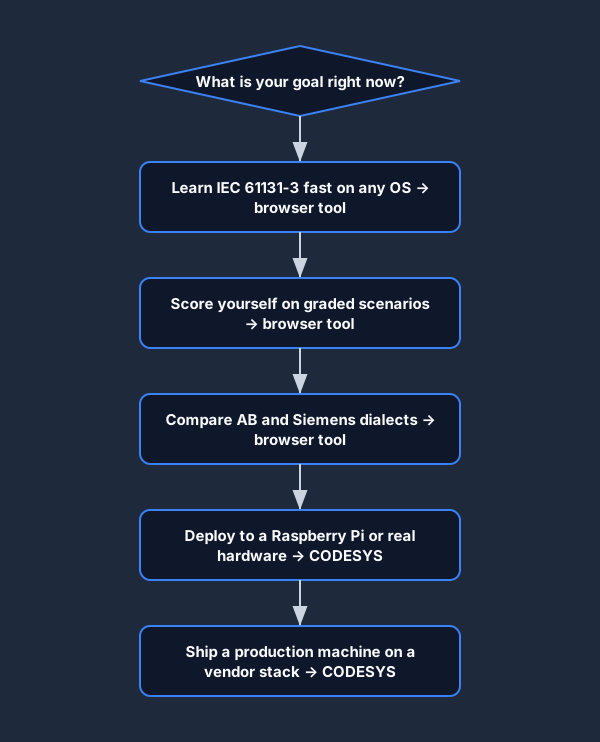
IEC 61131-3 scenarios
Pure IEC practice — transfers directly to Codesys later
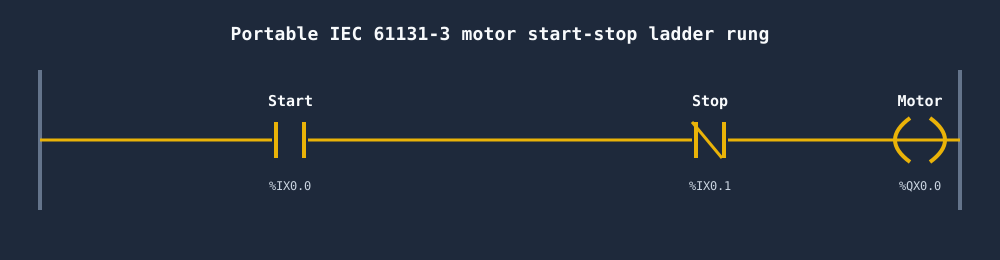
Of all the Codesys alternatives, the ones worth your time are the ones that keep your logic portable. The IEC 61131-3 core you build here — contacts, coils, seal-in rungs, timers, and structured text — moves straight into the Codesys IDE when you graduate to real hardware. Here is the classic motor start-stop seal-in rung in portable IEC addressing.
Third options
Other honest options
A browser tool is not the only choice. If you are weighing Codesys alternatives for real-hardware work rather than learning, these open-source options are worth a look.
- OpenPLC — fully open-source IEC 61131-3 runtime + editor. Best for real-hardware experiments on Raspberry Pi and Arduino.
- Beremiz — another open-source IEC 61131-3 IDE; shares the Matiec compiler with OpenPLC.
- Beckhoff TwinCAT — Codesys-powered vendor tool with a Visual Studio-based IDE; excellent if you have Windows and want a professional feel.
Online simulation
Using this as a Codesys PLC Simulator online
Searches for a Codesys PLC simulator usually mean one of two things: you want to simulate IEC 61131-3 logic without installing the full Codesys IDE, or you want to practice on a machine where the Codesys SoftPLC will not run (Mac, Linux, Chromebook, locked corporate Windows). Both use cases are what this browser simulator was built for.
The core IEC 61131-3 instruction set — contacts, coils, TON/TOF/TP timers, CTU/CTD counters, Set/Reset coils, rising/falling edge detectors, compare blocks, structured text expressions — is fully supported and behaves identically to what you would write in Codesys. When you are ready to move to the real Codesys IDE, your logic transfers directly; only the addressing format and project-level wrapping need adjusting.
The key difference from Codesys's own SoftPLC is the starting point: no IDE to configure, no task scheduler to wire up, no demo-mode two-hour countdown. Open the scenario, write the rung, run the test harness. For learners who just want to practice IEC logic, that friction removal matters.
Codesys alternative FAQ
Start IEC practice in a browser.
No Windows install. No 2-hour shutdown. No licence file.
Create free account →