Learn the Skills Studio 5000 Users Need — Free, in Your Browser
Studio 5000 Logix Designer is the industry-standard Allen-Bradley programming environment. This is the honest on-ramp to it: practise XIC, XIO, OTE, tags, timers, and counters in a free browser simulator — no Windows VM, no Rockwell licence, on any device.
Join 1300+ learners practicing PLC programming
Create a free account to save your progress.
Opening honesty
This is not Studio 5000 — it is practice for it.
If you are programming a real ControlLogix or CompactLogix controller on a plant floor, you will use Studio 5000 Logix Designer — there is no substitute for that on real hardware. This page is about the step before: building Allen-Bradley ladder fluency cheaply, on any computer, so the licensed tools feel familiar the first time you open them.
The positioning is honest: learn the skills Studio 5000 users need, free in your browser, then the real tool is a UI you pick up in a day.
What Studio 5000 is
Studio 5000 Logix Designer — the full picture
Studio 5000 Logix Designer (formerly RSLogix 5000) is Rockwell Automation's programming environment for the ControlLogix and CompactLogix controller families. It replaced the RSLogix 5000 brand at version 21 and is now the standard tool for all new Allen-Bradley Logix-platform projects.
The real costs of using it as a learner are real: it is Windows-only, requires a FactoryTalk Activation licence (which employers provide but students typically cannot access), and needs several gigabytes of installation including the FactoryTalk Services Platform. Without hardware or Studio 5000 Logix Emulate (itself a licensed add-on), you cannot feel the full control loop.
View Designer is Rockwell's companion HMI tool for PanelView screens. FactoryTalk View (ME/SE) is the broader SCADA/HMI suite. Together they form the Rockwell ecosystem that drives most mid-to-large North American industrial sites.
The differentiator
Studio 5000 term — universal concept — practice link
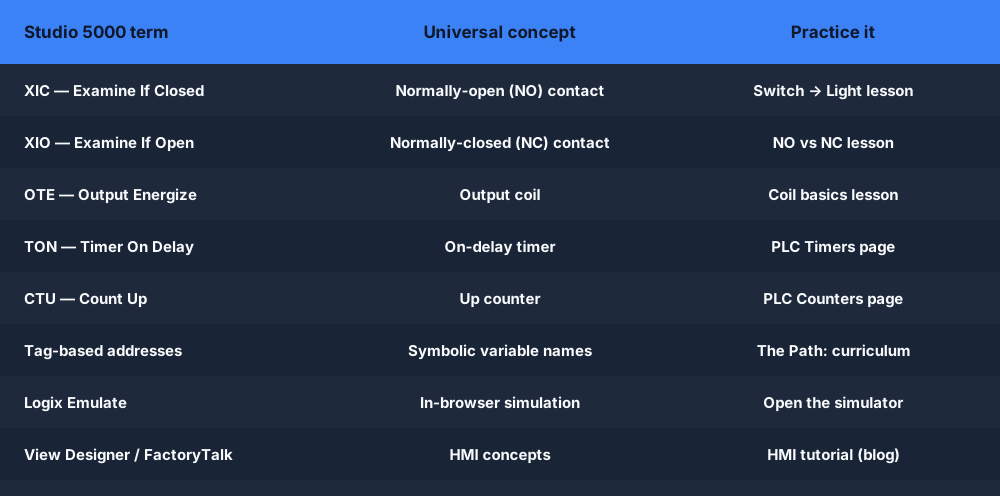
Every Studio 5000 instruction maps onto a transferable IEC 61131-3 concept. The table below shows that mapping — and links you straight to a free practice lesson for each one.
| Studio 5000 term | Universal concept | Practice it here |
|---|---|---|
| XIC — Examine If Closed | Normally-open (NO) contact | Lesson: Switch → Light → |
| XIO — Examine If Open | Normally-closed (NC) contact | Lesson: NO vs NC → |
| OTE — Output Energize | Output coil | Lesson: Coil basics → |
| TON — Timer On Delay | On-delay timer | Timer lessons → |
| CTU — Count Up | Up counter | Counter lessons → |
| Tag-based addresses | Symbolic variable names | The Path: curriculum → |
| Logix Emulate (virtual ctrl) | In-browser simulation | Open the simulator → |
| View Designer / FactoryTalk | HMI concepts | HMI tutorial (blog) → |
Where Rockwell slows beginners
The real cost of starting with Studio 5000
Windows-only
Studio 5000 does not run on Mac, Linux, or Chromebook. Getting started requires a Windows machine or a VM with its own setup overhead.
Licensed, not free
Studio 5000 is a professional, paid product. A learner without an employer FactoryTalk licence cannot open it.
Multi-gigabyte install
The installer pulls down FactoryTalk Services Platform and multiple components before you reach a blank ladder project.
Needs a controller or Emulate
Without hardware or the separate Logix Emulate product, the design experience is incomplete — no live scan to watch.
No scored curriculum
Studio 5000 is a workbench, not a course. There is no auto-grader telling a beginner whether their rung is logically correct.
No interview / portfolio mode
Built for professional work, not self-paced interview prep or a CV-ready portfolio of solved scenarios.
The learning path
The Path — a structured route from zero to job-ready
Our curriculum is designed to build the skills that Studio 5000 users use every day, in a sequence that makes each concept feel inevitable before the next arrives.
Contacts and coils
XIC, XIO, OTE — the three instructions that appear on nearly every rung. Build your first switch-to-light rung and watch the scan execute.
Start this step →Seal-in and interlock patterns
The motor start/stop latch and the safety interlock are the two rungs you will see on every panel diagram. Master them here.
Start this step →Timers — TON, TOF, RTO
Learn how .EN, .DN, and .ACC work, and the common mistake of reading the enable bit instead of the done bit.
Start this step →Counters — CTU, CTD
Count parts, count strokes, count faults. Practise CTU up-counters and CTD down-counters on real machine scenarios.
Start this step →Allen-Bradley dialect and tag addresses
Switch the editor to Allen-Bradley mode. Your rungs now use XIC/XIO/OTE notation and tag-based addresses, exactly as in Studio 5000.
Start this step →Fault diagnosis
Practise the 5-step troubleshooting method on 12 browser fault scenarios — wiring faults, logic faults, runtime faults, and scan-order problems.
Start this step →Your first program
Write your first Studio 5000-style program — and actually run it
Most Studio 5000 tutorials stop at screenshots: you watch someone create a project, add a controller, and drop a contact — but you never get to run anything yourself unless you have the licensed software and a controller. Here you build the same three starter rungs and watch them execute against a real scan engine, free, in the browser. These four diagrams are the program you will build, rung by rung.
Use Studio 5000 if…
- You are programming a real ControlLogix or CompactLogix.
- You need to download logic to a controller or go online.
- You build FactoryTalk HMI screens or configure EtherNet/IP I/O.
- You have Windows and a Rockwell licence available.
- You want a virtual controller via Logix Emulate.
Use our simulator if…
- You want to practise XIC, XIO, OTE, timers, and counters today.
- You are on a Mac, Linux, or Chromebook.
- You have no Studio 5000 licence yet.
- You want auto-graded scenarios with instant feedback.
- You are prepping for an Allen-Bradley ladder interview.
- You want to start free, with zero install.
Keep exploring
Related on this site
- RSLogix simulator — focused on the older RSLogix 500 file-based addressing used on SLC 500 and MicroLogix controllers.
- RSLogix 5000 tutorial — the tutorial companion to the simulator lander above; learning path for the RSLogix 5000 dialect specifically.
- Studio 5000 Emulate alternative — comparing Logix Emulate against browser-based practice.
- Allen-Bradley PLC simulator — the broader Allen-Bradley practice surface including ControlLogix-style tag addresses.
- PLC timers — TON, TOF, and RTO deep dives with interactive browser practice.
Studio 5000 tutorial FAQ
Practise the skills Studio 5000 users need — free, in your browser.
No Windows VM. No Rockwell licence. No install. Start today.