PLC Counters Explained: CTU, CTD and CTUD (with Live Examples)
The three counter instructions every PLC programmer needs — count up, count down, and bidirectional — with timing diagrams, ladder rungs, real application examples, and a browser simulator where you can watch CV accumulate in real time.
Join 1300+ learners practicing PLC programming
Foundations
What is a PLC counter?
A PLC counter is a software instruction that counts discrete events — rising edges on a digital input — and sets an output bit when the accumulated count reaches a configured preset. Unlike a mechanical tally counter, a PLC counter exists entirely in the controller's memory: the preset is a number you can change from an HMI without rewiring anything, and the current count is readable by other rungs in your program at any point during the scan cycle.
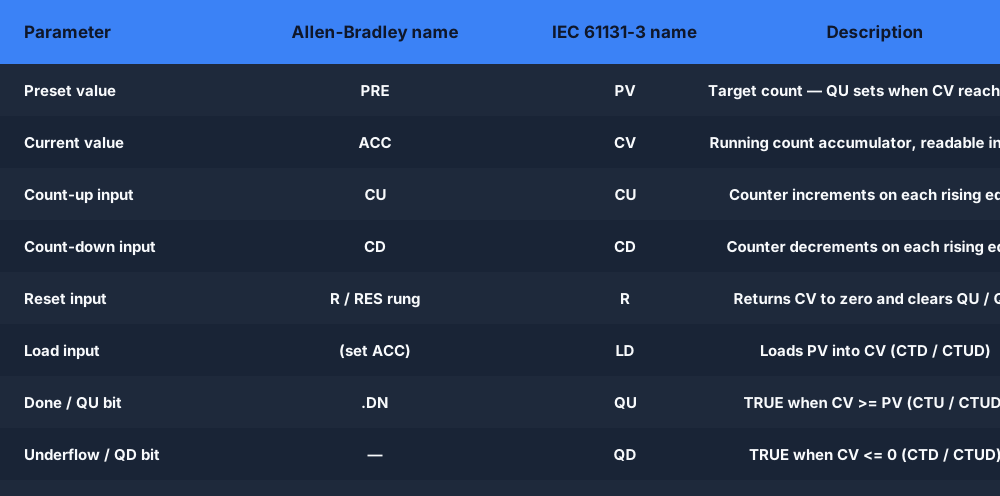
Every PLC counter — regardless of brand or dialect — has at least two parameters: a preset value (PV / PRE) and a current value accumulator (CV / ACC). Understanding these two elements, plus the input and output bits that drive and signal the counter, is the foundation for everything else.
Preset value (PV / PRE). The target count. When CV reaches PV, the counter signals completion via its done bit (QU or QD). You enter PV as an integer — it represents a number of events, not a time. In Allen-Bradley Logix, the parameter is called PRE. In IEC 61131-3 platforms (Siemens TIA Portal, Codesys, OpenPLC), it is called PV.
Current value (CV / ACC). The running count accumulator. The PLC increments or decrements CV by exactly one on each qualifying rising edge. You can read CV in your ladder logic to build sub-preset triggers — for example, turn on a warning light at CV = 8 (two parts before the preset of 10) before the final done signal fires.
Count inputs and control bits. The standard counter I/O set across all three counter types includes:
- CU — Count-up input. CV increments by one on each rising edge (0→1 transition).
- CD — Count-down input. CV decrements by one on each rising edge. Only present on CTD and CTUD.
- R — Reset input. Returns CV to zero and clears all done bits. In Allen-Bradley, this is a separate RES rung rather than a function block pin.
- LD — Load input. Sets CV equal to PV, used to prime a CTD or CTUD counter with its starting value.
- QU / .DN — Done bit (count-up direction). TRUE when CV is greater than or equal to PV. Allen-Bradley calls this .DN on a CTU.
- QD — Done bit (count-down direction). TRUE when CV is less than or equal to zero. Only present on CTD and CTUD in IEC; Allen-Bradley CTU has no QD equivalent.
One important difference from timers: counters only advance on rising edges, not continuously. If you hold a sensor input TRUE for 10 scan cycles, the counter increments only once — on the first scan where it transitions from 0 to 1. This means the speed of the counted signal matters. For high-frequency pulses (hundreds per second), standard ladder-scan counters cannot keep up and you need a high-speed counter (HSC) — covered in section 7 below.
Count-up counter
CTU — count up counter
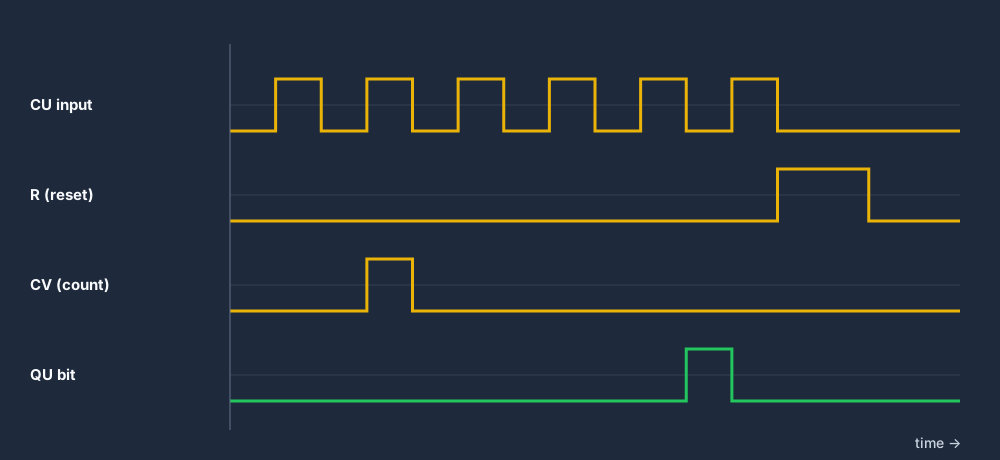
The CTU (count up) counter is the most common PLC counter instruction. It increments its current value (CV) by one on each rising edge of the CU input, and its QU done bit turns on when CV reaches or exceeds the preset PV.
How it works, step by step. At the start of each scan, the PLC evaluates the rung containing the CTU instruction. If the CU input transitions from FALSE to TRUE (a rising edge) since the last scan, CV is incremented by one. If CV is now greater than or equal to PV, QU (the done bit, called .DN in Allen-Bradley) is set. The counter holds its CV value between scans — it does not reset automatically. When a RES instruction is energised on a separate rung, CV returns to zero and QU clears.
Note that CV can accumulate beyond PV. If no reset logic is in place, CV continues counting as long as rising edges arrive. This is usually intentional in cycle-count applications but can cause unexpected behaviour if you forget the reset. Always pair a CTU with reset logic.
Real-world uses of the CTU counter
Part counting on a production line. A proximity sensor at the end of a conveyor pulses once per part. A CTU with PV = 100 counts parts into a box or bin. When CV reaches 100, QU fires: a diverter solenoid opens, directing the conveyor to an empty container, and a RES resets the counter for the next batch. This is the single most common CTU application in manufacturing.
Machine cycle counting for preventive maintenance. A sensor detects each closing of a punch press die. A CTU accumulates total press cycles. When CV reaches the maintenance interval (say, 50,000 cycles), QU triggers a maintenance-required alert on the HMI. The maintenance engineer resets the counter after servicing. Using a CTU here rather than a timer is correct because the wear mechanism is cycles, not hours.
Conveyor zone counting. In a multi-zone conveyor system, a CTU at each handoff point counts parts entering the zone. A second CTU or a CTUD tracks parts leaving. The difference between the two CV values gives you the number of parts currently in the zone — useful for anti-collision logic and zone fill detection.
Operator button press validation. Requiring an operator to press a confirm button exactly three times before a hazardous action is permitted. A CTU counts the presses; QU at PV = 3 enables the action. A timer resets the counter if 10 seconds pass without the third press, preventing accidental authorisation from stray presses.
Try it live
Watch a CTU accumulate in the browser
Click the count input, watch CV increment, and see QU fire when CV reaches the preset. No install required.
Count-down counter
CTD — count down counter
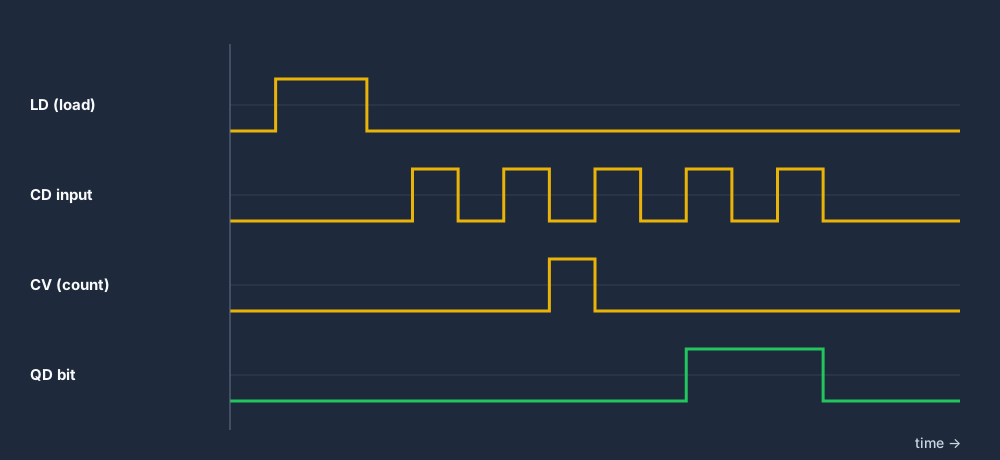
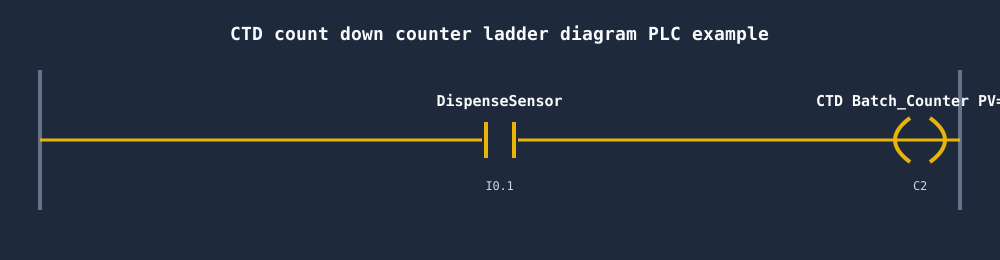
The CTD (count down) counter is the mirror of CTU. Instead of counting up from zero to a preset, it starts with CV loaded to PV and decrements toward zero. Its QD done bit turns on when CV reaches zero or below.
How it works. Before the CTD can count, it must be loaded. A pulse on the LD (load) input sets CV equal to PV. From that point, each rising edge on the CD (count-down) input decrements CV by one. When CV reaches zero, QD turns on. Like the CTU, the CTD holds CV between scans and does not reset automatically. A RES instruction (or R input) clears CV and QD.
The LD input is the key operational difference from CTU. In many applications, LD is pulsed by a batch-start trigger, a pallet-arrival sensor, or the done bit from a previous sequence step — this loads the new batch quantity into CV and starts the countdown. Failing to load CV before beginning a CTD countdown is the most common CTD programming mistake.
Real-world uses of the CTD counter
Batch quantity depletion. A dispense machine must dispense exactly 20 tablets per bottle. Load 20 into a CTD. Each dispense pulse decrements CV. When QD fires at zero, a solenoid closes the dispense port and a conveyor advances to the next empty bottle. The LD input loads 20 again for the next bottle. This is cleaner than CTU for depletion because the zero condition is the natural done state.
Inventory management. A raw-material bin contains 500 units. Load 500 into a CTD. Each time a robot retrieves a unit, CD pulses. When CV reaches a reorder point (monitored by a comparison instruction checking CV against a constant), a reorder alert triggers on the SCADA system. QD at zero halts the retrieval sequence until inventory is replenished and LD reloads the new quantity.
Pallet stack depletion. A pallet dispenser holds a stack of 30 pallets. A CTD loaded with 30 decrements on each pallet-dispensed signal. QD at zero alerts the operator to reload the stack. The LD input is pulsed when the operator confirms the stack has been reloaded with a new quantity.
Up/down counter
CTUD — up/down counter
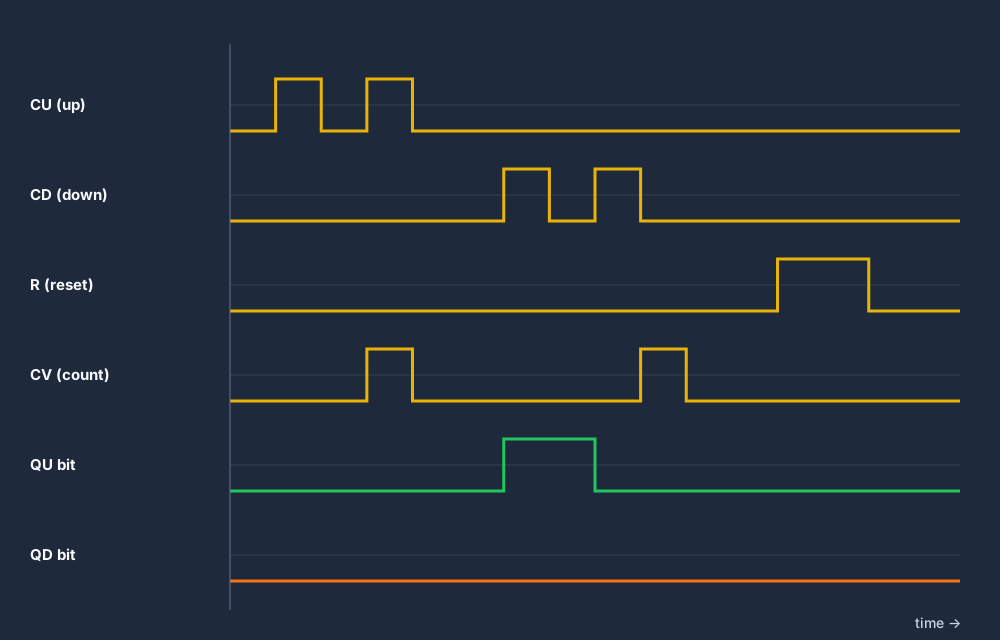
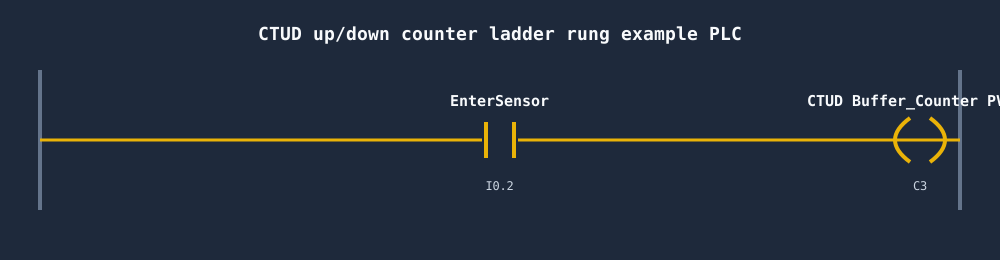
The CTUD (count up / count down) counter is the most versatile of the three counter types. It combines both CU and CD inputs in a single instruction, allowing CV to increment and decrement from the same counter. It produces two done bits: QU fires when CV reaches PV (the full condition) and QD fires when CV reaches zero (the empty condition).
How it works. On each rising edge of CU, CV increments by one. On each rising edge of CD, CV decrements by one. If CU and CD both pulse within the same scan cycle, the net effect depends on the platform — most IEC 61131-3 implementations either cancel (net zero) or prioritise one direction. Check your hardware documentation. QU is set when CV is greater than or equal to PV; QD is set when CV is less than or equal to zero. Both bits can be simultaneously TRUE only in the edge case where PV is zero.
The LD input loads PV into CV (same as CTD). The R input resets CV to zero and clears QU and QD. Neither QU nor QD prevents further counting — the CTUD will count past PV upward and below zero downward unless external logic gates the count inputs.
Real-world uses of the CTUD counter
Buffer zone tracking. Parts enter an accumulation conveyor buffer through an entry photoelectric sensor (pulses CU) and exit through an exit sensor (pulses CD). The CTUD CV tracks the exact number of parts currently in the buffer. QU at PV = 50 signals "buffer full — stop upstream conveyor" and QD at zero signals "buffer empty — stop downstream conveyor". This is the canonical CTUD application.
Car park occupancy system. A CTUD with PV = 200 (total spaces) counts vehicles entering (CU) and exiting (CD). QU fires when all spaces are full — a sign at the entrance changes from OPEN to FULL. QD at zero (theoretically impossible in a real car park, but a useful underflow guard) can alert to a sensor fault.
Warehouse bay tracking. Forklifts loading and unloading a bay trigger RFID gates that pulse CU (loading) and CD (unloading). The CTUD CV gives the current pallet count in the bay. QU at PV signals the bay is at capacity; QD signals the bay is empty and available for a new load.
Multi-pump alternation counter. A system with two duty pumps alternates which pump runs first on each start cycle. A CTUD tracks the cumulative start-count difference between the two pumps: each time pump A starts, CU pulses; each time pump B starts, CD pulses. The QU/QD bits signal when one pump has run significantly more than the other, triggering a switchover recommendation on the HMI.
Side-by-side
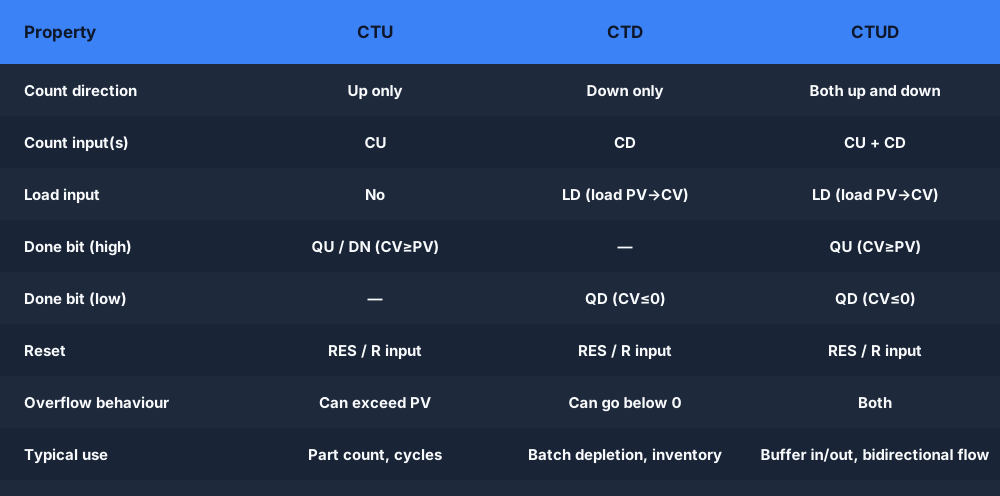
PLC counter types comparison: CTU vs CTD vs CTUD
The three standard PLC counter types differ on count direction, which inputs they accept, which done bits they produce, and the loading behaviour for their starting value.
CTU — Count Up
- CV increments on each CU rising edge
- Starts at zero, counts toward PV
- QU / .DN sets when CV ≥ PV
- No QD done bit
- Reset via RES / R input
- Use for: part counting, cycle counting, press stroke tracking
CTD — Count Down
- CV decrements on each CD rising edge
- LD loads PV into CV before counting
- QD sets when CV ≤ 0
- No QU done bit
- Reset via RES / R input
- Use for: batch depletion, inventory count-down, pallet stack
CTUD — Up/Down
- CU increments, CD decrements CV
- LD loads PV into CV
- QU sets when CV ≥ PV (full)
- QD sets when CV ≤ 0 (empty)
- Reset via RES / R input
- Use for: buffer tracking, car park occupancy, zone fill
Edge cases
Counter overflow and underflow
A PLC counter can exceed its preset in either direction if the count inputs continue to fire after the done condition is reached. Understanding overflow (CTU counting past PV) and underflow (CTD or CTUD counting below zero) is essential for writing robust counter logic that does not misbehave in real production conditions.
CTU overflow. The CTU QU done bit sets when CV reaches PV, but the counter does not stop counting. If rising edges continue to arrive on CU — because the reset logic has not been triggered yet, or because the upstream sensor is still active — CV continues to increase past PV. QU remains TRUE as long as CV is at or above PV, so there is no double-trigger issue with the done bit. However, if CV is a 16-bit integer (maximum 32,767 in most platforms), it will eventually roll over to 0 or to the minimum negative value. In a production environment where hundreds of thousands of parts are counted without a reset, this rollover can cause subtle bugs. Always verify that your reset logic fires reliably before CV can reach the integer maximum.
CTD and CTUD underflow. A CTD counter with CV at zero will decrement into negative values if CD continues to pulse. QD remains TRUE as long as CV is at or below zero. In most applications this means the dispense or depletion process should gate the CD input using the QD bit — an XIO (normally-closed) QD contact in series with the count trigger prevents further decrement. Without this gate, CV can go arbitrarily negative, and when LD next loads PV, the previous debt of negative counts does not carry over (LD is a hard-load, not an add). Still, allowing large negative values is a sign of a logic gap — the machine is counting dispense events when no inventory is present.
Best practice: gate the count inputs on the done bits. For a CTU, use an XIO Counter1.QU contact in series with the sensor that drives CU. This gates the count input closed the moment QU fires, preventing further accumulation until after the reset. For a CTD, use an XIO Counter1.QD contact in series with the CD input. For CTUD, gate CU with XIO QU and gate CD with XIO QD. This single pattern eliminates both overflow and underflow at the source.
Platform-specific overflow limits. Allen-Bradley SLC-500 and ControlLogix CTU instructions use a signed 16-bit (SLC, maximum 32,767) or 32-bit (Logix, maximum 2,147,483,647) integer for PRE and ACC. IEC 61131-3 CTU and CTUD use INT (−32,768 to +32,767) or DINT (−2,147,483,648 to +2,147,483,647) depending on the function block variant. For applications counting in the millions of cycles, always choose a DINT-typed counter (CTU_DINT in IEC) or verify that your Allen-Bradley Logix counter uses a 32-bit accumulator.
High-frequency counting
High-speed counters (HSC) — when standard counters are too slow
A standard CTU instruction can only count one rising edge per PLC scan cycle. If the scan cycle takes 10 ms and the sensor signal pulses at 500 Hz (500 pulses per second, one pulse every 2 ms), the PLC will miss the vast majority of pulses — the counter will under-count dramatically. This is the problem that high-speed counters (HSC) solve.
What makes an HSC different. A high-speed counter is implemented in dedicated hardware on the PLC CPU or a specialised I/O module, independent of the ladder scan cycle. The HSC hardware accumulates pulse counts between scans using an interrupt-driven or hardware-latched approach, then makes the accumulated CV available to the ladder program on each scan. The HSC can accurately count at rates from tens of thousands to millions of pulses per second depending on the hardware.
When you need an HSC. Common applications requiring high-speed counting include:
- Encoder position feedback. A rotary encoder on a servo motor may produce 1,000 to 10,000 pulses per revolution. At 1,500 RPM, that is 25,000 pulses per second — far beyond what a scan-cycle CTU can handle. HSC firmware in the Logix backplane or a dedicated HSC module accumulates the position count accurately.
- Flow meter pulse counting. A turbine flow meter generating 1,000 pulses per litre at high flow rates produces pulse streams well into the hundreds of Hz. An HSC accumulates the pulse count for accurate flow totalisation.
- High-speed packaging. A high-speed labelling machine running at 1,200 parts per minute (20 parts per second) with a sensor dwell of 10 ms per part is borderline for a standard CTU on a 10 ms scan. An HSC provides a margin of safety.
- Quadrature encoder input. HSC modules support A/B quadrature encoder inputs for bidirectional position counting — direction is determined by the phase relationship between the two pulse trains, not a separate input signal. This is the hardware equivalent of a CTUD in firmware.
Allen-Bradley HSC implementation. ControlLogix and CompactLogix use the built-in HSC firmware on certain CPU models and the 1756-HSC / 1769-HSC module for others. The HSC is configured in the I/O tree, not in the ladder logic. Ladder reads the HSC accumulator as a tag (like HSC.ACC). Siemens S7-1200 and S7-1500 have built-in HSC function blocks (CTRL_HSC) configurable up to 1 MHz on the CPU's high-speed DI terminals.
The rule of thumb: if your counted signal frequency could ever exceed one pulse per two scan cycles at maximum scan time, use an HSC. For everything else — parts per minute on a human-speed line, button press counts, batch totals — a standard CTU is correct and simpler to implement.
PLC counter and timer
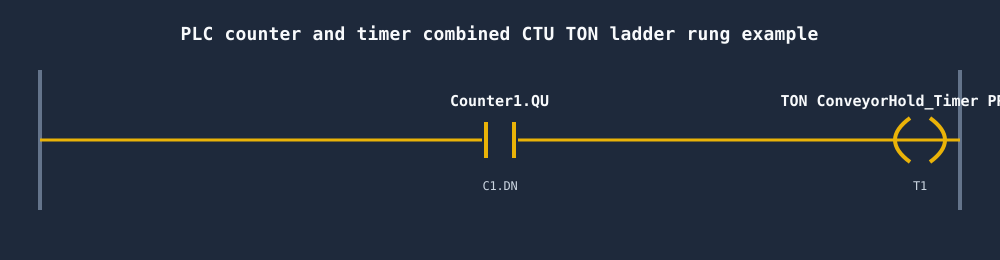
PLC counter and timer combined example: count 10 parts then hold conveyor 5 s
Combining a CTU counter with a TON timer is one of the most common ladder logic patterns in manufacturing. The counter defines the quantity condition; the timer defines the dwell duration after that quantity is reached. Together they implement the "count X, then wait Y seconds" cycle that drives packaging machines, batching systems, and conveyor sorting everywhere.
The application. A conveyor deposits parts into a box. After 10 parts are deposited, the conveyor must stop for 5 seconds to allow the box to be removed and an empty box positioned. The conveyor then restarts automatically for the next 10 parts.
Rung 1 — Count incoming parts:
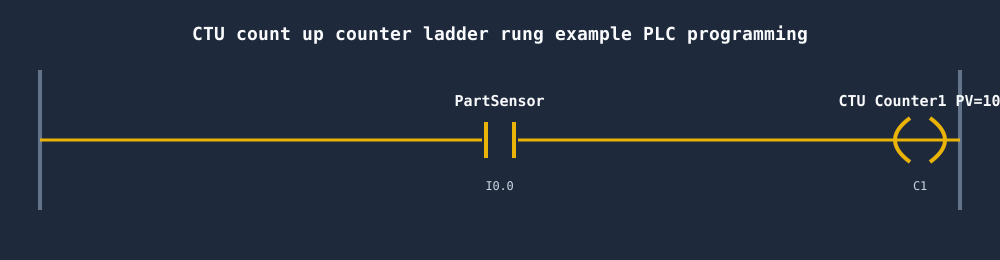
XIC PartSensor — CTU Counter1 PRE=10 / PV=10
Each rising edge on PartSensor (a photoelectric sensor at the box fill point) increments Counter1.ACC / CV. When CV reaches 10, QU (.DN in Allen-Bradley) turns on.
Rung 2 — Start the conveyor hold timer on QU:
XIC Counter1.QU — TON ConveyorHold_Timer PRE=5000 ms
The moment Counter1.QU turns on, the TON's enable rung goes TRUE and the timer begins counting. ACC increments toward 5,000 ms.
Rung 3 — Stop the conveyor while QU is TRUE:
XIO Counter1.QU — OTE Conveyor_Motor
A normally-closed Counter1.QU contact in series with the conveyor motor output drops the motor output the moment QU fires. The conveyor stops immediately on the 10th part.
Rung 4 — Reset counter and timer when the hold is complete:
XIC ConveyorHold_Timer.DN — RES Counter1
XIC ConveyorHold_Timer.DN — RES ConveyorHold_Timer
When the TON DN bit fires at 5,000 ms, the two RES rungs execute: Counter1.ACC / CV resets to zero (clearing QU), and the timer ACC resets to zero. With QU now FALSE, rung 2's enable drops — the TON resets — and rung 3's XIO re-closes, restarting the conveyor for the next 10-part cycle.
This four-rung pattern is self-resetting and runs indefinitely without operator intervention. The scan-cycle order matters: place the RES rungs after both the CTU and TON rungs so the reset executes on the same scan that DN fires, not one scan earlier.
Naming conventions
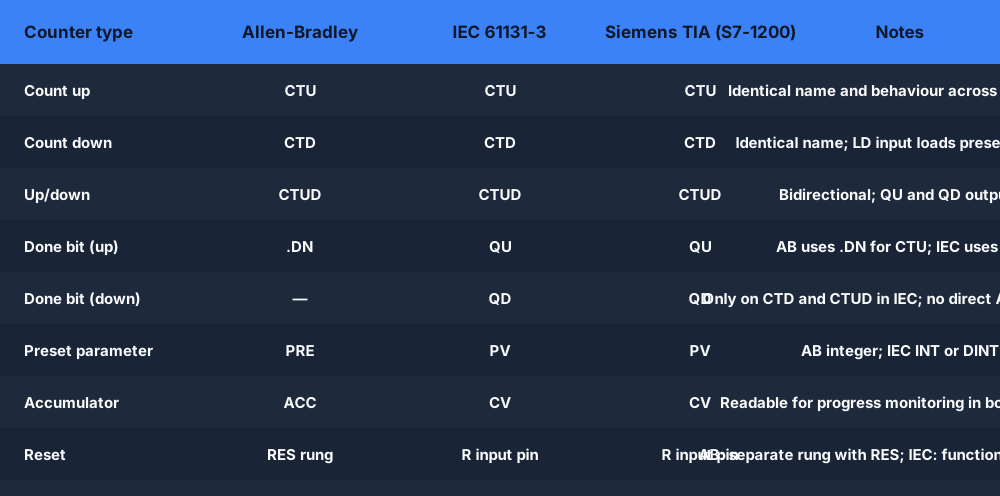
Allen-Bradley vs IEC 61131-3 counter naming
Like timer instructions, PLC counter instructions share the same logical behaviour across vendor platforms but carry different parameter names. The IEC 61131-3 standard (published 1993, revised 2013) standardised the CTU, CTD, and CTUD names — and the major PLC vendors follow this naming closely, making counter knowledge highly transferable between platforms.
The most significant naming difference is the done bit: Allen-Bradley calls the CTU done bit .DN (matching the timer done-bit convention), while IEC 61131-3 calls it QU (quantity up). Similarly, IEC provides a QD (quantity down) bit on CTD and CTUD that Allen-Bradley's CTD approximates differently. Once you learn CTU in any one platform, the transfer to another is a lookup exercise, not a conceptual relearn.
Allen-Bradley (RSLogix / Studio 5000)
- CTU — count up. Parameters: PRE (integer), ACC (integer). Done bit: .DN (sets when ACC ≥ PRE).
- CTD — count down. Same parameter names. Done bit: .DN (sets when ACC ≤ 0 after LD loads PRE into ACC).
- CTUD — up/down. Available in Logix (ControlLogix/CompactLogix). QU and QD bits exposed as tag members.
- RES — reset instruction on a separate rung. Clears ACC and .DN for CTU and CTD. AB does not use an R function-block input.
- In RSLogix 500 (SLC-500 / MicroLogix), counters use file-based addressing: C5:0.ACC, C5:0.PRE, C5:0/DN.
IEC 61131-3 (Siemens, Codesys, OpenPLC)
- CTU — count up. Inputs: CU (BOOL), R (BOOL). Outputs: Q (BOOL, same as QU), CV (INT or DINT).
- CTD — count down. Inputs: CD (BOOL), LD (BOOL). Outputs: Q (same as QD), CV.
- CTUD — up/down. Inputs: CU, CD, R, LD. Outputs: QU (BOOL), QD (BOOL), CV.
- Reset via R input pin — no separate RES rung required. Setting R := TRUE clears CV and QU/QD.
- Siemens TIA Portal (S7-1200/1500) provides CTU, CTD, CTUD with INT and DINT variants (CTU_DINT etc.) for large count values.
OUT C with a K-value preset — e.g. LD X0 / OUT C1 K10 — incrementing C1 each time X0 goes from OFF to ON. Omron CX-Programmer uses a CNT (counter) instruction with similar syntax. The logical behaviour is identical to IEC CTU; only the textual syntax and addressing differ. Omron also provides a reversible CNTR (up/down counter) matching CTUD behaviour.Live browser simulator
Try a live PLC counter — no install, no licence
Drop into a scenario, place a CTU or CTUD on a rung, set the preset, click the input — and watch CV accumulate in real time. The simulator grades your solution automatically.
CTU: Part Count
Drop a CTU on a rung, set a preset, click the sensor input — watch CV increment and QU fire.
Open scenario →Conveyor Sort
Use a CTU to count parts and divert to a second lane after a batch of 10. Full auto-graded scenario.
Open scenario →Counter Overflow Fault
Diagnose and fix a real counter overflow bug — CV exceeds PRE because the reset logic is missing.
Open scenario →Why a live simulator beats reading about counters
Practice PLC counters free — in your browser.
Two auto-graded scenarios unlocked immediately. No credit card. No install. Works on Mac, Windows, Linux and Chromebook.
PLC counter FAQ
Watch a CTU counter accumulate in your browser today
No licence. No install. No credit card. Just ladder logic.
Create free account →