A Browser RSLogix Simulator for Allen-Bradley Ladder Practice
Practise XIC, XIO, OTE, timers, and counters in the Allen-Bradley dialect — with no RSLogix 500, Studio 5000, or FactoryTalk install, on any operating system, free to start. Honest version: we are a learning simulator, not Rockwell software and not a real controller.
Join 1300+ learners practicing PLC programming
Create a free account to save your progress.
Opening honesty
This is not Rockwell software — it is practice for it.
If you are programming a live MicroLogix, SLC 500, ControlLogix, or CompactLogix controller, you will use Rockwell's own RSLogix 500 or Studio 5000 — there is no substitute for that on real hardware. This page is about the step before: building Allen-Bradley ladder fluency cheaply, on any computer, so the licensed tools feel familiar when you get to them.
Runs online, no download
An RSLogix simulator that runs online — nothing to install
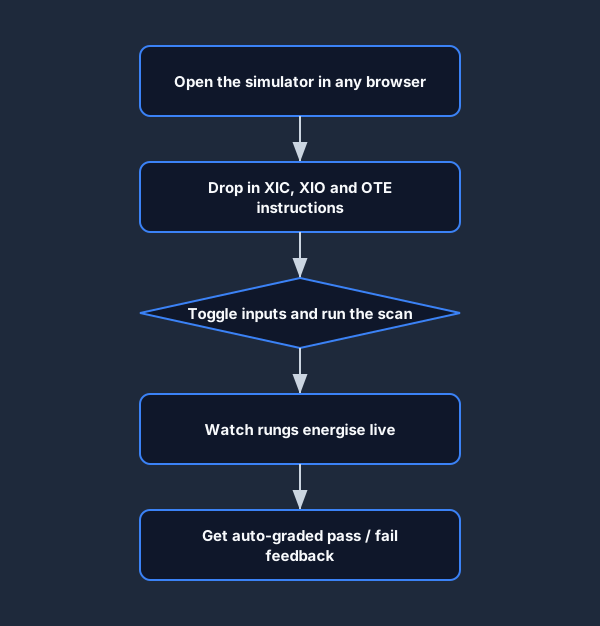
Searching for an “RSLogix 500 simulator online” usually dead-ends: RSLogix Emulate, PLCLogix, and LogixPro are all Windows desktop downloads, and Rockwell's FactoryTalk Logix Echo needs a full Studio 5000 install. This simulator is genuinely browser-based — open a tab on a Mac, Windows, Linux, or Chromebook, build an Allen-Bradley XIC/XIO/OTE rung, and watch it scan. No installer, no licence file, no virtual machine.
Background
What RSLogix and Studio 5000 actually are
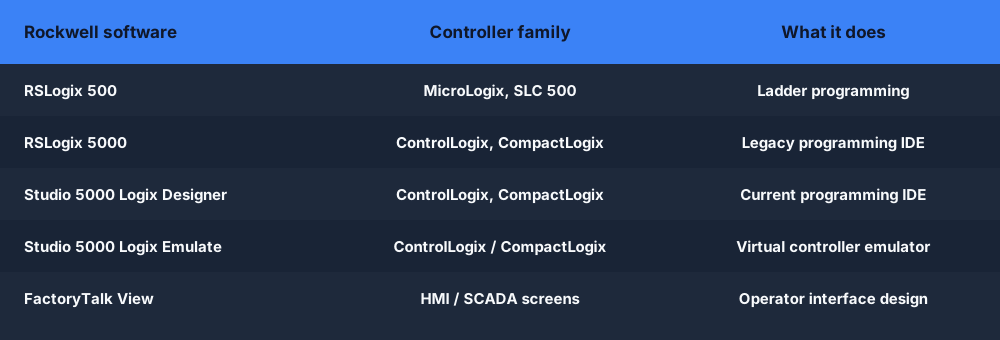
RSLogix 500 is Rockwell Automation's programming software for the older MicroLogix and SLC 500 controller families. It uses file-based addressing — inputs like I:0/0, outputs like O:0/0, timers like T4:0 — and is the tool millions of technicians learned ladder logic on.
RSLogix 5000, since rebranded Studio 5000 Logix Designer, programs the modern ControlLogix and CompactLogix families using tag-based addressing. Alongside it, Studio 5000 Logix Emulate is Rockwell's virtual-controller emulator for testing logic without hardware, and FactoryTalk View builds the HMI and SCADA screens operators touch.
All of these are Windows-only and licensed. That makes them excellent professional tools and a poor fit for a beginner on a Mac, a student without a licence, or anyone who just wants to try Allen-Bradley ladder logic this afternoon.
The dialect
XIC, XIO, OTE — the Allen-Bradley ladder you came to practise
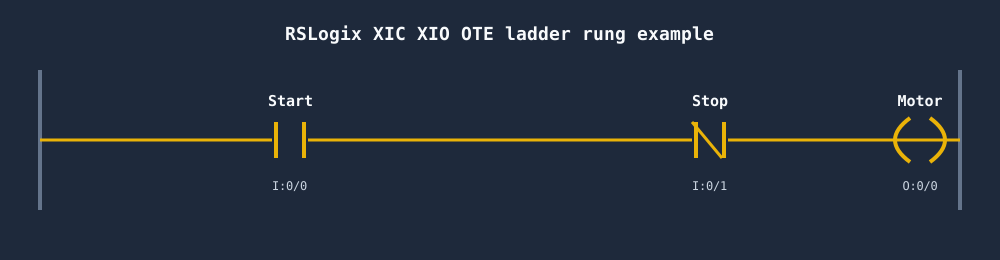
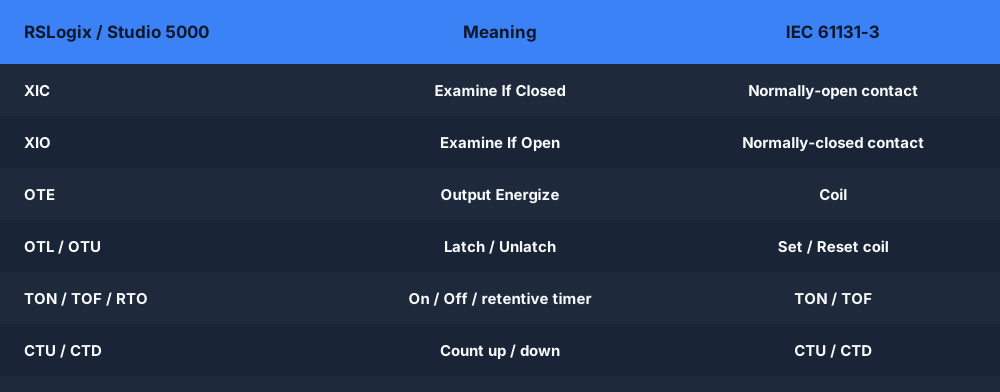
The instructions that make Allen-Bradley ladder feel distinct are the bit instructions: XIC (Examine If Closed, a normally-open contact), XIO (Examine If Open, a normally-closed contact), and OTE (Output Energize, a coil). Our editor speaks this dialect directly, so the rungs you build look like the ones in RSLogix.
Learner friction
Where the real Rockwell tools slow a first-time learner
Windows-only
RSLogix 500 and Studio 5000 do not run on Mac, Linux, or Chromebook. The workaround is a Windows VM with its own cost and setup tax.
Licensed, not free
These are professional, paid products. A learner without an employer licence is locked out before writing a single rung.
Heavy install + activation
Multi-gigabyte installs, FactoryTalk Activation Manager, and version-matching to a controller — hours before you reach ladder.
Needs a controller to feel real
Without hardware or Logix Emulate, the experience is incomplete. Emulate is itself a licensed add-on.
No scored curriculum
They are workbenches, not courses. There is no auto-grader telling a beginner whether their rung is correct.
No interview / portfolio mode
Built for engineering work, not self-paced interview prep or a CV-ready portfolio of solved scenarios.
Feature comparison
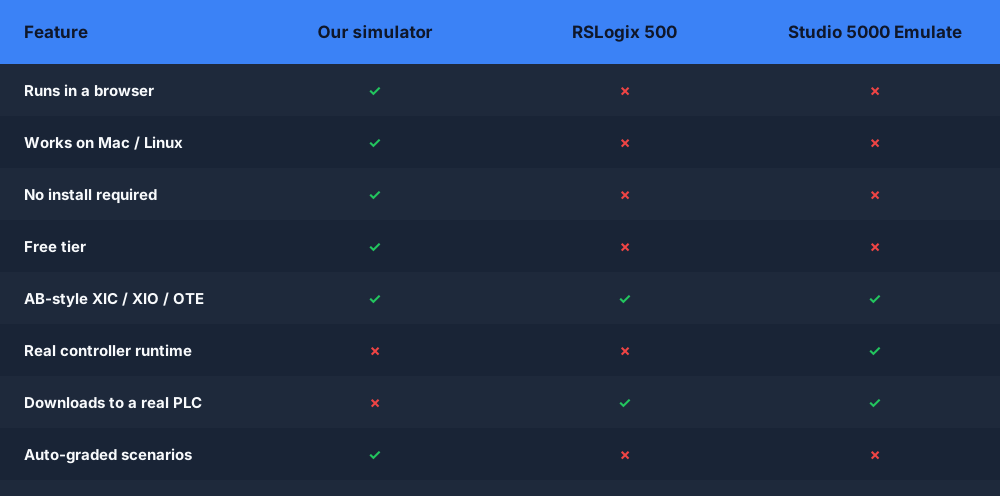
Our browser simulator vs RSLogix 500 vs Studio 5000 Emulate
| Feature | Our simulator | RSLogix 500 | Studio 5000 Emulate |
|---|---|---|---|
| Runs in a browser | Yes | No | No |
| Mac / Linux support | Yes | No | No |
| Install required | None | Windows install | Windows install |
| Price | Free tier + Pro | Licensed | Licensed |
| AB-style XIC / XIO / OTE | Yes | Yes | Yes |
| Real controller runtime | No | No | Yes (virtual) |
| Downloads to a real PLC | No | Yes | Yes |
| Auto-graded scenarios | Yes | No | No |
Hands-on
Build a seal-in motor circuit, then watch it scan
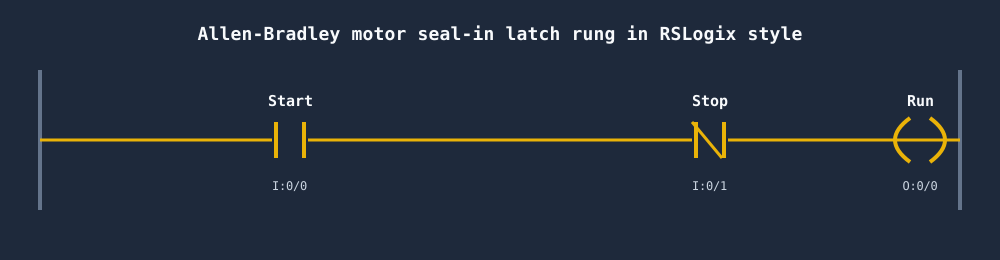
The first rung most technicians ever write is three-wire motor control: a momentary start, a normally-closed stop, and an OTE that seals itself in. You build it here exactly the way you would in RSLogix, toggle the inputs, and watch the rung energise as the processor scans top to bottom.
Timers & counters
TON, TOF, RTO, CTU, CTD — the same instructions you will use later
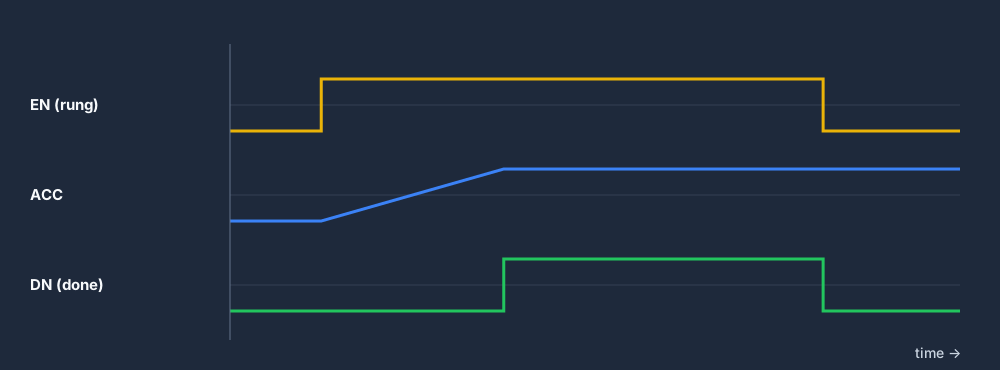
Allen-Bradley timers carry status members like .EN, .DN, and .ACC. In a TON, the done bit DN only turns on after the accumulator reaches the preset, and it drops the instant the rung goes false. Practising that behaviour — and the classic mistake of reading the enable instead of the done bit — is exactly what builds real fluency.
Honest scope
What transfers — and what only the real Rockwell tools do
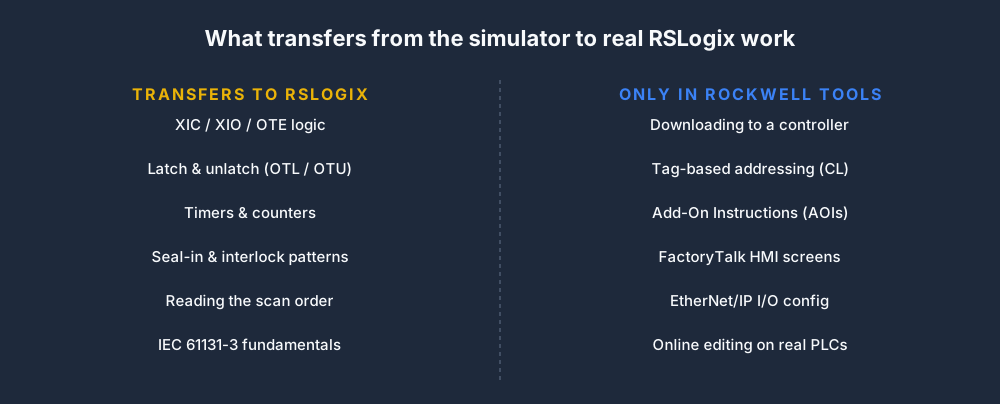
We are deliberate about the boundary. The ladder fundamentals you practise here carry straight into RSLogix 500 and Studio 5000. The vendor-specific layer does not — and we will never pretend otherwise.
Addressing
Learn RSLogix 500 file-based addressing
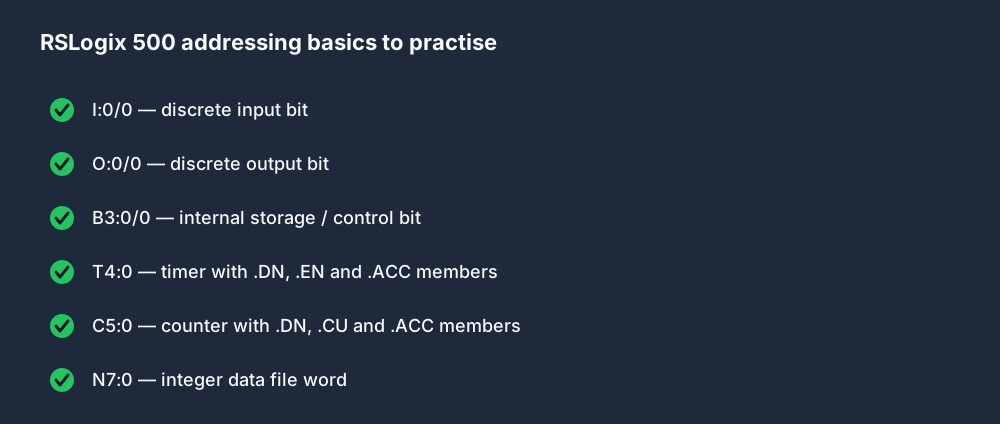
Allen-Bradley's SLC and MicroLogix addressing scheme trips up a lot of newcomers — data files, bit-level addresses, and timer/counter members all live in a tidy but unfamiliar notation. Getting comfortable reading I:0/0, T4:0.DN, and C5:0.ACC pays off the moment you open the real software.
Use RSLogix / Studio 5000 if…
- You are programming a real MicroLogix, SLC, ControlLogix, or CompactLogix.
- You need to download logic to a controller or go online with hardware.
- You build FactoryTalk HMI screens or configure EtherNet/IP I/O.
- You have Windows and a Rockwell licence available.
- You want a virtual controller via Studio 5000 Logix Emulate.
Use our simulator if…
- You want to practise XIC, XIO, OTE, timers, and counters today.
- You are on a Mac, Linux, or Chromebook.
- You have no RSLogix or Studio 5000 licence yet.
- You want auto-graded scenarios with instant feedback.
- You are prepping for an Allen-Bradley ladder interview.
- You want to start free, with zero install.

Keep exploring
Related practice on this site
- The PLC simulator — the full browser sandbox: build, run, and step through ladder programs in any dialect.
- The ladder logic simulator — focused practice on contacts, coils, branches, and the scan cycle.
- LogixPro alternative — if you came here from the classic LogixPro 500 simulator, start here.
RSLogix simulator FAQ
Practise Allen-Bradley ladder logic in your browser.
No RSLogix install. No Windows VM. No licence file. Free to start.