Analog I/O and PID Tuning: The 90% Method That Works on Most Loops
Most PLC engineers find PID loops intimidating. The textbooks make them worse with Ziegler-Nichols tables, derivative kick, integral windup, and dozens of pages of equations. In practice, 90% of PID loops in the field can be tuned to good-enough performance using a method that fits on one page. This post is that method.
We'll also cover the analog I/O chain — how a 4–20 mA signal becomes a number your ladder code can use — because PID without scaling is just theatre. If you want the fundamentals refresher first, our PID control for PLCs post goes deeper on what the terms mean.
The analog chain, end to end
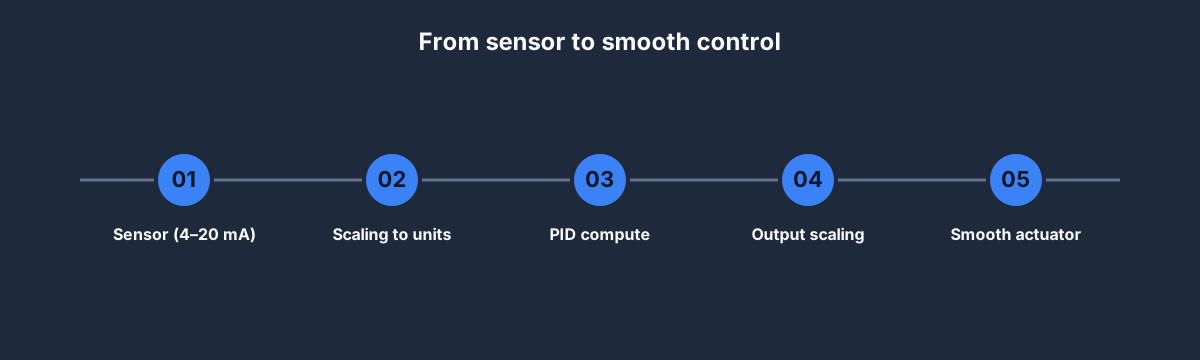
Every analog control loop is five steps:
- Sensor — a transmitter outputs 4–20 mA (industrial standard) or 0–10 V (machinery standard). Pressure, temperature, level, flow, position.
- Scaling — your PLC's analog input module converts mA or V to a 16-bit integer (usually 0–27648 for Siemens, 0–32767 for Rockwell, vendor-specific). Your ladder scales that to engineering units.
- PID compute — the PID block reads the scaled process variable (PV), compares to the setpoint (SP), and writes an output (0–100 % or scaled).
- Output scaling — that output is converted back to the analog output module's integer range and driven to the actuator (valve, VFD, heater).
- Actuator — the physical change that affects the process.
Miss any step and your loop behaves badly. Over-scale and PID thinks the PV is saturated when it's only 60%. Under-scale and the derivative term goes wild.
The scaling rung in plain terms
A 4–20 mA transmitter measuring 0–100 °C. For more worked examples of reading and scaling analog inputs in ladder logic, see analog input PLC examples.
raw_input ∈ 0..27648   (Siemens SM1231 convention)
4 mA → raw = 5530
20 mA → raw = 27648
span_raw = 27648 - 5530 = 22118
span_eu = 100 - 0 = 100

PV_in_EU := (raw_input - 5530) * 100 / 22118
Write that once in a scaling function block, call it for every analog input, and you're done. Never retype the magic numbers.
PID in plain English
Three terms. None of them are scary on their own.
- P (Proportional) — "how far off are we?" Bigger error → bigger corrective output. If the tank is 10 °C below setpoint, open the steam valve wider.
- I (Integral) — "how long have we been off?" Small persistent error → slowly bigger output. Corrects for steady-state offset that P alone can't fix.
- D (Derivative) — "how fast is the error changing?" Rapid change → damping output. Prevents overshoot on fast loops; amplifies noise on slow loops. Often turned off.
In ladder logic, every vendor gives you a PID function block with these three as parameters: Kp, Ki (or Ti), Kd (or Td). You set them, the block does the math.
When PID isn't the right tool
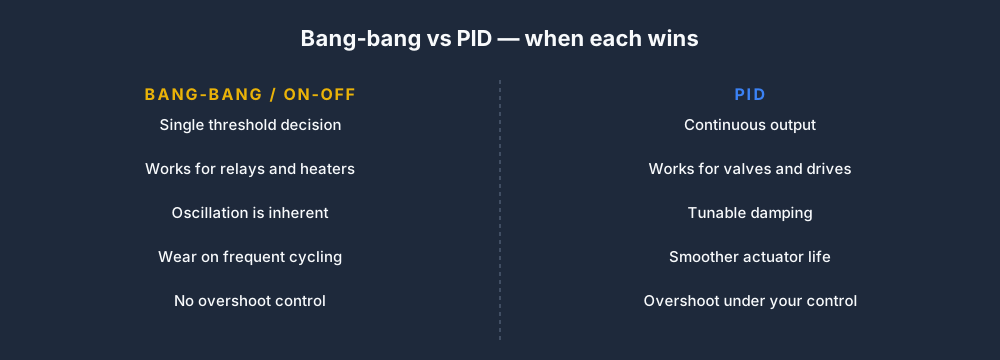
Simple on-off (bang-bang) control is often better than PID for:
- Water heaters with big tanks — oscillation is fine, PID is overkill.
- Cabin heaters in HVAC where setpoint drift of ±1 °C doesn't matter.
- Relay-driven systems that can't cycle faster than once every 30 seconds.
Reserve PID for:
- Analog actuators — modulating valves, VFDs, SCRs, servo drives.
- Loops where overshoot matters — temperature loops on chemical reactions, pressure loops on regulators.
- Loops where ripple matters — pressure control in process systems, level control in tank blending.
If your actuator is a contactor or a solenoid, use on-off. If it's a valve or VFD, use PID.
The 90% tuning method
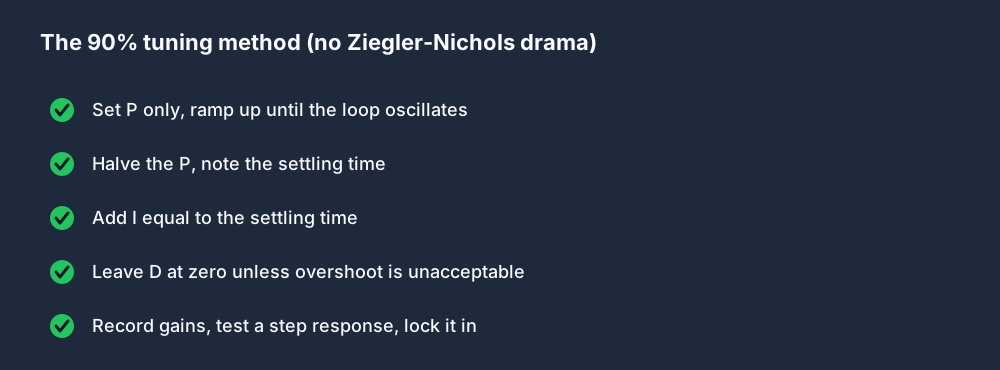
Step by step, for the vast majority of temperature, level, flow, and pressure loops:
- Set P only. Start with Ki and Kd at 0. Pick a small Kp — 0.1 is a reasonable start for most loops.
- Ramp up P. Double Kp every 30 seconds (or every 2–3 settling times for slow loops) while making step changes to the setpoint. Watch the PV response.
- Stop when it oscillates. When the PV starts swinging back and forth around the setpoint, you've found the critical gain. Note the period of the oscillation — this is
Tc, typically 10–60 seconds for temperature loops, 1–5 seconds for fast pressure loops. - Halve the Kp. That's your operating P. The loop is now stable but sluggish, with steady-state offset.
- Add I with Ti = Tc. Set the integral time to roughly the period of oscillation. The loop now eliminates steady-state offset.
- Leave D at zero unless you see unacceptable overshoot on step response. If you add D, start at Td = Tc / 8 and increase cautiously.
- Test. Do a 10% setpoint change. Good tune: reaches setpoint in 2–3 settling times, less than 10% overshoot. If not, adjust Ki or Kd slightly.
- Lock in the gains. Write them down. Add a comment in the PID block noting the tuning date and who did it.
That's the whole method. It won't beat a control engineer with proper step-response identification tools, but it'll get you 90% of the way in an afternoon.
Avoiding the classic PID traps
Five things that bite newcomers:
- Integral windup. If your output saturates (valve fully open) and error persists, the integral keeps accumulating. When error finally reverses, the loop overshoots wildly. Cure: use vendor's anti-windup feature (all modern PID blocks have one).
- Derivative kick on setpoint changes. If D acts on error, a step setpoint change produces a huge derivative spike. Cure: use "D on PV only" configuration (standard on modern blocks).
- Scan time too slow. If your scan is 100 ms and your loop period is 1 second, you've got only 10 samples per cycle. Marginal. Move PID to a faster task or shorten your scan.
- Noisy PV. A shaky sensor reading amplifies D wildly. Cure: filter the PV (first-order lag, 0.1–0.5 seconds) before feeding it to the PID block.
- Tuning with the wrong process. If you tune a water-heating loop with the tank empty, the gains won't fit the real load. Tune with the real process running.
PID in IEC, Rockwell, Siemens
Same math, slightly different parameter names:
- IEC 61131-3 —
PIDfunction block, parametersCTRL_MODE,SP_INT,PV_IN,LMN_PER(output), tuning viaGAIN,TI,TD. - Rockwell Studio 5000 —
PIDE(Enhanced PID) function block. ParametersKp,Ki,Kd. Auto-tune feature built in. - Siemens TIA Portal —
PID_Compact(for S7-1200) orPID_3Step(for S7-1500). Auto-tune modes called "Pretuning" and "Fine-tuning."
Our PID Temperature scenario is a browser playground for this method — tune it until the loop settles smoothly, then port the gains to real hardware.
FAQ
Is PID hard to tune?
The 90% method above is not. Ziegler-Nichols is. Most engineers who say PID is hard were taught via Z-N without seeing the simpler iterative approach.
Do I need to learn the math?
No. You need intuition for what each term does (see "PID in plain English" above) and a systematic tuning method. The math is optional.
What's the best PID tuning software?
For most loops: none. The 90% method works with a stopwatch and the PLC's online view. For tricky loops: ExperTune PlantTriage, Matrikon Process Doctor, or vendor-specific auto-tune features.
How long does PID tuning take?
30 minutes per loop for the 90% method. 4 hours per loop if you want a professional-quality tune with step-response identification.
Do modern PLCs auto-tune PID?
Siemens PID_Compact and Rockwell PIDE both offer auto-tune. They work for about 70% of loops and are a good starting point for the other 30%.
Where to start
- Open our PID Temperature scenario. Pro tier.
- Start with Kp = 0.1, Ki = 0, Kd = 0.
- Follow the eight steps above.
- When the loop settles cleanly, port the gains to a real PID block in Studio 5000, TIA Portal, or whatever IDE your target job uses.
Eight steps, thirty minutes, one dominant practical skill. That's PID on a PLC.