PLC Programming Online Simulator: Browser-First, No Install, Real Code
An online PLC simulator is a browser-based environment where you write ladder logic or structured text, wire it to simulated inputs and outputs, and run the program against a machine physics model — all without installing a thing. You open a URL, sign in, and you're coding.
This post is the honest, builder's-view answer to plc programming online simulator as a search query. If you're evaluating simulators for a course, a bootcamp, your own self-study, or a CI pipeline that tests student submissions, this post will save you a week of trials.
Why "online" matters in 2026
Ten years ago, running a PLC simulator meant installing a few gigabytes of vendor IDE on a Windows machine that probably wasn't yours. Five years ago, the story improved slightly — Codesys and PLC Fiddle started to offer browser-adjacent flavours, but both still expected desktop tooling for serious work. Today, a handful of simulators run entirely in the browser, and the gap between "running in the browser" and "being a real tool" has closed.
Three things changed:
- WebAssembly matured. A PLC runtime — parser, compiler, scan loop — is small enough to ship as WASM and run at near-native speed in the browser. The scan loop in this simulator runs at a true 20 Hz inside the same JS heap as the UI, with no round-trip to a server.
- Canvas and WebGL are production-grade. Machine physics — a traffic light, a conveyor, a PID temperature loop — used to require a native runtime. Now it's a thousand lines of Phaser.
- Auth is trivial. Sessions, subscriptions, state persistence — all standard commodity infrastructure. You don't need a VM to save your progress across devices.
Put together, these shifts make an online PLC simulator the right default for anyone who isn't already sitting in front of a physical PLC.
What "online" gets you that installed software doesn't
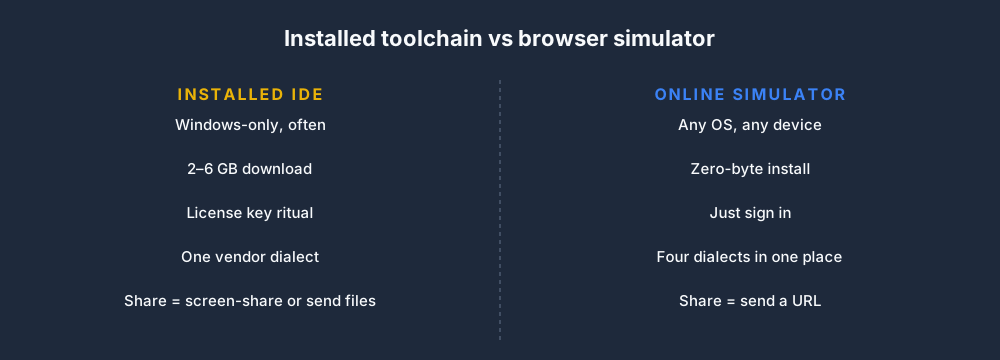
Four wins for browser-first:
- It works on any OS. If your laptop is a Mac, or your Chromebook was the cheapest thing on offer, or you want to squeeze in 20 minutes on an iPad on a train, none of the vendor IDEs will talk to you. A browser simulator doesn't care.
- There is no install ritual. RSLogix 5000 is 2.5 GB before you add the license manager. TIA Portal is north of 6 GB. Students reliably lose a day of course time on activation servers, license dongles, and firewall rules. An online tool skips all of it.
- Sharing a program is a URL. Teaching? Debugging with a colleague? Grading a cohort? Pasting
plcsimulator.com/play/traffic-light?state=...beats zipping up a project directory and hoping the recipient's version matches yours. - Updates are invisible. You never open the tool and discover you can't open a project because you're two point-releases behind.
The trade-offs are real, though, and you should know them:
- No direct hardware I/O. You can't flash code from a browser to a physical PLC. For learning and prototyping, that doesn't matter. For production commissioning, it obviously does.
- No vendor-specific extensions. Allen-Bradley add-on instructions, Siemens SCL libraries, Delta XINJE co-processor bits — you work in the IEC-61131-3 subset. Good for portability, annoying if your employer standardised on one extension.
- Offline work depends on service-worker caching. Most online simulators run fine offline after the first load, but none of them pretend to replace a full desktop IDE for field work.
What runs where in a browser-first simulator
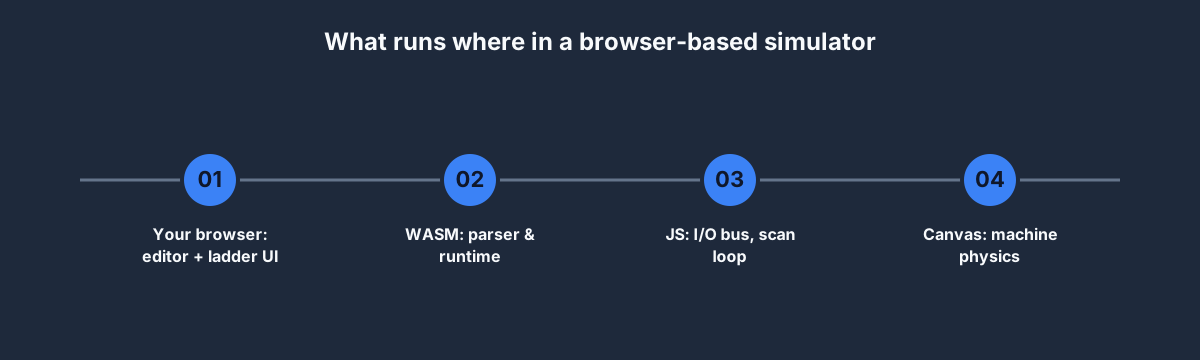
A good mental model for how an online PLC simulator works:
- The editor is React or plain HTML, backed by a standard code-mirror-family component. It understands four dialects — IEC 61131-3, Allen-Bradley RSLogix, Siemens STL/LAD, and Delta IVC — and parses on every keystroke.
- The interpreter (parser → AST → bytecode → interpreter) ships as either plain JS or compiled WebAssembly. Ours is JS and fits in about 120 KB gzipped.
- The I/O bus is an in-memory map of tag-name → current value. The scan loop ticks it at 20 Hz (50 ms per scan — the same cadence Rockwell and Siemens use as a default), the runtime solves the ladder, and the bus publishes changes back.
- The machine physics run on a separate canvas via Phaser. They subscribe to the I/O bus, react to output changes ("MOTOR_CONTACTOR just went high, so spin the pulley"), and write back any sensor changes ("tank is now full, so FILL_HIGH = 1").
- Persistence is a plain JSON blob per (user, scenario). A 150-line ladder program serialises to about 12 KB. It syncs on change via a debounced fetch.
If you want to see all of this running, every scenario on this site has a live preview embedded on its public page — for example, the Traffic Light scenario preview boots the scene in your browser, loads the canonical solution ladder, and runs the demo loop. No login required.
Your first rung, live
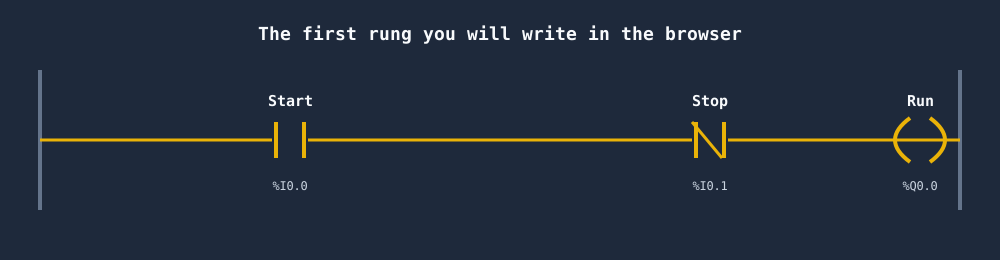
The rung above is the single most-important 5-symbol pattern in PLC programming: start-stop with seal-in. In IEC 61131-3 ladder it reads as:
| Start  Stop                         Run |
|---[ ]---[/]-----------------------( )---|
|   Run                                    |
|---[ ]---+                                |
A well-built online simulator lets you:
- Open a scenario (say, Motor Start/Stop).
- Type that rung into the editor.
- Press Run.
- Click the simulated Start button on the canvas.
- Watch the motor spin. Let go of Start. Motor keeps spinning because of the seal-in. Press Stop. Motor stops.
That whole loop — from "I have an idea for a rung" to "I saw the motor move in response to my code" — takes about 45 seconds. On installed vendor tooling, the same loop takes closer to 10 minutes for a first-timer once you factor in the project wizard, the tag database, and the download-to-emulator step.
Is a browser simulator the right tool for you?
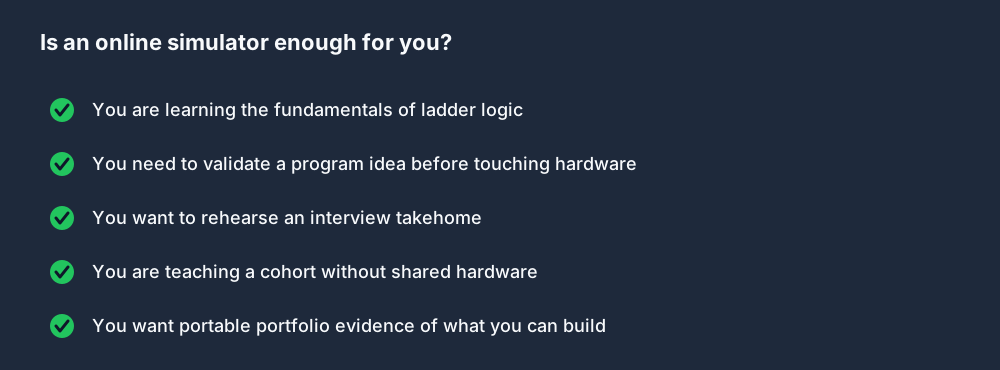
Browser-first is a yes when:
- You are learning fundamentals or training a cohort
- You want to validate a program idea before touching hardware
- You are rehearsing an interview takehome or a portfolio project
- Your class or bootcamp lacks the budget for per-student licences
Browser-first is a no (or at least "not alone") when:
- You are commissioning a physical machine on site — you need vendor tooling that can talk to the PLC
- You rely on vendor-specific add-on instructions or proprietary function blocks
- Your employer's change-control policy forbids code outside an approved IDE
For almost every learner, the first case applies. For working engineers, an online simulator complements — not replaces — the vendor IDE.
Five things to look for before committing to one
Not all "online PLC simulators" are built the same. When you're evaluating, check for:
- Real IEC 61131-3 parsing — not just pattern-matched examples. A good simulator should accept ST, LD, and ideally SFC, and flag syntax errors with line numbers and sensible messages.
- Deterministic scan semantics — input read → logic → output write, once per scan. If the simulator lets outputs change mid-scan, you will learn habits that fail on real hardware.
- Automated test cases — you submit a program, the simulator pokes the simulated inputs according to a recipe, and you see pass/fail per assertion. This is the single largest differentiator between "toy" and "teaching tool."
- A real solution per scenario — so you can stop, read how a senior engineer would solve it, and learn from diffs. Our simulator ships a canonical
solution.iecfor every scenario and walks you through it rung-by-rung with commentary. - Persistence and sharing — your program should save across sessions, and you should be able to share a URL that someone else can open and inspect.
If a simulator you're looking at misses any three of those, keep shopping.
How we built ours
Short version: we took the browser-first approach seriously.
- Parser and runtime are hand-written in TypeScript, ~4,000 lines. Four dialects covered.
- Physics models are Phaser scenes, one per scenario — 40 of them at launch, from traffic lights through PID temperature control.
- State persists to a Postgres-backed API with a 50-line Inertia controller.
- The entire toolchain runs against a single React + Laravel codebase, and every push deploys to production in ~3 minutes.
You're welcome to sign up and try the free tier — two scenarios, three lessons, a quiz, no credit card. It takes about 20 minutes to tell if this style of tool fits your brain.
FAQ
Is there a free online PLC simulator?
Yes — including ours. Free tier: two scenarios (Traffic Light, Motor Start/Stop), three lessons, one quiz. Nothing time-limited. If you want all 40 scenarios, the Basic plan is USD 12/month or USD 99/year.
Can I run an online PLC simulator on an iPad or Chromebook?
Yes. Anything that runs a modern Chromium-based browser will run ours. The editor is touch-friendly; the canvas is responsive.
Does an online simulator support Allen-Bradley or Siemens dialects?
Ours does — plus IEC 61131-3 and Delta. See our dialects comparison post for the syntax map between them.
Can I use an online simulator to prepare for a job interview?
Yes, that's one of the strongest use cases. Run through our interview questions post first, then work through the Junior Controls interview track which packages the simulator scenarios into a rehearsable 6-hour block.
What about OpenPLC?
OpenPLC is an excellent open-source runtime and the industry reference for a free alternative. The gap is on the teaching side — there's no curriculum, no graded test cases, no interview prep, no machine-physics models. It's a runtime; ours is a course. They complement each other if you want to deploy your learning to a Raspberry Pi.
Is browser PLC programming "real"?
Yes. The IEC 61131-3 language your browser executes is the same language your Allen-Bradley or Siemens PLC executes — just on a different machine. Skills, idioms, and debugging intuitions transfer 1:1. We built this simulator precisely because that's true.
Start coding now
You don't need a credit card to write your first rung.
- Open the Traffic Light scenario preview — it auto-runs in your browser, no login.
- Sign up free when you're ready to start writing your own code.
- Work through the complete 12-week course at your own pace.
The only way this doesn't work is if you don't start.