Structured Text Programming: Syntax and Examples (IEC 61131-3)
Structured Text Programming: Syntax and Examples
Structured Text (ST) is the high-level, Pascal-like PLC language defined by IEC 61131-3. You write logic as statements — IF, CASE, FOR, WHILE — instead of drawing rungs, which makes it the right tool for maths, loops, recipes and state machines. Learn five constructs and the standard data types and you can write almost any ST program. This tutorial is a hands-on syntax reference: every section gives you a small, working example you can adapt.
If you are still deciding whether to use ST at all, read ladder logic vs structured text first — this post assumes you have decided to write ST and want the syntax.
Where Structured Text fits in IEC 61131-3
The IEC 61131-3 standard defines five PLC programming languages. ST is one of the two textual languages and is supported, in some form, by every major vendor — Allen-Bradley Studio 5000, Siemens TIA Portal (as SCL), CODESYS, Beckhoff and more.
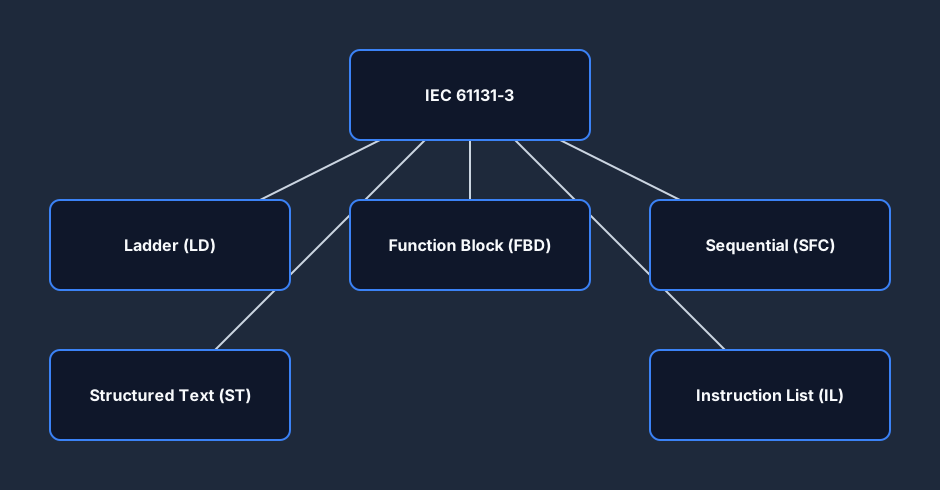
ST is a general-purpose language. Where Ladder Diagram (LD) and Function Block Diagram (FBD) are graphical and Instruction List (IL) is low-level, ST reads like Pascal and is by far the most compact way to express calculation-heavy logic.
The five core ST constructs
Almost every structured text program is built from the same handful of statements. Here is what each one is for, side by side.
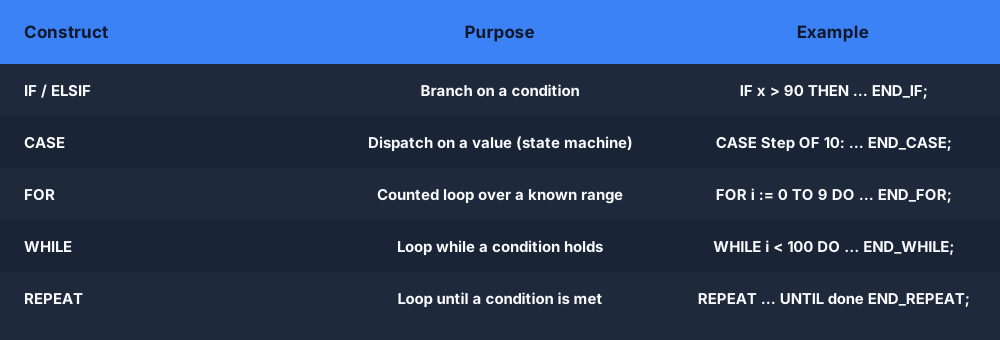
We will work through each one with a real example.
IF / ELSIF / ELSE — conditional logic
IF is the workhorse. It evaluates a Boolean condition and runs a block of statements when it is true. Chain conditions with ELSIF and add a fallback with ELSE. Every IF ends with END_IF;.
IF Tank_Level > 90.0 THEN
    Pump_Run := FALSE;          (* full — stop filling *)
    Alarm_High := TRUE;
ELSIF Tank_Level < 20.0 THEN
    Pump_Run := TRUE;           (* low — start filling *)
    Alarm_High := FALSE;
ELSE
    Alarm_High := FALSE;        (* normal band — leave pump as-is *)
END_IF;
Note the syntax that trips up beginners: assignment is := (not =), comparison is = (not ==), every statement ends in a semicolon, and comments go inside (* ... *) or //.
CASE — clean state machines
When you have one variable that selects between many discrete behaviours — sequence steps, modes, recipe numbers — a CASE statement is far cleaner than a tower of ELSIFs. This is the canonical way to write a state machine in ST.
CASE Step OF
    0:  // idle — wait for start
        IF Start THEN Step := 10; END_IF;
    10: // clamp the part
        Clamp := TRUE;
        IF Clamp_Closed THEN Step := 20; END_IF;
    20: // drill
        Drill := TRUE;
        IF Drill_Done THEN Step := 30; END_IF;
    30: // release and return to idle
        Drill := FALSE;
        Clamp := FALSE;
        Step := 0;
ELSE
        Step := 0;              // unknown state — recover safely
END_CASE;
Each label can be a single value, a list (1, 3, 5:) or a range (10..20:). The ELSE branch is your safety net for an unexpected step value.
FOR — counted loops
A FOR loop repeats a known number of times — perfect for iterating over an array. This is something ladder logic simply cannot do without unrolling every iteration by hand.
Total := 0;
Highest := 0;
FOR i := 0 TO 9 BY 1 DO
    Total := Total + Readings[i];
    IF Readings[i] > Highest THEN
        Highest := Readings[i];
    END_IF;
END_FOR;
Average := Total / 10.0;
The BY step is optional (it defaults to 1) and may be negative to count down. Keep the loop bounded — a FOR over a large array still has to finish inside one PLC scan.
WHILE and REPEAT — conditional loops
WHILE tests its condition before each pass; REPEAT tests after, so a REPEAT body always runs at least once. Use these when the iteration count is not known up front.
// WHILE: search an array for a target value
i := 0;
Found := FALSE;
WHILE (i < 100) AND (NOT Found) DO
    IF Buffer[i] = Target THEN
        Found := TRUE;
        Index := i;
    END_IF;
    i := i + 1;
END_WHILE;
// REPEAT: runs the body, then checks the exit condition
n := 0;
REPEAT
    n := n + 1;
    Bits := SHL(Bits, 1);
UNTIL n >= 8
END_REPEAT;
Treat conditional loops with care on a PLC: a condition that never becomes false will stall the scan and trip the watchdog. Always include a guard like the i < 100 counter above.
Calling timers in Structured Text
Timers and counters are IEC function blocks, and you call them in ST as instances. Declare an instance, call it with its parameters, then read the .Q output. Here is a TON on-delay timer driving a motor 5 seconds after Start:
VAR
    DelayTimer : TON;          // instance of the on-delay timer
    Motor      : BOOL;
END_VAR

DelayTimer(IN := Start, PT := T#5s);   // call the function block
Motor := DelayTimer.Q;                  // read the done bit
You drive logic from .Q (the done bit), watch progress with .ET (elapsed time), and set the preset with a time literal like T#5s or T#500ms. If you are shaky on TON, TOF and TP behaviour, the PLC timers guide covers all three with timing diagrams.
The same logic as a rung
A great way to learn ST is to take logic you already understand in ladder and rewrite it. Here is a classic seal-in (start/stop with memory) rung:
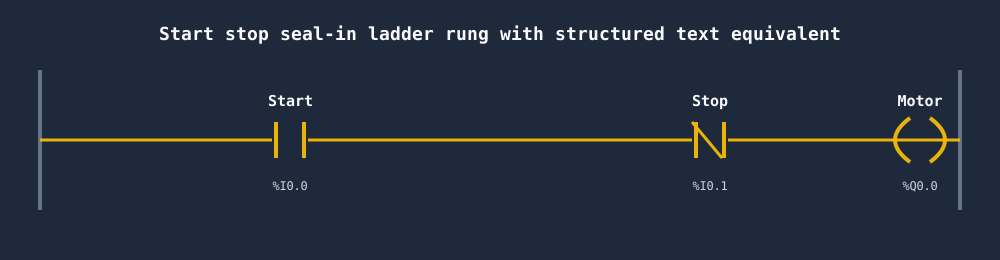
The same behaviour in one line of structured text:
// Seal-in: latch on Start, drop on Stop (Stop is normally closed)
Motor := (Start OR Motor) AND NOT Stop;
That single assignment captures the contact, the coil and the seal-in branch at once — a good example of how compact ST can be for logic that is purely Boolean. The trade-off is you lose the live, visual rung you would monitor in ladder.
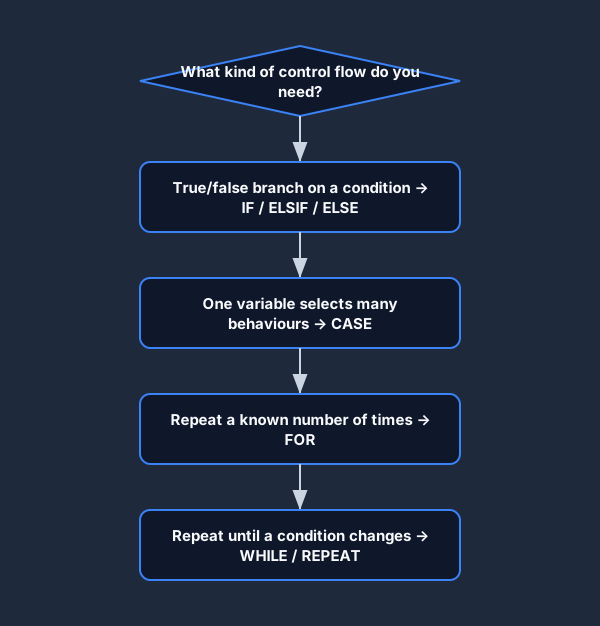
ST decision flow at a glance
When you are reaching for control flow, this is the quick mental model: branch with IF, dispatch on a value with CASE, repeat with a loop.
ST data types you will actually use
Strong typing is one of ST's strengths. Picking the right type keeps memory tight and prevents overflow surprises. These are the elementary IEC 61131-3 types you will reach for most.
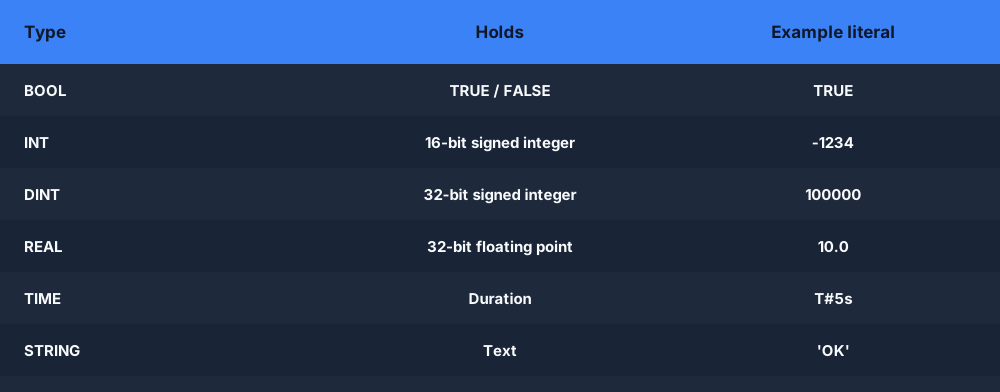
Declare everything inside a VAR ... END_VAR block, and use the suffixed literals where they matter: T#5s for time, 16#FF for hex, 2#1010 for binary, and a decimal point (10.0) to force a REAL.
When ST beats ladder — and when it doesn't
ST is not a replacement for ladder; it is a complement. Each language has tasks it does best, and good PLC programmers mix both in one project.
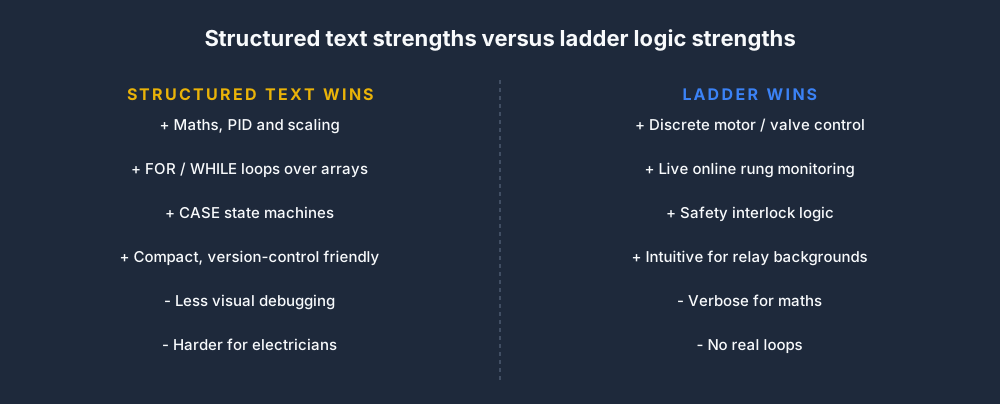
Reach for ST for maths, PID scaling, loops over arrays and state machines; stay in ladder for discrete machine control and field troubleshooting where a live rung is gold.
Best practices and pitfalls
A few habits separate clean, maintainable ST from the kind that is impossible to debug at 2 a.m. on a breakdown.
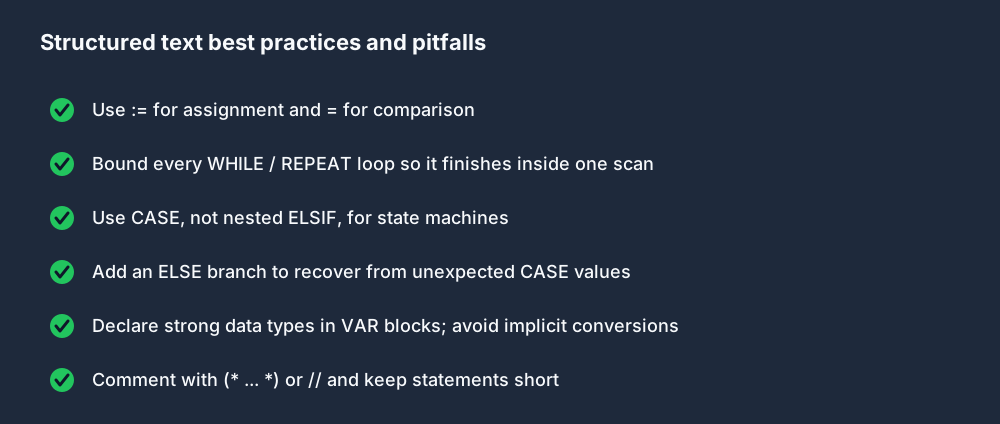
The biggest single trap is the unbounded WHILE loop — keep every loop guaranteed to finish inside one scan, and your code will never trip the watchdog.
Practise Structured Text in your browser
The fastest way to make this syntax stick is to type it and watch it run. You can write IF/CASE/FOR/WHILE logic, call timers and counters, and toggle inputs live in the free browser PLC simulator — no install. Want to compare the ST and ladder versions of the same logic? Build the rung in the ladder logic editor and translate it line by line.
FAQ
What is structured text programming?
Structured Text (ST) is a high-level, Pascal-like PLC programming language defined by IEC 61131-3. You write logic as textual statements — assignments, IF, CASE, FOR and WHILE — rather than drawing ladder rungs, which makes it ideal for maths, loops and state machines.
Is structured text the same as IEC 61131-3? No. IEC 61131-3 is the standard that defines five PLC languages; structured text is one of them (the others are Ladder Diagram, Function Block Diagram, Instruction List and Sequential Function Chart). Siemens calls its ST implementation SCL.
What is the difference between := and = in structured text?
:= is assignment (store a value in a variable) and = is the equality comparison operator. Using = where you meant := is the most common ST syntax mistake.
Can you write timers in structured text?
Yes. Timers like TON, TOF and TP are IEC function blocks. You declare an instance, call it with IN and PT parameters, and read its .Q done bit — for example DelayTimer(IN := Start, PT := T#5s); Motor := DelayTimer.Q;.
Should I learn ladder logic or structured text first? Most newcomers from an electrical background start with ladder; those from a software background find ST natural. See ladder logic vs structured text for a full comparison.