PLC Structured Text Programming: The Complete Guide (With Runnable Examples)
Everything you need to master Structured Text — from syntax basics to IF/ELSIF/ELSE, CASE state machines, FOR loops, timers, and vendor-specific details for Studio 5000, CODESYS, and Siemens TIA Portal (SCL). Write and run real ST code in the browser, free.
Join 1300+ learners practicing PLC programming
Foundations
What is Structured Text?
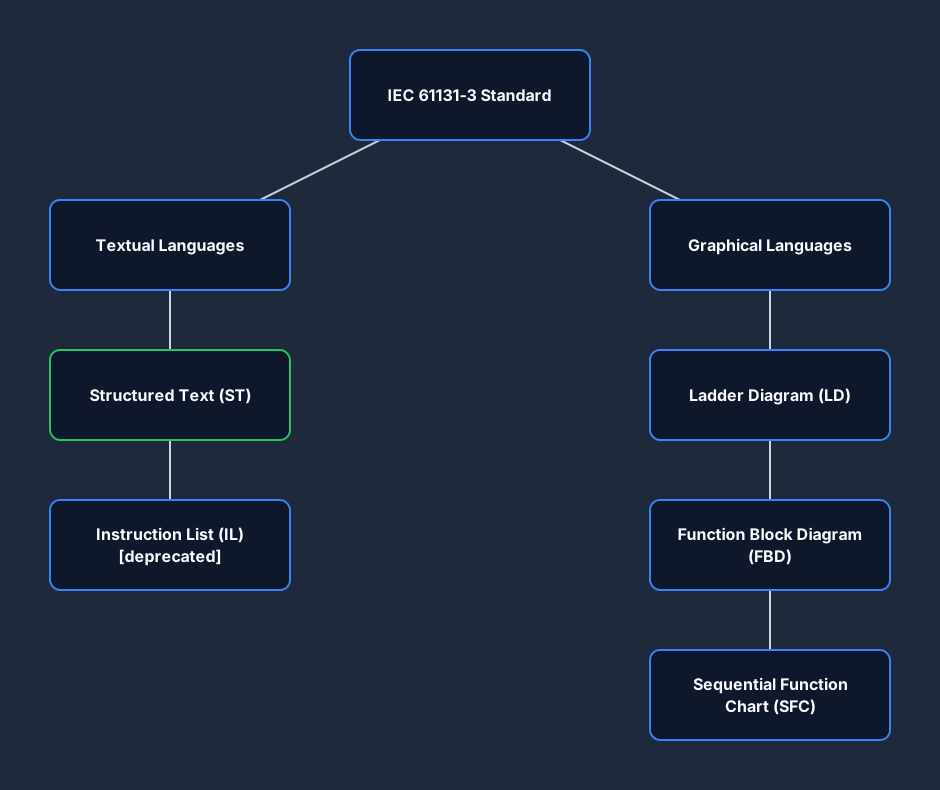
Structured Text (ST) is one of the five programming languages defined by the IEC 61131-3 standard — the international standard for programmable logic controller languages. Published by the International Electrotechnical Commission, IEC 61131-3 defines a common baseline that any compliant PLC platform must implement, covering both textual languages (Structured Text and Instruction List) and graphical languages (Ladder Diagram, Function Block Diagram, and Sequential Function Chart).
ST is the most powerful and expressive of the five. Its syntax is modelled on Pascal and Ada — structured, readable, and high-level enough to express complex algorithms in a fraction of the rungs that Ladder Diagram would require. Where Ladder Diagram maps directly to relay logic and is ideal for discrete I/O, Structured Text feels like a conventional programming language: statements end with semicolons, blocks have explicit open/close keywords (END_IF, END_FOR), and you can write multi-line programs with comments, variables, and function calls.
Where ST fits among the IEC 61131-3 languages. IEC 61131-3 defines five languages in two categories:
- Textual: Structured Text (ST) — high-level, Pascal-like. Instruction List (IL) — assembler-like, now deprecated in IEC 61131-3 Edition 3.
- Graphical: Ladder Diagram (LD) — relay-logic visual. Function Block Diagram (FBD) — signal flow, common in process. Sequential Function Chart (SFC) — state-machine visual.
ST can call function blocks defined in any of the other languages and vice versa — within a project, you mix languages freely. An SFC step might call an ST Action. A Ladder rung might call an ST Function Block. This composability is one of the reasons ST is growing: it handles the parts that are awkward in Ladder, while Ladder handles the parts that electricians maintain.
Why Structured Text is growing. A decade ago, ST was niche — used mainly in motion control and process industries where the mathematical capability justified the learning curve. Today, ST is mainstream for several reasons:
- Software engineers entering the controls industry bring programming backgrounds (C, Python, Java) where ST feels natural and Ladder feels alien.
- Modern PLCs (ControlLogix L8x, Siemens S7-1500, Beckhoff CX) are powerful enough to run complex ST algorithms without scan-time concerns that once pushed programmers to Ladder for performance.
- CODESYS-based platforms — used in hundreds of OEM controllers from Beckhoff, Wago, Pilz, Schneider, and others — treat ST as the primary language.
- IIoT and edge computing work (data parsing, protocol handling, JSON-like data structures) is genuinely painful in Ladder and natural in ST.
- Version control with Git is far easier with text-based ST files than with proprietary Ladder XML formats.
Syntax basics
Structured Text basics — syntax
Every Structured Text statement ends with a semicolon. Semicolons are not optional — a missing semicolon is the single most common beginner error and produces a compile error on every platform. The language is case-insensitive for keywords and identifiers: IF, if, and If are all valid. Convention is to write keywords in UPPERCASE for readability.
Comments. Single-line comments use // this is a comment or, in older platforms, (* this is a comment *). Block comments use (* ... *). Both are ignored by the compiler. Document every non-obvious section — ST programs can grow long and comments are the difference between maintainable and baffling code.
Variable declaration (VAR blocks). Before you use a variable in ST, you declare it in a VAR block. This is mandatory — ST is statically typed, and the compiler must know the type of every identifier before compilation. The VAR block sits above the program body:
VAR
    MotorRunning   : BOOL := FALSE;    // output
    StartButton    : BOOL;             // input
    StopButton     : BOOL;             // input (NC wired)
    MotorSpeed     : REAL := 0.0;      // engineering value
    RunTime        : TIME := T#0MS;    // accumulated run time
    BatchCount     : INT := 0;         // integer counter
    Description    : STRING := '';     // text label
END_VAR
The := operator is assignment — the same symbol used in your program body to assign values. The initial value after := in the VAR block is the power-up default. If you omit it, the compiler initialises numeric types to 0, BOOL to FALSE, and STRING to empty.
Assignment in the program body. The assignment operator := writes a value to a variable. This is different from the equality comparison operator = used inside conditions. Mixing them up is the second most common beginner mistake.
(* Assignment — writes a value *)
MotorRunning := TRUE;          // assign BOOL TRUE
BatchCount   := BatchCount + 1; // increment integer
MotorSpeed   := 1450.0;        // assign REAL

(* Comparison — evaluates to BOOL, used inside IF/WHILE *)
IF BatchCount = 10 THEN        // = is equals, not assignment
    MotorRunning := FALSE;
END_IF;
VAR_INPUT, VAR_OUTPUT, VAR_IN_OUT. When writing a function block (FB), variables that come in from outside are VAR_INPUT, variables that the FB publishes are VAR_OUTPUT, and variables passed by reference are VAR_IN_OUT. Internal working variables use VAR. Retained (power-loss persistent) variables use VAR RETAIN.
(* Function Block declaration example *)
FUNCTION_BLOCK FB_MotorControl
VAR_INPUT
    StartCmd   : BOOL;
    StopCmd    : BOOL;
    FaultReset : BOOL;
END_VAR
VAR_OUTPUT
    MotorOn    : BOOL;
    FaultBit   : BOOL;
END_VAR
VAR
    InternalStep : INT := 0;   // not visible to caller
END_VAR

(* Program body below *)
IF StartCmd AND NOT FaultBit THEN
    MotorOn := TRUE;
END_IF;
IF StopCmd THEN
    MotorOn := FALSE;
END_IF;

END_FUNCTION_BLOCKData types
ST data types — BOOL, INT, DINT, REAL, TIME, STRING, ARRAY
Structured Text is statically typed — every variable has a type declared at compile time, and the compiler enforces type compatibility. This catches whole classes of bugs at compile time that Ladder Diagram would only surface at runtime. The IEC 61131-3 elementary data types cover every industrial need:
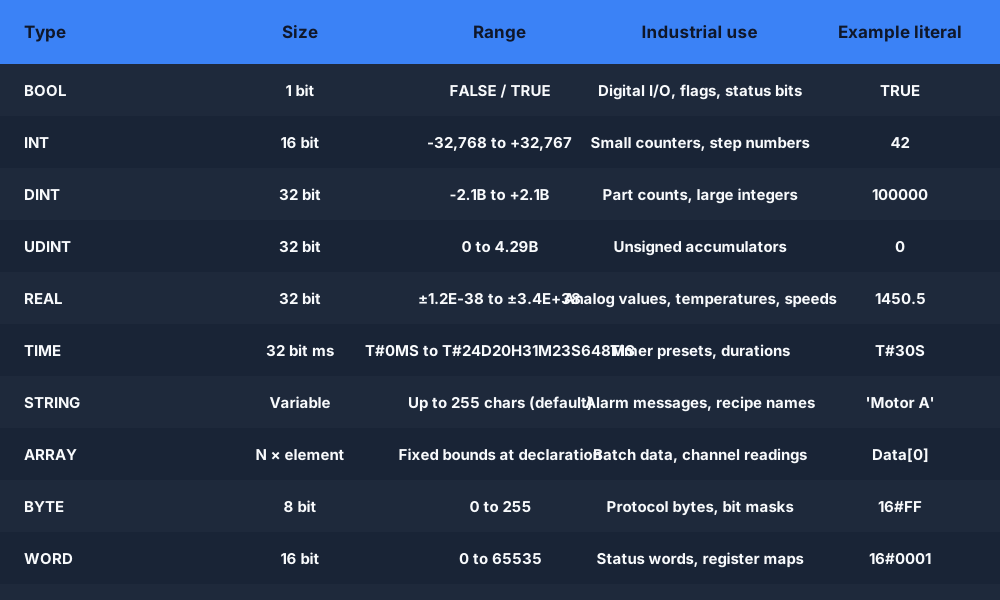
BOOL — 1-bit true/false. Every digital input and output in the PLC is a BOOL. Motor running, valve open, sensor tripped — all BOOLs. Literals: TRUE and FALSE.
INT / DINT / UDINT — Signed 16-bit integer (INT: -32,768 to +32,767), signed 32-bit (DINT: -2,147,483,648 to +2,147,483,647), unsigned 32-bit (UDINT: 0 to 4,294,967,295). Use DINT for most counters — INT overflow is a common field bug when batch counts exceed 32,767 unexpectedly.
REAL — 32-bit IEEE 754 floating-point. Use for analog values (temperatures, pressures, speeds), percentage calculations, PID output, and any arithmetic where fractional precision matters. Literals must include a decimal point: 3.14, 0.0, 1450.5.
TIME — Duration type, internally 32-bit milliseconds. Literals use the T# prefix: T#5S (5 seconds), T#500MS (500 milliseconds), T#2M30S (2 minutes 30 seconds). Used as the PT (preset time) parameter for TON/TOF/TP timers.
STRING — Variable-length character string. Declare with an optional max-length: STRING[80]. String literals use single quotes: 'Conveyor Belt A'. Used for alarm messages, recipe names, SCADA tag labels.
ARRAY — A fixed-size indexed collection of any type. Declare with bounds: ARRAY[0..9] OF REAL for 10 reals (indices 0 through 9). Access elements with square brackets: TemperatureReadings[3]. Arrays and FOR loops are made for each other — the FOR loop index variable naturally iterates through array indices.
VAR
    (* Basic types *)
    ValveOpen       : BOOL := FALSE;
    PartCount       : DINT := 0;
    ProcessTemp     : REAL := 0.0;
    HeaterOnDelay   : TIME := T#10S;
    RecipeName      : STRING[40] := 'Default Recipe';

    (* Arrays *)
    ChannelReading  : ARRAY[0..7] OF REAL;   // 8 analog channels
    ZoneEnabled     : ARRAY[1..10] OF BOOL;  // 10 zones (1-indexed)
    BatchHistory    : ARRAY[0..99] OF DINT;  // last 100 batch counts

    (* Typed constants — preferred over magic numbers *)
    MAX_TEMP        : REAL := 85.0;          // read-only in body
    TANK_CAPACITY   : DINT := 5000;          // litres
END_VAR

(* Assign a float to REAL — must match type exactly *)
ProcessTemp := 72.4;

(* Access array element by index *)
ChannelReading[0] := 4.85;   // first channel

(* Type conversion — DINT to REAL *)
ProcessTemp := DINT_TO_REAL(PartCount) / 100.0;
Operators
Operators and expressions
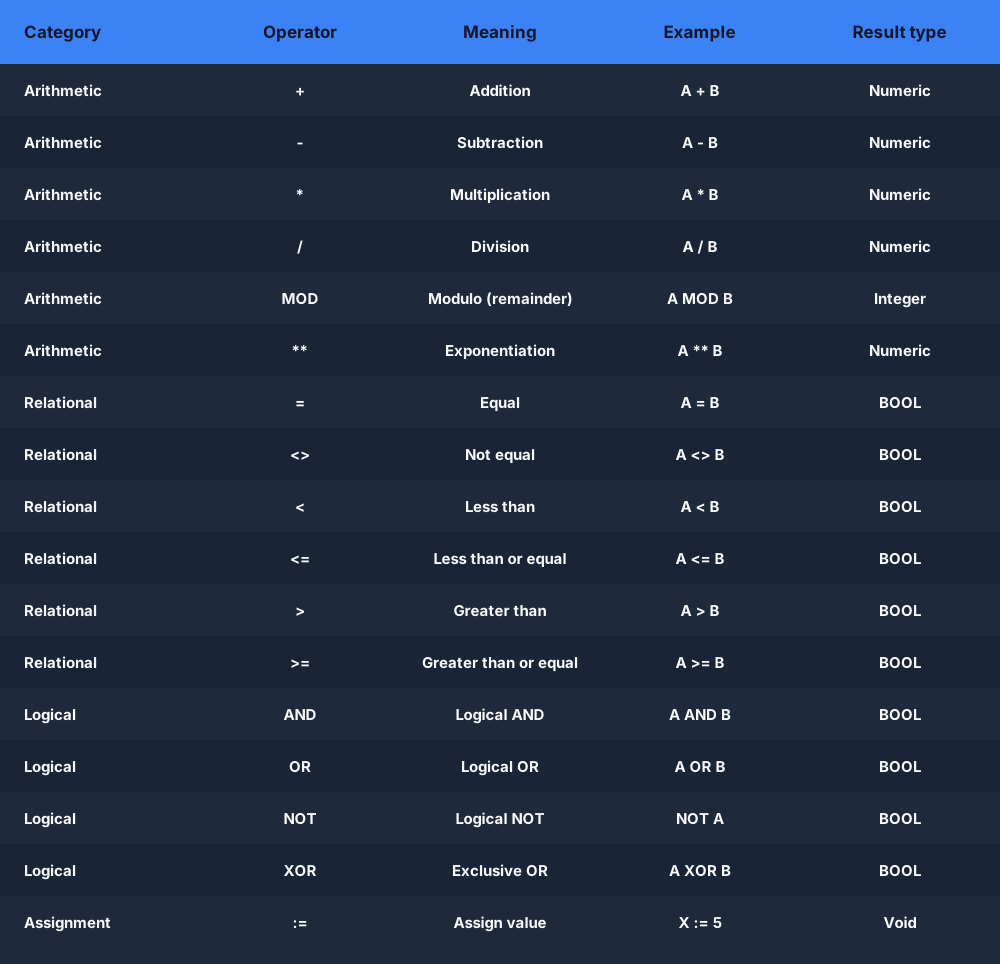
ST supports the full set of arithmetic, relational, and logical operators you would expect from a high-level language. All operators follow standard precedence rules — parentheses override precedence, and it is always better to add parentheses than to rely on knowing the exact precedence table.
(* ── Arithmetic operators ── *)
TotalCost  := UnitPrice * Quantity;          // multiplication
Remainder  := TotalParts MOD PackSize;       // modulo
PowerResult := BASE ** EXPONENT;             // exponentiation (CODESYS/Siemens)
Average    := (Reading1 + Reading2 + Reading3) / 3.0;  // use parens

(* ── Relational operators — all return BOOL ── *)
IsHot      := Temperature > MAX_TEMP;        // greater than
IsEmpty    := TankLevel <= 0.0;              // less than or equal
IsDone     := PartCount = TargetCount;       // equality  (= not ==)
IsFaulted  := ErrorCode <> 0;               // not equal (<> not !=)

(* ── Logical operators — operate on BOOLs ── *)
MotorOn    := StartButton AND NOT StopButton AND NOT FaultBit;
AnyAlarm   := HighTemp OR LowPressure OR EmergencyStop;
GateAllow  := (ZoneA OR ZoneB) AND NOT LockOut;

(* ── Bitwise operators — operate on integer types ── *)
StatusWord := StatusWord OR 16#0001;         // set bit 0
StatusWord := StatusWord AND 16#FFFE;        // clear bit 0
IsSet      := (StatusWord AND 16#0004) <> 0; // test bit 2

(* ── Assignment ── *)
Output     := Input;                         // := not =
Counter    := Counter + 1;                   // no ++ operator in ST
Scaled     := (RawADC - 4000.0) / (20000.0 - 4000.0) * 100.0;
Note that ST does not have ++ or += operators. You increment with Counter := Counter + 1; and accumulate with Total := Total + NewValue;. This verbosity is intentional — it keeps ST readable to people who are not full-time programmers.
Conditionals
Conditional statements — IF/THEN/ELSIF/ELSE and CASE
IF/THEN/ELSIF/ELSE/END_IF is the primary conditional statement in ST. It evaluates a BOOL expression and executes one of several branches. The ELSIF keyword (not ELSEIF — no space, no second E) allows multiple conditions in one structure without nesting. Every IF must close with END_IF followed by a semicolon.
(* Simple IF/THEN/END_IF *)
IF StartButton THEN
    MotorRunning := TRUE;
END_IF;

(* IF/THEN/ELSE/END_IF *)
IF EmergencyStop THEN
    MotorRunning := FALSE;
    AlarmActive  := TRUE;
ELSE
    AlarmActive  := FALSE;
END_IF;

(* IF/THEN/ELSIF/ELSIF/ELSE/END_IF *)
IF Temperature > 90.0 THEN
    CoolingFan   := TRUE;
    HeatingCoil  := FALSE;
    AlarmHigh    := TRUE;
ELSIF Temperature > 75.0 THEN
    CoolingFan   := TRUE;
    HeatingCoil  := FALSE;
    AlarmHigh    := FALSE;
ELSIF Temperature < 20.0 THEN
    CoolingFan   := FALSE;
    HeatingCoil  := TRUE;
ELSE
    CoolingFan   := FALSE;
    HeatingCoil  := FALSE;
END_IF;
CASE statement — the standard tool for state machines. A CASE statement evaluates an integer variable and jumps to the matching branch. This is how every experienced ST programmer writes a state machine — one integer variable holds the current state, and CASE dispatches to the right logic for that state. CASE is the most important construct to master for industrial ST programming.
The syntax is CASE StateVar OF, followed by value: body pairs, an optional ELSE branch, and closed with END_CASE;. You can match a range (1..4) or a comma-separated list of values (5, 7, 9) in a single branch.
(* Traffic light CASE state machine — classic ST example *)
VAR
    State       : INT := 0;
    GreenLight  : BOOL;
    YellowLight : BOOL;
    RedLight    : BOOL;
    Timer1      : TON;
END_VAR

(* Update timer every scan *)
Timer1(IN := TRUE, PT := StateDuration);

CASE State OF

    0:  (* IDLE / system start *)
        GreenLight  := FALSE;
        YellowLight := FALSE;
        RedLight    := TRUE;
        State       := 1;   // go straight to RED_WAIT

    1:  (* RED — hold red, wait 30 s *)
        GreenLight  := FALSE;
        YellowLight := FALSE;
        RedLight    := TRUE;
        StateDuration := T#30S;
        IF Timer1.Q THEN
            Timer1(IN := FALSE, PT := T#0S); // reset timer
            State := 2;
        END_IF;

    2:  (* GREEN — hold green, wait 25 s *)
        GreenLight  := TRUE;
        YellowLight := FALSE;
        RedLight    := FALSE;
        StateDuration := T#25S;
        IF Timer1.Q THEN
            Timer1(IN := FALSE, PT := T#0S);
            State := 3;
        END_IF;

    3:  (* YELLOW — hold yellow, wait 5 s *)
        GreenLight  := FALSE;
        YellowLight := TRUE;
        RedLight    := FALSE;
        StateDuration := T#5S;
        IF Timer1.Q THEN
            Timer1(IN := FALSE, PT := T#0S);
            State := 1; // back to RED
        END_IF;

    ELSE:
        (* Fault — unknown state — safe default *)
        GreenLight  := FALSE;
        YellowLight := FALSE;
        RedLight    := TRUE;
        State       := 0;

END_CASE;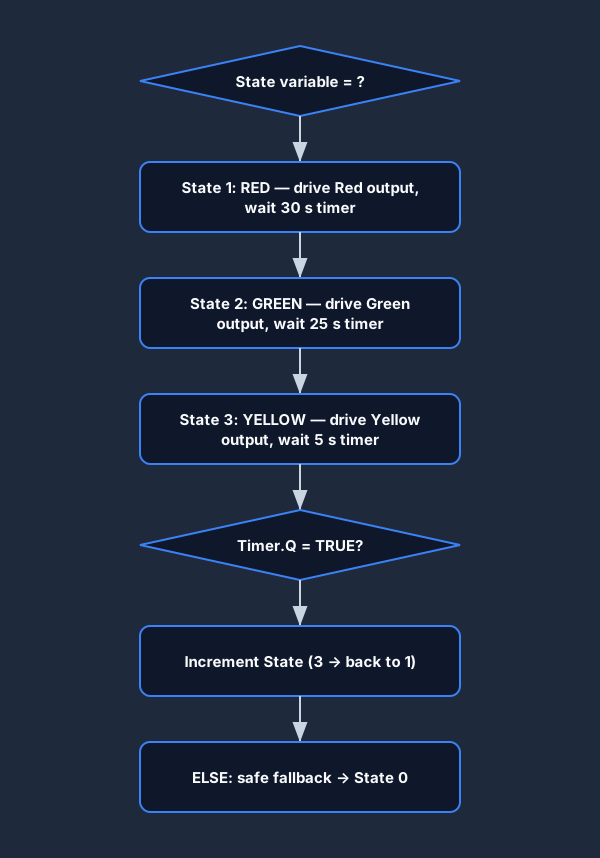
Try it live
Run a traffic light CASE state machine in the browser
Write the CASE statement, run the simulation, and watch state transitions live — no install required.
Loops
Loops in Structured Text — FOR, WHILE, REPEAT…UNTIL
Structured Text supports three loop constructs. All three execute their entire iteration count within a single PLC scan cycle — there is no "spread across scans" behaviour. This is efficient but means large loops can extend your scan time measurably. Keep an eye on scan time in your runtime diagnostics when using loops with large iteration counts.
FOR loop — structured text array processing. FOR loops iterate a counter variable from a start value to an end value, optionally with a custom BY step. They are the standard tool for processing arrays element by element. The loop variable must be declared as an integer type (INT or DINT).
VAR
    i               : INT;
    Readings        : ARRAY[0..7] OF REAL;
    Total           : REAL := 0.0;
    Average         : REAL := 0.0;
    MaxReading      : REAL := 0.0;
    RecipeValues    : ARRAY[1..10] OF REAL;
    ScaledValues    : ARRAY[1..10] OF REAL;
END_VAR

(* Sum all 8 channel readings *)
Total := 0.0;
FOR i := 0 TO 7 DO
    Total := Total + Readings[i];
END_FOR;
Average := Total / 8.0;

(* Find the maximum value in an array *)
MaxReading := Readings[0];
FOR i := 1 TO 7 DO
    IF Readings[i] > MaxReading THEN
        MaxReading := Readings[i];
    END_IF;
END_FOR;

(* Scale an array with a BY step *)
FOR i := 1 TO 10 BY 1 DO
    ScaledValues[i] := RecipeValues[i] * 1.05; // +5% scaling
END_FOR;

(* Iterate in reverse — count down *)
FOR i := 9 TO 0 BY -1 DO
    (* shift array right by one position *)
    Readings[i+1] := Readings[i];
    // Note: declare Readings with [0..9] — bounds check matters
END_FOR;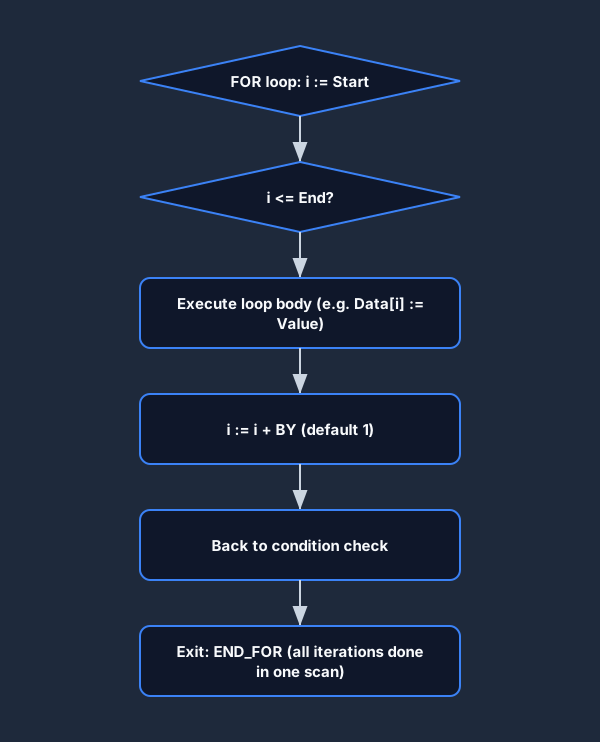
WHILE loop. A WHILE loop repeats its body while a condition is TRUE, checking the condition before each iteration. If the condition is FALSE on entry, the body never executes. Use WHILE when the number of iterations is not known in advance and depends on a condition being met.
VAR
    QueueHead   : INT := 0;
    QueueTail   : INT := 0;
    Buffer      : ARRAY[0..255] OF DINT;
    Processed   : DINT;
    Iterations  : INT := 0;
    MAX_ITER    : INT := 100; // safety: never infinite-loop
END_VAR

(* Process queue until empty, with safety guard *)
Iterations := 0;
WHILE (QueueHead <> QueueTail) AND (Iterations < MAX_ITER) DO
    Processed   := Buffer[QueueHead];
    QueueHead   := (QueueHead + 1) MOD 256;
    Iterations  := Iterations + 1;
    (* process Processed here *)
END_WHILE;
REPEAT…UNTIL loop. A REPEAT loop checks its condition after each iteration — the body always executes at least once. It exits when the UNTIL condition becomes TRUE (the inverse of WHILE, which exits when its condition becomes FALSE).
VAR
    Index   : INT := 0;
    Found   : BOOL := FALSE;
    Target  : REAL := 72.5;
    Data    : ARRAY[0..99] OF REAL;
END_VAR

(* Search array for first index where value >= Target *)
Index := 0;
Found := FALSE;
REPEAT
    IF Data[Index] >= Target THEN
        Found := TRUE;
    ELSE
        Index := Index + 1;
    END_IF;
UNTIL Found OR (Index >= 99)
END_REPEAT;
Which loop to use. Use FOR when you know the iteration count ahead of time (always the case when processing an array of known size). Use WHILE when you are waiting for a condition and may not iterate at all. Use REPEAT when you must execute the body at least once before testing the condition. In practice, FOR loops make up around 90% of industrial ST loops — WHILE and REPEAT are used for queue/buffer processing and search algorithms.
Always include a safety guard (a maximum iteration counter) in WHILE and REPEAT loops. An infinite loop in a PLC will cause a watchdog timeout and put the controller in fault mode — this stops production. With a guard, the loop exits in a bounded number of iterations even if the exit condition is never reached.
Practice loops
Write FOR and WHILE loops in the browser
The simulator runs your loop logic against test cases and shows you whether the array was processed correctly.
Timers and counters
Timers and counters in Structured Text
In Ladder Diagram, TON and CTU are graphical instruction blocks dropped onto rungs. In Structured Text, they are function block instances — you declare them as variables, then call them each scan with named parameters. The underlying logic is identical; only the syntax differs.
TON (on-delay timer) in ST. Declare a TON instance in your VAR block and call it each scan with IN (the enable condition, a BOOL) and PT (the preset time, a TIME literal). Read TimerInstance.Q for the done bit and TimerInstance.ET for elapsed time.
VAR
    StartDelay  : TON;       // on-delay timer instance
    FanRunOn    : TON;       // second timer for fan off-delay logic
    MotorOn     : BOOL;
    FanOn       : BOOL;
    StartButton : BOOL;
END_VAR

(* TON call — must be called every scan with current IN value *)
StartDelay(
    IN := StartButton AND NOT EmergencyStop,
    PT := T#3S      // 3-second on-delay
);

(* Use the .Q output (done bit) to drive the motor *)
MotorOn := StartDelay.Q;

(* Read elapsed time for a progress display *)
// ElapsedMs := TIME_TO_DINT(StartDelay.ET);  // ET is a TIME value

(* TOF pattern — fan runs on 60s after motor stops *)
FanRunOn(
    IN := MotorOn,
    PT := T#60S
);
FanOn := FanRunOn.Q;CTU (count-up counter) in ST. A CTU increments its CV (count value) on each rising edge of the CU input. When CV reaches PV (preset value), the Q output bit sets. The R (reset) input clears CV back to zero.
VAR
    PartCounter : CTU;               // count-up counter instance
    PartSensor  : BOOL;              // part-present sensor
    ResetButton : BOOL;              // operator reset
    BatchDone   : BOOL;
    CurrentCount: DINT;
END_VAR

(* CTU call every scan *)
PartCounter(
    CU := PartSensor,               // count on rising edge
    R  := ResetButton,              // reset CV to 0
    PV := 500                       // preset: 500 parts per batch
);

BatchDone    := PartCounter.Q;      // TRUE when CV >= PV
CurrentCount := PartCounter.CV;     // read current count

(* Auto-reset after batch done — self-resetting counter *)
IF PartCounter.Q THEN
    PartCounter(CU := FALSE, R := TRUE, PV := 500); // force reset
END_IF;
ST vs Ladder for timers. The functional behaviour is identical. In Ladder, a TON occupies one rung and is visually clear to anyone familiar with relay logic. In ST, the function block call syntax is compact and integrates naturally with IF and CASE blocks — you can put a TON call inside a CASE branch so the timer only runs in that state. This is cleaner than the Ladder equivalent, which requires a separate rung with a state-bit enable condition.
Ladder logic vs Structured Text
Structured Text vs Ladder Logic — when to use each
The question "is Structured Text better than Ladder Logic?" misses the point. They solve different problems. Experienced industrial programmers mix both languages in a single project — Ladder for discrete I/O logic, ST for algorithms. The real question is "which language should I use for this specific piece of logic?"
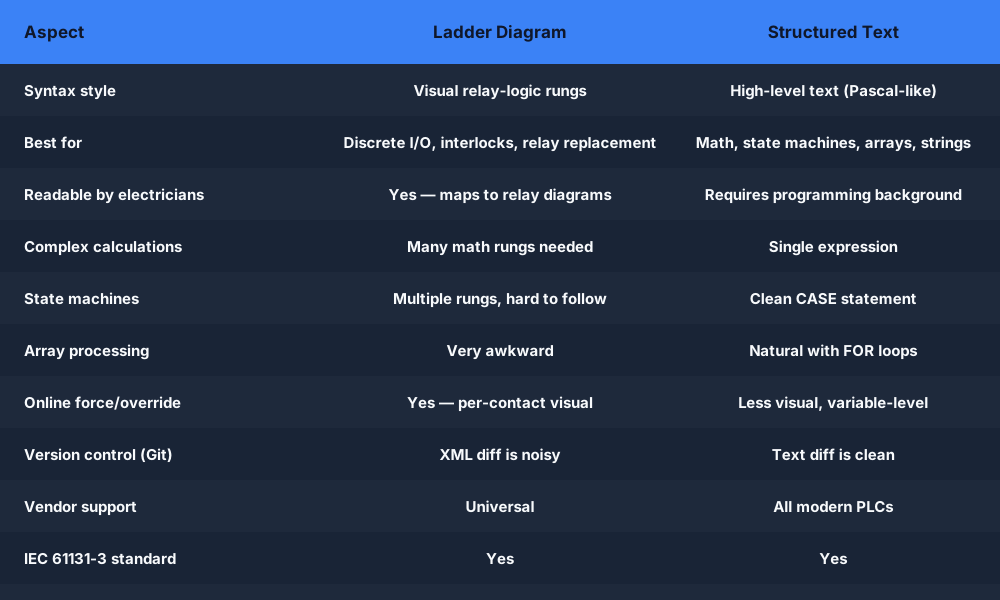
Use Ladder Diagram when:
- The logic is discrete I/O — contacts, coils, interlocks, seal-in circuits. Ladder maps directly to how electricians think about relay logic.
- Your maintenance team is electricians who are not programmers. They can trace a Ladder rung through the contacts to understand why a coil is energised; they cannot parse an ST algorithm.
- You need a visual force/override during troubleshooting — Ladder online mode shows live rung state and lets you force individual contacts.
- The logic is a simple sequence of rungs without complex calculation.
Use Structured Text when:
- You have math-heavy logic — analog scaling, PID tuning parameters, flow calculations, unit conversions. A single ST line replaces 5+ Ladder rungs of math instructions.
- You are implementing a state machine with many states. A CASE statement with 10 states fits in one routine; the equivalent Ladder logic sprawls across dozens of rungs.
- You are processing arrays — sorting, averaging, finding extremes. FOR loops in ST do in 5 lines what requires FIFO/LIFO instructions and complex addressing in Ladder.
- You are writing reusable Function Blocks that other projects will call. ST FBs are easier to maintain, test, and document than Ladder FBs.
- You are working with string data — recipe names, alarm messages, protocol parsing. ST has native string functions; Ladder does not.
- You are integrating with IT systems — parsing data from barcode scanners, constructing JSON-like payloads, handling serial protocol frames.
- Your team includes software engineers. ST is immediately readable to anyone who has written Pascal, Ada, or even Python with BEGIN/END syntax.
The practical mix in a real project. A typical conveyor control project might have: (a) Ladder rungs for E-stop, safety relay monitoring, and conveyor run/stop interlocks — because the electricians maintain those and need to trace them visually; (b) an ST Function Block for the conveyor sequencer state machine, with CASE dispatching through IDLE, STARTING, RUNNING, DECELERATING, STOPPED, and FAULT states; (c) an ST routine for analog sensor scaling and alarm limit calculation; (d) an SFC for the overall machine startup sequence that calls both Ladder routines and ST FBs.
(* What would be 6+ Ladder rungs is 4 ST lines *)

(* Analog scaling — raw 0-32767 ADC to engineering units *)
ProcessPressure := (DINT_TO_REAL(RawADC) / 32767.0) * MAX_PRESSURE;

(* Alarm band with hysteresis — complex in Ladder, trivial in ST *)
IF ProcessPressure > HIGH_ALARM AND NOT AlarmActive THEN
    AlarmActive := TRUE;
ELSIF ProcessPressure < (HIGH_ALARM - HYSTERESIS) AND AlarmActive THEN
    AlarmActive := FALSE;
END_IF;

(* Recipe table lookup — very awkward in Ladder *)
ActiveSetpoint := RecipeTable[ActiveRecipeIndex];
Allen-Bradley
Structured Text in Allen-Bradley Studio 5000 / RSLogix
Allen-Bradley Studio 5000 Logix Designer (for ControlLogix and CompactLogix) supports Structured Text as a routine type. When you create a new routine in a Program, you can choose Ladder Diagram, Structured Text, Function Block Diagram, or Sequential Function Chart. Each routine in the project can use a different language — an ST routine is just another routine that your Main Ladder routine can call with a JSR (Jump to Subroutine) instruction.
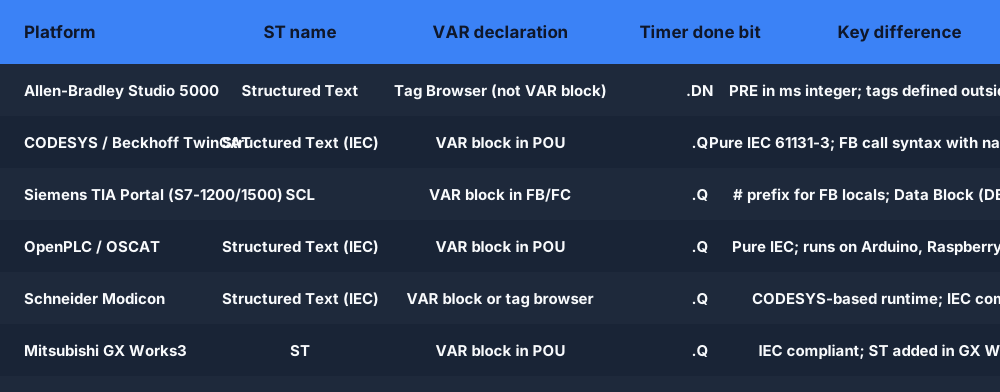
ST syntax in Studio 5000. The syntax follows IEC 61131-3 closely, but with Allen-Bradley naming conventions for system objects. Tag names use the Logix tag database — the same symbolic names you use in Ladder. Function blocks follow the Logix instruction set: the TON timer in ST uses Timer.PRE and Timer.DN member notation (Allen-Bradley AB style), not the IEC .Q and .ET names.
(* Studio 5000 Structured Text — Allen-Bradley syntax *)

(* Variable declaration in Logix uses the Tag Browser,
   not a VAR block — the tags are defined outside the routine.
   In Studio 5000 ST, you reference existing controller/program tags. *)

(* Allen-Bradley TON in ST — uses .PRE / .ACC / .DN / .EN *)
IF ConveyorRun THEN
    ConveyorStartTimer.PRE := 3000;      // preset in milliseconds
    TON(ConveyorStartTimer);             // call TON instruction
END_IF;

(* Read the DN done bit *)
IF ConveyorStartTimer.DN THEN
    ConveyorAtSpeed := TRUE;
END_IF;

(* IF/ELSIF in Studio 5000 ST — identical to IEC syntax *)
IF EmergencyStop.0 THEN
    MachineState := 99;    // fault state
ELSIF ConveyorOverload THEN
    MachineState := 98;    // overload fault
ELSIF StartCommand THEN
    MachineState := 1;     // running
ELSE
    MachineState := 0;     // idle
END_IF;

(* CASE statement — machine state dispatcher *)
CASE MachineState OF
    0: (* Idle *)
        ConveyorMotor := 0;
        ReadyLight    := 1;
    1: (* Running *)
        ConveyorMotor := 1;
        ReadyLight    := 0;
    98, 99: (* Fault states *)
        ConveyorMotor := 0;
        FaultLight    := 1;
END_CASE;
Key differences between Studio 5000 ST and standard IEC ST. In Studio 5000, variables (tags) are defined in the tag browser, not in a VAR block within the ST routine. The ST routine body references these pre-defined tags by name. Timer instances use the Allen-Bradley TIMER data type with members .PRE, .ACC, .EN, .TT, .DN — not IEC .Q and .ET. Timer preset is in milliseconds (integer), not IEC TIME literals. The TON instruction is called as a statement (TON(TimerTag);) rather than a function block instantiation.
Despite these differences, the structural logic — IF/ELSIF/ELSE, CASE, FOR, WHILE — is identical. If you learn IEC 61131-3 ST, the port to Studio 5000 ST is purely a naming lookup, not a re-learning.
CODESYS
Structured Text in CODESYS
CODESYS (Control Development System) by 3S-Smart Software Solutions is the dominant IEC 61131-3 runtime for OEM machine builders. Beckhoff TwinCAT, Wago PFC, Pilz PNOZmulti, Schneider Electric Modicon, and hundreds of other platforms all run CODESYS or a CODESYS-derived runtime. If you learn ST on CODESYS, your skills transfer directly to all of these platforms with minimal adjustment.
CODESYS ST follows IEC 61131-3 exactly. Variables are declared in VAR blocks within the program object (POU — Program Organisation Unit). Function block instances (TON, CTU, etc.) are declared in the VAR block and called with named parameters. The .Q done bit and .ET elapsed time naming convention is standard IEC.
(* CODESYS Structured Text — pure IEC 61131-3 syntax *)

PROGRAM PLC_PRG    // CODESYS program POU
VAR
    StartButton  : BOOL;
    StopButton   : BOOL;
    MotorRunning : BOOL;
    StartTimer   : TON;         // IEC TON instance
    PartCounter  : CTU;         // IEC CTU instance
    BatchDone    : BOOL;
END_VAR

(* Motor start logic with 2-second delay *)
StartTimer(
    IN := StartButton AND NOT StopButton,
    PT := T#2S
);
MotorRunning := StartTimer.Q;   // .Q = done bit (IEC standard)

(* Part counting *)
PartCounter(
    CU := PartSensor,
    R  := BatchDone,
    PV := 200
);
BatchDone := PartCounter.Q;

(* Motor state machine using CASE *)
CASE MotorStep OF
    0:  // Idle
        SpeedSetpoint := 0.0;
        IF StartButton THEN MotorStep := 1; END_IF;
    1:  // Ramping up
        SpeedSetpoint := SpeedSetpoint + 10.0;
        IF SpeedSetpoint >= 1450.0 THEN
            SpeedSetpoint := 1450.0;
            MotorStep := 2;
        END_IF;
    2:  // Running at speed
        IF StopButton THEN MotorStep := 3; END_IF;
    3:  // Decelerating
        SpeedSetpoint := SpeedSetpoint - 20.0;
        IF SpeedSetpoint <= 0.0 THEN
            SpeedSetpoint := 0.0;
            MotorStep := 0;
        END_IF;
END_CASE;
Siemens TIA Portal
Structured Text in Siemens TIA Portal (SCL)
Siemens calls its Structured Text implementation SCL — Structured Control Language. Available in TIA Portal for S7-1200 and S7-1500, SCL is syntactically identical to IEC 61131-3 ST with a few Siemens-specific extensions. S7-300 and S7-400 also support SCL but with a slightly older dialect; TIA Portal SCL is the modern standard.
Siemens Data Blocks (DB). In TIA Portal, persistent data lives in Data Blocks, not in program-local variables. You declare a DB in the project tree, define its structure, and reference it in SCL as "BlockName".VariableName. This is the biggest structural difference from CODESYS or Studio 5000 ST — and it is the first thing to understand when learning Siemens SCL.
Siemens timer syntax. In TIA Portal SCL, TON is an IEC function block. You declare it in a DB (as a Multi-instance DB or inside a FB that holds its own instance DB). The call syntax uses the same IEC parameters: IN, PT, .Q, .ET.
// Siemens TIA Portal SCL (S7-1200 / S7-1500)
// In a Function Block (FB) with its own instance DB

// Variable declaration — static vars live in the FB instance DB
VAR
    StartCmd     : BOOL;
    StopCmd      : BOOL;
    MotorOutput  : BOOL;
    StartDelay   : TON;             // TON instance in FB instance DB
    StepNumber   : INT := 0;
END_VAR

// REGION collapsible sections (Siemens extension to IEC syntax)
REGION Motor control
    // IEC-compliant TON call
    #StartDelay(IN := #StartCmd AND NOT #StopCmd,
                PT := T#3S);
    #MotorOutput := #StartDelay.Q;
END_REGION

REGION State machine
    CASE #StepNumber OF
        0: // Idle
            "MotorDB".Status := 'Idle';
            IF #StartCmd THEN
                #StepNumber := 1;
            END_IF;
        1: // Running
            "MotorDB".Status := 'Running';
            "MotorDB".RunHours := "MotorDB".RunHours + 1;
            IF #StopCmd THEN
                #StepNumber := 0;
            END_IF;
    END_CASE;
END_REGION

// FOR loop with ARRAY access — same as CODESYS/IEC
FOR i := 0 TO 7 DO
    "SensorDB".Scaled[i] := INT_TO_REAL("SensorDB".Raw[i]) / 327.67;
END_FOR;
The # prefix on variable names inside an SCL Function Block refers to the FB's own instance — it distinguishes local FB variables from global DB addresses. This is Siemens syntax; IEC 61131-3 standard does not use the # prefix.
Complete examples
Complete Structured Text program examples
Example 1 — Motor start/stop with interlock
The most fundamental PLC program: a motor that starts when StartButton is pressed, seals in (latches), and stops when StopButton or EmergencyStop is pressed or a fault bit is set. In Ladder this is a seal-in rung; in ST it is an IF/ELSIF structure.
VAR
    StartButton   : BOOL;
    StopButton    : BOOL;    // wired NC — TRUE means OK
    EmergencyStop : BOOL;    // wired NC — TRUE means OK
    OverloadFault : BOOL;
    MotorRunning  : BOOL;
    RunHours      : REAL := 0.0;
    HourTimer     : TON;
END_VAR

(* Motor start/stop with seal-in — ST equivalent of 3-wire rung *)
IF (StartButton OR MotorRunning)
   AND StopButton
   AND EmergencyStop
   AND NOT OverloadFault
THEN
    MotorRunning := TRUE;
ELSE
    MotorRunning := FALSE;
END_IF;

(* Hour meter — accumulate run hours *)
HourTimer(IN := MotorRunning, PT := T#1H);
IF HourTimer.Q THEN
    RunHours := RunHours + 1.0;
    HourTimer(IN := FALSE, PT := T#1H);  // reset timer
END_IF;
Example 2 — Analog scaling (4–20 mA to engineering units)
Scaling a raw ADC reading from a 4–20 mA transmitter to engineering units. This is three lines in ST; it would be a sequence of math instructions in Ladder.
VAR
    RawADC        : INT;       // 0-32767 from 4-20mA card
    TankLevel     : REAL;      // 0.0 to 100.0 percent
    TankVolume    : REAL;      // 0.0 to 5000.0 litres
    TANK_MAX_L    : REAL := 5000.0;

    HighLevelAlarm : BOOL;
    LowLevelAlarm  : BOOL;
    HIGH_LIMIT     : REAL := 90.0;
    LOW_LIMIT      : REAL := 10.0;
END_VAR

(* Scale raw ADC (0-32767 representing 4-20mA) to 0-100% *)
(* 4mA = 0% = ADC value ~6553 (25% of range)
   20mA = 100% = ADC value 32767                         *)
TankLevel := (DINT_TO_REAL(RawADC) - 6553.0)
             / (32767.0 - 6553.0)
             * 100.0;

(* Clamp to 0-100 range — sensor fault protection *)
IF TankLevel < 0.0 THEN TankLevel := 0.0; END_IF;
IF TankLevel > 100.0 THEN TankLevel := 100.0; END_IF;

(* Convert to litres *)
TankVolume := TankLevel / 100.0 * TANK_MAX_L;

(* Alarm logic with hysteresis *)
IF TankLevel > HIGH_LIMIT THEN
    HighLevelAlarm := TRUE;
ELSIF TankLevel < (HIGH_LIMIT - 5.0) THEN
    HighLevelAlarm := FALSE;
END_IF;

IF TankLevel < LOW_LIMIT THEN
    LowLevelAlarm := TRUE;
ELSIF TankLevel > (LOW_LIMIT + 5.0) THEN
    LowLevelAlarm := FALSE;
END_IF;
Example 3 — Array fill and statistics with FOR loop
Process a ring buffer of temperature readings: maintain a 10-sample circular buffer, compute the rolling average, and detect if any sample exceeded a limit.
VAR
    Samples         : ARRAY[0..9] OF REAL;  // 10-sample ring buffer
    SampleIndex     : INT := 0;             // write pointer
    NewSample       : REAL;                 // current temperature
    RollingAverage  : REAL := 0.0;
    SumTotal        : REAL;
    OverLimit       : BOOL := FALSE;
    TEMP_LIMIT      : REAL := 80.0;
    i               : INT;
END_VAR

(* Write new sample to ring buffer *)
Samples[SampleIndex] := NewSample;
SampleIndex := (SampleIndex + 1) MOD 10;  // wrap 0-9

(* Compute rolling average over all 10 samples *)
SumTotal := 0.0;
FOR i := 0 TO 9 DO
    SumTotal := SumTotal + Samples[i];
END_FOR;
RollingAverage := SumTotal / 10.0;

(* Check if ANY sample exceeds the limit *)
OverLimit := FALSE;
FOR i := 0 TO 9 DO
    IF Samples[i] > TEMP_LIMIT THEN
        OverLimit := TRUE;
    END_IF;
END_FOR;
(* Note: EXIT statement available in CODESYS/IEC to break early *)
Example 4 — Complete traffic light CASE state machine (runnable)
The complete traffic light program — suitable for practicing in the browser simulator. This version handles initialisation, the RED-GREEN-YELLOW cycle with configurable times, and an emergency-vehicle preemption input that forces RED.
VAR
    (* Outputs *)
    Red         : BOOL;
    Yellow      : BOOL;
    Green       : BOOL;
    (* Inputs *)
    EmergencyVehicle : BOOL;   // forces RED when TRUE
    (* State *)
    State       : INT := 0;
    PhaseTimer  : TON;
    PhaseDur    : TIME;
    (* Configuration *)
    RED_TIME    : TIME := T#30S;
    GREEN_TIME  : TIME := T#25S;
    YELLOW_TIME : TIME := T#5S;
END_VAR

(* Emergency preemption — override any state to RED *)
IF EmergencyVehicle THEN
    Red    := TRUE;
    Yellow := FALSE;
    Green  := FALSE;
    PhaseTimer(IN := FALSE, PT := T#0S);   // reset timer
    State  := 1;    // next non-emergency state is RED_HOLD
    RETURN;         // skip CASE below
END_IF;

(* Run phase timer *)
PhaseTimer(IN := TRUE, PT := PhaseDur);

CASE State OF

    0:  (* Initialise *)
        Red    := TRUE;
        Yellow := FALSE;
        Green  := FALSE;
        PhaseDur := T#1S;     // short init hold
        IF PhaseTimer.Q THEN
            PhaseTimer(IN := FALSE, PT := T#0S);
            State := 1;
        END_IF;

    1:  (* RED *)
        Red    := TRUE;
        Yellow := FALSE;
        Green  := FALSE;
        PhaseDur := RED_TIME;
        IF PhaseTimer.Q THEN
            PhaseTimer(IN := FALSE, PT := T#0S);
            State := 2;
        END_IF;

    2:  (* GREEN *)
        Red    := FALSE;
        Yellow := FALSE;
        Green  := TRUE;
        PhaseDur := GREEN_TIME;
        IF PhaseTimer.Q THEN
            PhaseTimer(IN := FALSE, PT := T#0S);
            State := 3;
        END_IF;

    3:  (* YELLOW *)
        Red    := FALSE;
        Yellow := TRUE;
        Green  := FALSE;
        PhaseDur := YELLOW_TIME;
        IF PhaseTimer.Q THEN
            PhaseTimer(IN := FALSE, PT := T#0S);
            State := 1;  // back to RED
        END_IF;

    ELSE:
        (* Unknown state — safe fallback *)
        Red    := TRUE;
        Yellow := FALSE;
        Green  := FALSE;
        State  := 0;

END_CASE;
Practice scenarios
Write and run Structured Text in the browser
These scenarios use the Structured Text dialect. Write real ST syntax, run it, and get instant pass/fail feedback — no PLC hardware, no install.
Mixed ST Curriculum
Structured Text fundamentals: variables, IF/ELSIF, CASE, FOR loops, and function block calls across a graded series.
Open scenario →Motor Start/Stop in ST
Rewrite the classic start/stop seal-in circuit in Structured Text. See how 1 IF block replaces 3 Ladder rungs.
Open scenario →Traffic Light State Machine
Build the RED-GREEN-YELLOW cycle with a CASE statement and TON timers. The definitive ST state machine exercise.
Open scenario →Structured Text basics — pitfalls
Common Structured Text mistakes (and how to fix them)
1. Missing semicolons
Every ST statement ends with a semicolon. This includes assignment statements, function block calls, and even the last statement before END_IF or END_CASE. A missing semicolon is a compile error on every platform. The compiler message varies ("expected ';'", "syntax error at END_IF") but the cause is always the same.
(* WRONG — compile error *)
IF SensorTripped THEN
    AlarmBit := TRUE    // missing semicolon!
END_IF;

(* CORRECT *)
IF SensorTripped THEN
    AlarmBit := TRUE;   // semicolon on every statement
END_IF;
2. Using = instead of := for assignment
In ST, = is the equality comparison operator (used inside IF conditions) and := is the assignment operator. Using = on the left-hand side of an assignment is a compile error. Programmers from C/Python backgrounds make this mistake on first contact every time.
(* WRONG — = is comparison, not assignment *)
MotorRunning = TRUE;       // compile error

(* CORRECT — := is assignment *)
MotorRunning := TRUE;

(* = is correct inside a condition *)
IF BatchCount = TargetCount THEN  // comparison uses =
    BatchComplete := TRUE;
END_IF;
3. Wrong data type in assignment
ST is strictly typed. Assigning a REAL to an INT, or an INT to a BOOL, is a compile error or (on some platforms) a silent truncation that produces wrong values. Always use explicit type-conversion functions: REAL_TO_INT(), INT_TO_REAL(), DINT_TO_REAL().
VAR
    MyInt  : INT;
    MyReal : REAL;
END_VAR

(* WRONG — type mismatch *)
MyInt  := 3.7;              // REAL to INT — compile error or truncation
MyReal := MyInt + 1;        // INT + INT assigned to REAL — may warn

(* CORRECT — explicit conversion *)
MyInt  := REAL_TO_INT(3.7); // rounds to 4
MyReal := INT_TO_REAL(MyInt) + 1.0;  // promote to REAL first
4. Infinite loops crashing the watchdog
A WHILE or REPEAT loop that never reaches its exit condition will run indefinitely within a single scan cycle, causing the PLC watchdog timer to expire and putting the controller in fault mode. Always include a maximum iteration guard as a safety net, even if you are confident the exit condition will be reached.
(* DANGEROUS — if Found never becomes TRUE, watchdog trips *)
WHILE NOT Found DO
    (* search logic here *)
END_WHILE;

(* SAFE — bounded iteration with guard *)
Iterations := 0;
WHILE NOT Found AND (Iterations < 1000) DO
    (* search logic here *)
    Iterations := Iterations + 1;
END_WHILE;
(* Check Iterations = 1000 separately if you need to detect "not found" *)
5. Not calling function block instances every scan
TON, TOF, CTU, and other function blocks must be called every scan cycle to operate correctly. If you call a TON only inside an IF block that is sometimes false, the timer's internal state machine does not execute and the timer behaves incorrectly — it may not reset when expected, or its Q output may stick. Call the FB unconditionally at the top of the program, then use the result in your logic.
(* WRONG — TON only called when condition is true *)
IF SomeCondition THEN
    DelayTimer(IN := EnableBit, PT := T#5S);
END_IF;
(* When SomeCondition goes FALSE, timer stops updating *)

(* CORRECT — call TON every scan; control via IN parameter *)
DelayTimer(IN := EnableBit AND SomeCondition, PT := T#5S);
IF DelayTimer.Q THEN
    Output := TRUE;
END_IF;
6. Array out-of-bounds access
Accessing an array index outside its declared bounds (ARRAY[0..9] OF REAL accessed at index 10) is undefined behaviour. Some PLCs raise a fault; others silently read/write adjacent memory, producing data corruption that is extremely hard to debug. Always validate the index before accessing the array, especially when the index comes from an external source or a calculated value.
VAR
    Data : ARRAY[0..9] OF REAL;  // valid indices: 0 to 9
    Idx  : INT;
END_VAR

(* UNSAFE — no bounds check *)
Result := Data[Idx];   // crashes if Idx < 0 or Idx > 9

(* SAFE — clamp before access *)
IF Idx < 0 THEN Idx := 0; END_IF;
IF Idx > 9 THEN Idx := 9; END_IF;
Result := Data[Idx];
Practice Structured Text free
How to practice Structured Text without installing software
Learning Structured Text traditionally requires a PLC programming software licence — Studio 5000 Logix Designer costs several hundred dollars per year, CODESYS is free to download but requires hardware or a virtual PLC runtime to run programs, and Siemens TIA Portal requires a licence for most features. That is a high barrier before you have written your first IF block.
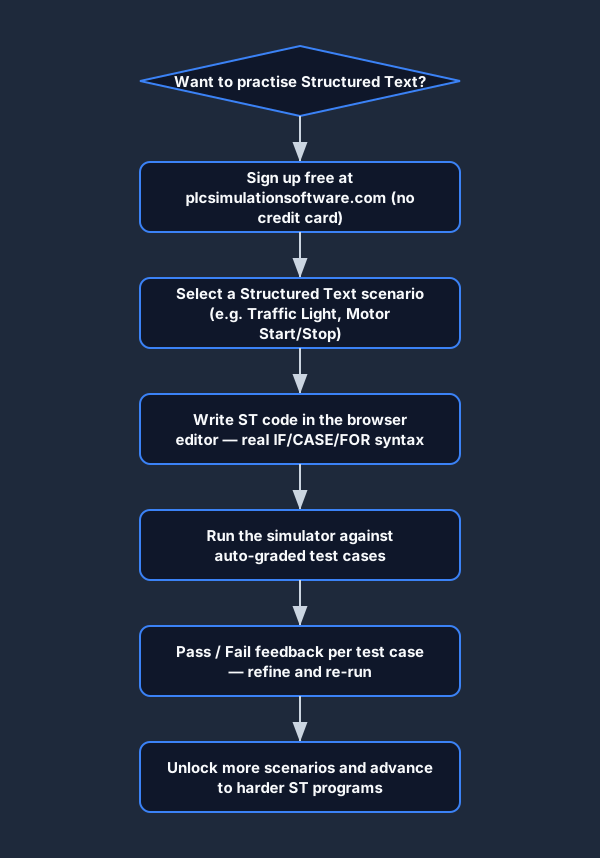
PLC Simulation Software runs a Structured Text dialect entirely in the browser. You write real ST syntax — the same IF/THEN/ELSIF/ELSE/END_IF, CASE/OF/END_CASE, FOR/TO/BY/DO/END_FOR, WHILE/DO/END_WHILE, TON, CTU function block calls — and the simulator executes your code against auto-graded test cases. No install, no hardware, no licence.
Sign up free
No credit card. Two scenarios unlocked immediately, including ST scenarios with IF and CASE.
Open an ST scenario
Select a Structured Text scenario. The editor opens with a VAR block and an empty program body. Write real ST syntax.
Run and get graded
The simulator executes your ST program against every test case. Instant pass/fail with per-test breakdown — same feedback loop as a real PLC.
vs CODESYS runtime, TIA Portal trial, Studio 5000 trial
Start writing Structured Text today. Free.
Two auto-graded ST scenarios free forever. Full access to all scenarios from a monthly rate.
PLC Structured Text FAQ
Write and run Structured Text in your browser
No install. No Studio 5000 licence. No credit card. Real ST syntax, real auto-graded feedback.
Create free account →