One-Shots & Edge Detection in PLCs: ONS, OSR and R_TRIG
One-Shots & Edge Detection in PLCs
A one-shot fires for exactly one PLC scan when an input changes state, instead of staying on the whole time the input is true. Rising-edge detection (IEC R_TRIG, Allen-Bradley ONS/OSR, the Siemens P contact) gives you a single-scan pulse the moment a signal goes from 0 to 1; falling-edge detection (F_TRIG, the N contact) does the same on the 1-to-0 transition. That one-scan pulse is what you reach for whenever you need to react to the event of something happening — not the fact that it is still happening.
This guide shows what an edge actually is, how the instructions behave scan by scan, the names every dialect uses, and the classic bugs that make one-shots misbehave.

Level vs edge: the core idea
Most contacts you write are level-triggered. An XIC / --| |-- contact is true for as long as the bit behind it is true. If you press and hold a button, the rung stays energised the entire time you hold it.
An edge-triggered instruction does not care that the bit is high — it cares about the moment it became high. It compares the bit's value this scan with its value last scan. If it was 0 last scan and is 1 this scan, that is a rising edge, and the instruction produces a pulse that is true for one scan only, then drops automatically even though the input is still held.
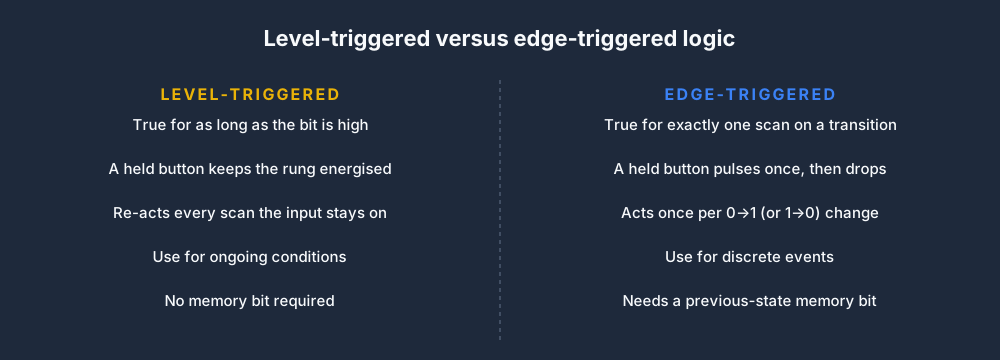
That single-scan behaviour is the whole point. It turns a continuous signal into a discrete event you can count, latch, or step on exactly once.
What a rising edge looks like
Here is the behaviour that surprises people first: the input can be held high for a hundred scans, but the edge-detect output Q is only true for the first of them.
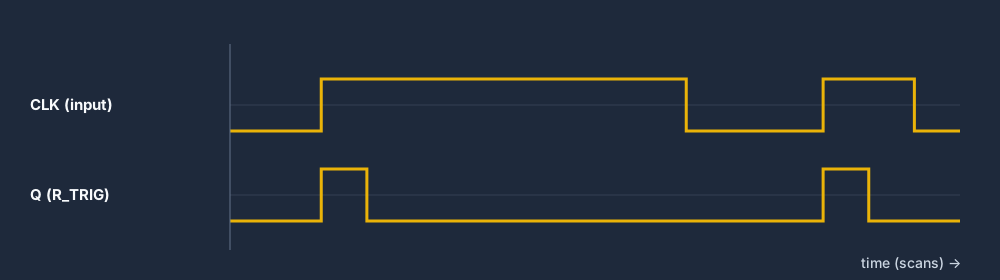
Read the diagram: CLK (the input) goes high and stays high, but Q is a one-scan blip on each 0-to-1 transition. To get another pulse the input must go low and high again. A F_TRIG is the mirror image — its pulse appears on the 1-to-0 transition instead.
A one-shot driving a coil
The classic rung puts an ONS (one-shot) between a contact and a coil. The button can be held down forever; the coil it drives only pulses once per press.
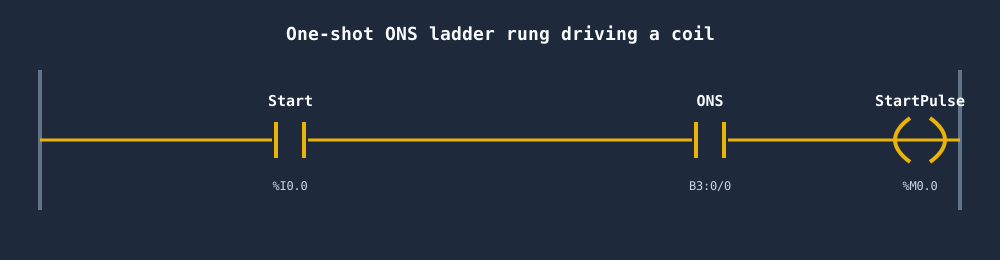
This is how you make a "press to toggle" or "press to start one cycle" button. Without the one-shot, holding the button would re-trigger the action every scan — hundreds of times a second.
The killer use case: incrementing a counter
Edge detection and counters go together. A CTU count-up instruction adds 1 on every rising edge of its enable. But if you wire a plain held contact straight into a counter, the counter behaviour already edge-detects internally on most platforms — the trap is when you build your own count logic with an ADD. Then you must put a one-shot in front, or the value races up by one per scan.
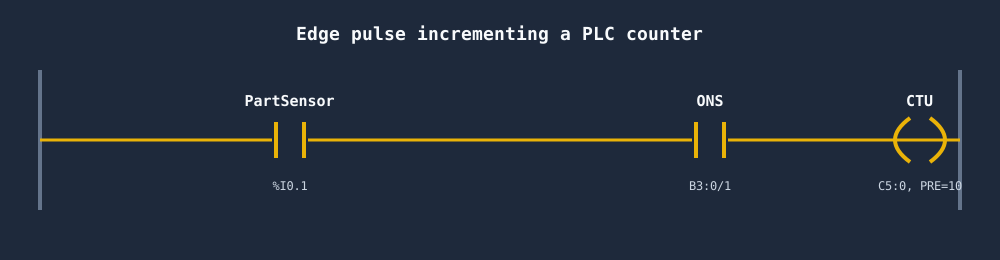
One press, one increment. That is only true because the rung pulses for a single scan.
The instruction names by dialect
The concept is identical everywhere; the spelling is not. Learn the IEC function blocks and you can map the rest.
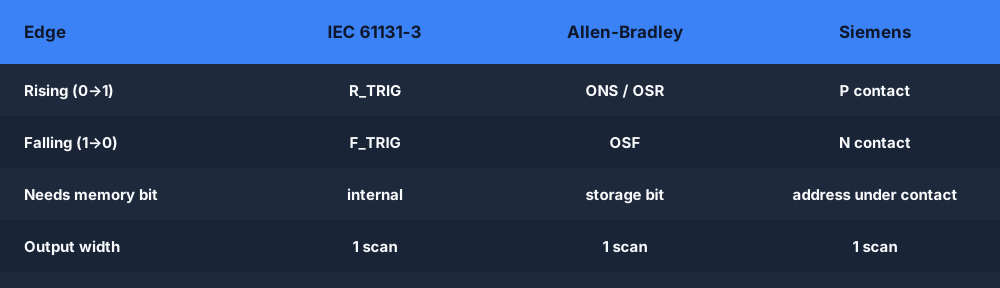
A few notes worth keeping in your head:
R_TRIG/F_TRIG(IEC 61131-3) are function blocks with aCLKinput and aQoutput, each carrying its own internal memory bit.ONS(Allen-Bradley) is a single instruction that needs a dedicated storage bit;OSR/OSFare the rising/falling output-style one-shots in newer Rockwell processors.PandNcontacts (Siemens, also IEC LD) detect edges inline on a contact and need a memory bit address written underneath them.
Every one of these stores a "previous state" bit somewhere — which is exactly where the bugs come from.
When do you actually need an edge?
Not every rung needs a one-shot. Use this quick check before you add one.
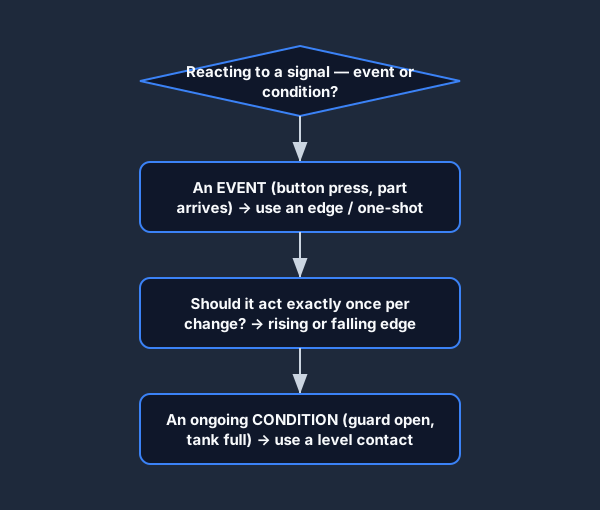
The rule of thumb: if you are reacting to an event (a button press, a part arriving, an alarm appearing) you want an edge. If you are reacting to a condition (a guard is open, a tank is full, a motor is running) you want the level.
Edge-detection pitfalls
One-shots cause some of the most confusing bugs in PLC code precisely because they "work" most of the time and fail in edge cases.
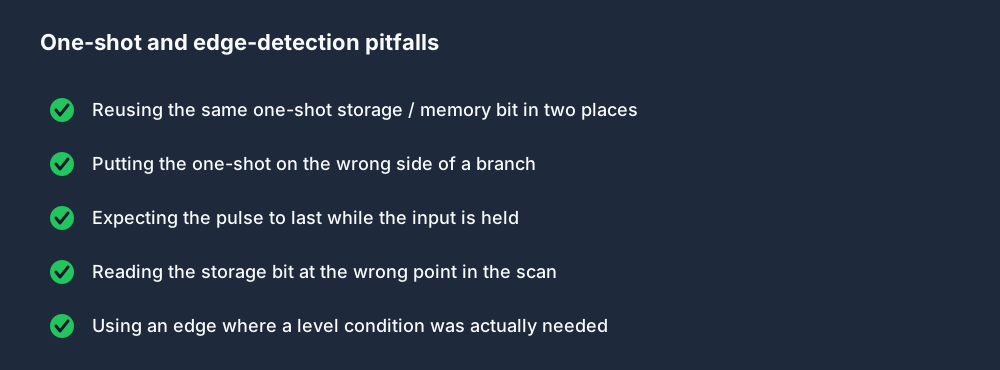
The single worst one is reusing the same one-shot storage bit in two places. The two instructions fight over the same "previous state" memory, and both fire unpredictably. Every ONS and every P/N contact needs its own unique memory bit. The next most common is putting the one-shot on the wrong side of a branch so it edge-detects something you did not intend — almost always traceable to the scan cycle reading the storage bit at a different point than you pictured.
Falling edges matter too
Do not forget the other direction. A F_TRIG or N contact is how you react to something stopping: latch a fault when a "machine running" bit drops, capture the final count when a guard opens, or trigger a cleanup routine the instant a cycle ends. It is the same single-scan pulse, just on the 1-to-0 transition.
Practice edge detection in your browser
The fastest way to make one-shots click is to wire one up and single-step the scan so you can see the pulse appear for one scan and vanish. You can do exactly that in the free browser PLC simulator — drop an R_TRIG, hold the input, and watch Q fire once. Switch the ladder logic editor between IEC, Allen-Bradley and Siemens dialects to see R_TRIG, ONS and the P contact side by side, and keep the TON / R_TRIG / TOF dialect cheat sheet open while you do.
FAQ
What is a one-shot in ladder logic? A one-shot is an instruction that produces a true output for exactly one PLC scan when its input transitions from false to true, then turns itself off even if the input stays true. It converts a held signal into a single momentary pulse.
What is the difference between ONS and OSR?
Both are Allen-Bradley one-shots. ONS is an input-style instruction placed in series before the output it pulses. OSR (and its falling-edge sibling OSF) is an output-style instruction that sets a separate output bit for one scan on the rising edge. They behave the same; the difference is where they sit on the rung.
What does R_TRIG do in a PLC?
R_TRIG is the IEC 61131-3 rising-edge function block. Its Q output is true for one scan each time the CLK input goes from 0 to 1. F_TRIG is the falling-edge equivalent that pulses on the 1-to-0 transition.
Why does my one-shot fire twice or not at all? Almost always because two instructions share the same storage / memory bit, or the bit is read and written at different points in the scan than you expected. Give every one-shot its own unique memory bit and check where in the scan the bit is updated.
When should I use an edge instead of a level contact? Use an edge when you are reacting to an event — a button press, a part arriving, an alarm appearing — and you want to act exactly once. Use a level contact when you are reacting to an ongoing condition that should keep the rung energised the whole time it is true.