The PLC Scan Cycle Explained (With Diagrams)
The PLC Scan Cycle Explained (With Diagrams)
If your PLC program behaves in a way that seems to miss events or update outputs a fraction too late, the scan cycle is almost certainly involved.
The PLC scan cycle is the continuous loop — typically completing in 1–20 ms — during which the processor reads all inputs into memory, executes your control program from top to bottom, then writes the results to all outputs. Everything your program does happens within this cycle. Understanding it is the difference between writing reliable control logic and writing code that occasionally misbehaves in production.

The Four Phases of the Scan Cycle
Modern PLCs typically break the scan into four distinct phases:
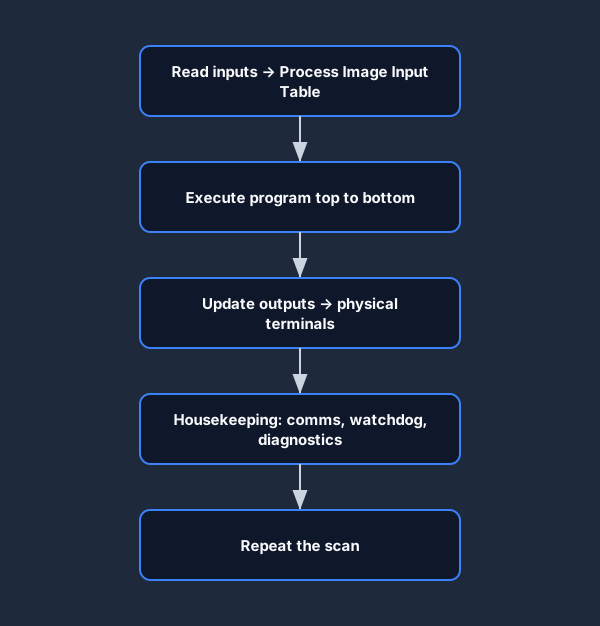
Phase 1: Input Scan
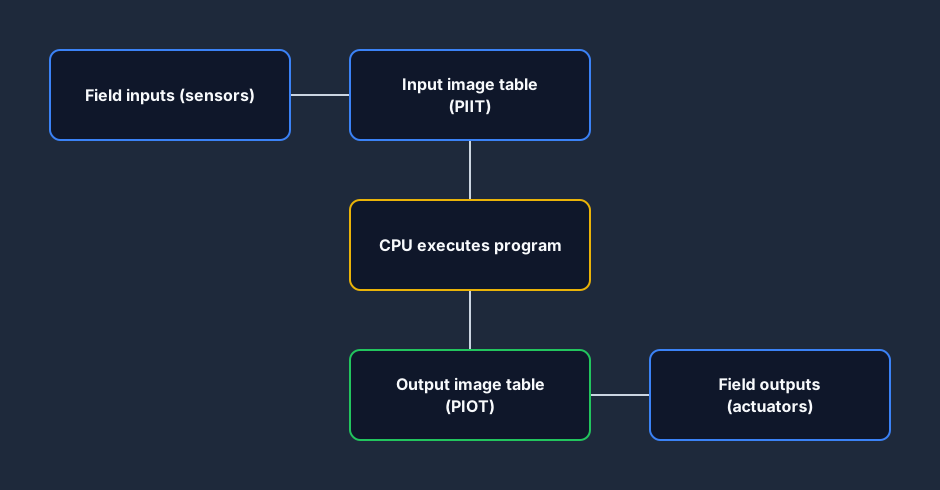
The processor reads every digital and analogue input wired to the I/O modules and copies the values into a region of RAM called the Process Image Input Table (PIIT) or Input Image Register. From this point forward, your program works against these snapshot values — not the live wire.
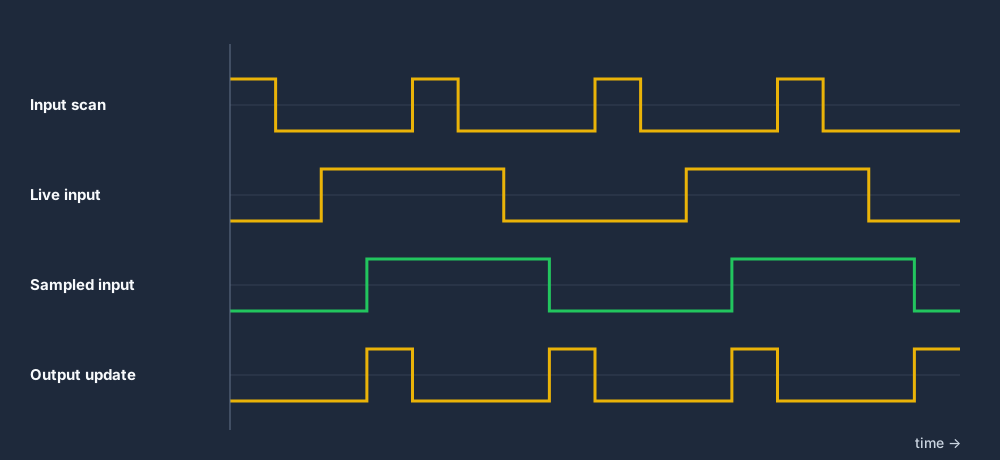
This is a critical design decision: if a sensor changes state while the program is running, the program does not see the change until the next scan. This prevents a rung in the middle of your program from seeing a different sensor state than a rung at the top, which would make deterministic logic nearly impossible.
Phase 2: Program Execution
The CPU works through your ladder program from the first rung to the last, left to right on each rung. For each rung it:
- Evaluates the input conditions (contacts) using the PIIT values.
- Computes the rung result (true or false).
- Updates the affected output coils and memory bits in the Process Image Output Table (PIOT) in RAM.
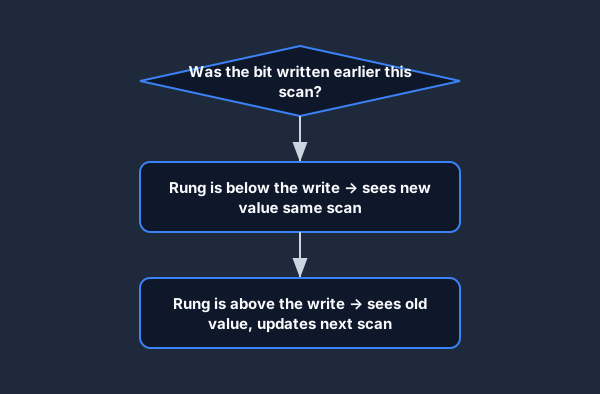
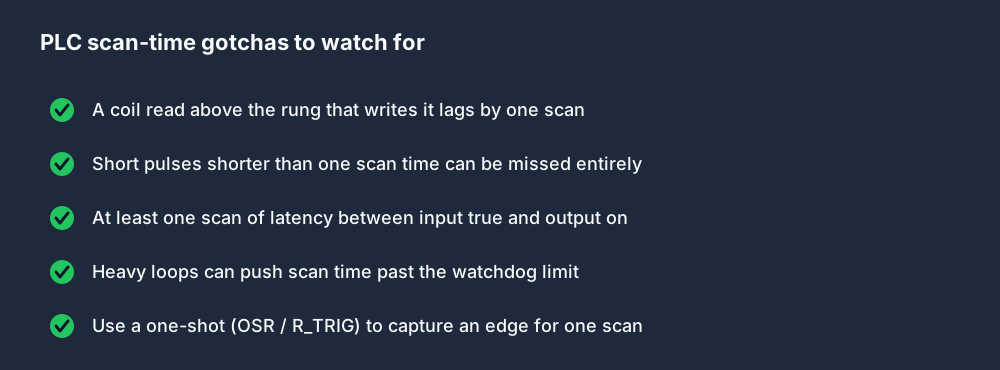
Note: coil values written in Phase 2 are immediately available for contacts further down the program in the same scan. This is the source of several common sequencing bugs — a bit set late in the program is invisible to rungs that already ran above it.
Phase 3: Output Scan
The processor writes the Process Image Output Table to the physical output terminals on the I/O modules. Field devices — motor starters, solenoid valves, indicator lights — respond to the change.
Phase 4: Housekeeping
The CPU handles internal tasks: communication servicing (Ethernet/IP, Modbus, serial), updating the real-time clock, checking the watchdog timer, and self-diagnostics. On some PLCs this phase is interleaved with program execution; on others it is a discrete step.
Why Scan Time Matters
The Watchdog Timer
Every PLC has a watchdog timer — a hardware timer that the firmware resets at the end of every successful scan. If the scan takes longer than the configured maximum (e.g. 500 ms), the watchdog trips a fault and the PLC stops. This prevents a runaway program from leaving outputs energised indefinitely in an unsafe state.
If you add computationally expensive operations (nested loops over large arrays, heavy floating-point maths) and the scan time exceeds the watchdog threshold, you will get a fault. Keep scan time well below the watchdog limit.
Input Timing and Short Pulses
If an input signal is present for less than one full scan time, the PLC may not see it. Consider a proximity sensor whose output pulse lasts 500 µs and a PLC with a 10 ms scan: in most configurations the input scan will never sample that pulse.
Solutions:
- Use high-speed interrupt inputs (HSC — High Speed Counter) for fast events.
- Use latching hardware inputs that hold the signal until the next scan.
- Re-architect the sensor or mechanical system to produce longer signals.
Output Latency
There is always at least one scan of latency between a condition becoming true and the corresponding output energising. For a 10 ms scan cycle this is imperceptible to humans, but it matters for precise motion control applications.
Scan Cycle Timing in Practice
(* Estimated scan-time contribution of a simple motor control program *)
(* Rung count: ~20 rungs, no function blocks *)
(* Typical execution time: 0.05–0.2 ms on a mid-range CPU *)
(* Total scan including I/O: 2–5 ms *)
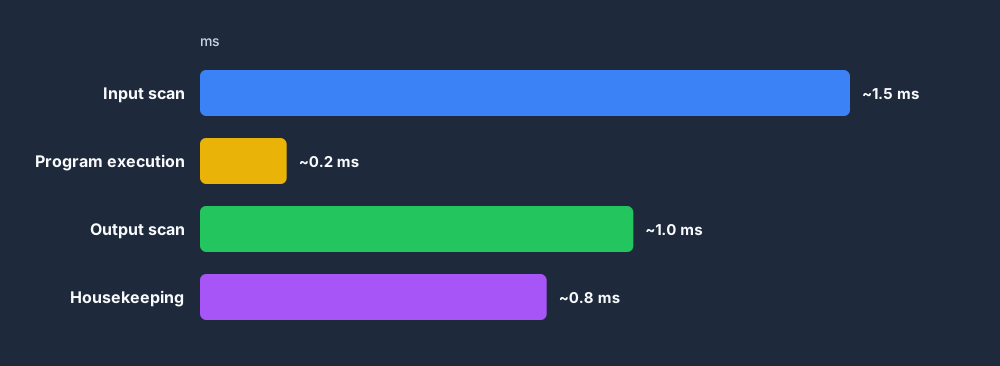
The execution phase is usually the smallest contributor to total scan time. I/O scanning — especially if you have a large rack of analogue cards or remote I/O over a field bus — often dominates.
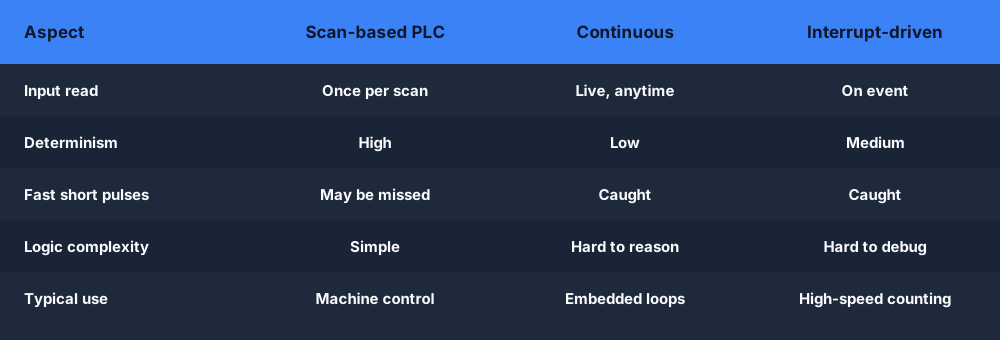
Periodic vs Event-Driven Tasks
Most modern PLCs let you organise your program into tasks with different priorities:
| Task type | Trigger | Typical use | |---|---|---| | Cyclic (Free-running) | Continuous scan | Main control logic | | Periodic | Fixed interval (e.g. every 10 ms) | Predictable timing for motion, PID | | Event | Rising edge on a bit | Interrupt-style fast response |
A periodic task with a 10 ms period will execute every 10 ms regardless of how long lower-priority cyclic tasks take. Use periodic tasks for PID loops (see PID Control for PLCs: Practical Tuning Guide) where consistent sample intervals are critical.
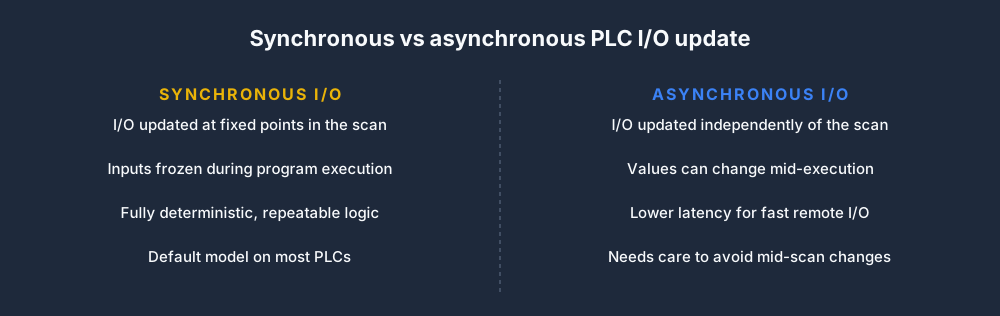
How a task updates its I/O also varies. With synchronous I/O the process image is refreshed at fixed points in the scan, keeping inputs frozen while the program runs; with asynchronous I/O the data can update independently for lower latency.
The Scan Cycle and Ladder Logic Execution Order
Here is a critical gotcha for ladder logic beginners:
(* Rung 1 — sets BitA based on Input1 *)
IF Input1 THEN
    BitA := TRUE;
ELSE
    BitA := FALSE;
END_IF;

(* Rung 2 — reads BitA, which was just updated this scan *)
IF BitA THEN
    Output1 := TRUE;
END_IF;
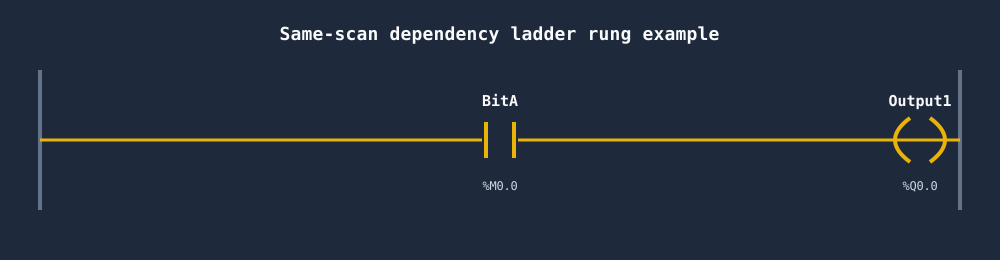
In this example, Output1 will energise in the same scan that BitA is set by Input1. No scan delay. But if the rungs were reversed — Rung 2 above Rung 1 — Output1 would not energise until the next scan after Input1 goes high. This matters when you are building sequences and timers.
Debugging Scan-Cycle Timing Issues
- Monitor scan time — most PLCs expose current scan time in diagnostics. Watch it under load.
- Use one-shot contacts — if you are detecting a rising edge, use an
OSR(one-shot rising) orR_TRIGfunction block to capture the event for exactly one scan. - Trace the data table — step through the output image table after a scan to verify which bits were set and by which rung.
- Simulate first — use a browser-based PLC simulator to iterate quickly. In the simulator you can pause after each scan and inspect every register.
For a deeper dive into how ladder logic rungs execute, see How to Read Ladder Logic (Step by Step) and work through the Debugging and the Scan Cycle lesson.
Practice this yourself in the simulator — 3 scenarios free. No install. No credit card. Write real ladder logic against a live machine model in your browser.