PLC Practice Problems: Ladder Logic Exercises With a Live In-Browser Simulator
Every problem is runnable. Write the ladder, press Run, and get instant pass/fail feedback — just like a real PLC scan cycle. No install, no hardware, no static diagrams.
Join 1300+ learners practicing PLC programming
The problem with static resources
Why static PLC practice problems miss the point
Search for "PLC practice problems" and you will find dozens of PDF worksheets and blog posts. They share the same format: a machine description, a hand-drawn rung diagram, and an answer at the bottom. Read the problem, look at the solution, feel like you understand it. Move to the next one.
The problem is that reading a correct rung diagram is nothing like writing one. When you sit down at a real PLC — or a job-site laptop running Studio 5000 — you have a blank rung and a machine that needs to do something. Nobody hands you the answer. You have to build it, run it, and figure out why the motor sealed in when it should not have.
That feedback loop — build, execute, observe, fix — is the actual skill. Static practice problems train reading comprehension. This platform trains programming.
Every exercise here is a live scenario. You write the ladder logic in a visual editor, the platform executes a real PLC scan cycle, forces every relevant input combination against your program, and tells you which test cases your rungs pass and which they fail. The grader is not checking that your diagram looks right. It is checking that your program behaves right.
That is the difference: build it, run it, grade it.
Build it
Use the visual ladder editor to place contacts and coils. The instruction set mirrors Allen-Bradley (XIC, XIO, OTE, TON, CTU) or IEC 61131-3, switchable per scenario.
Run it
Press Run and the platform executes your program against a simulated I/O table through every test case. No install, no external software, no hardware.
Grade it
Each test case reports pass or fail. You see exactly which input combination broke your logic so you can fix the rung rather than guess.
Beginner ladder logic exercises
Free beginner PLC practice problems
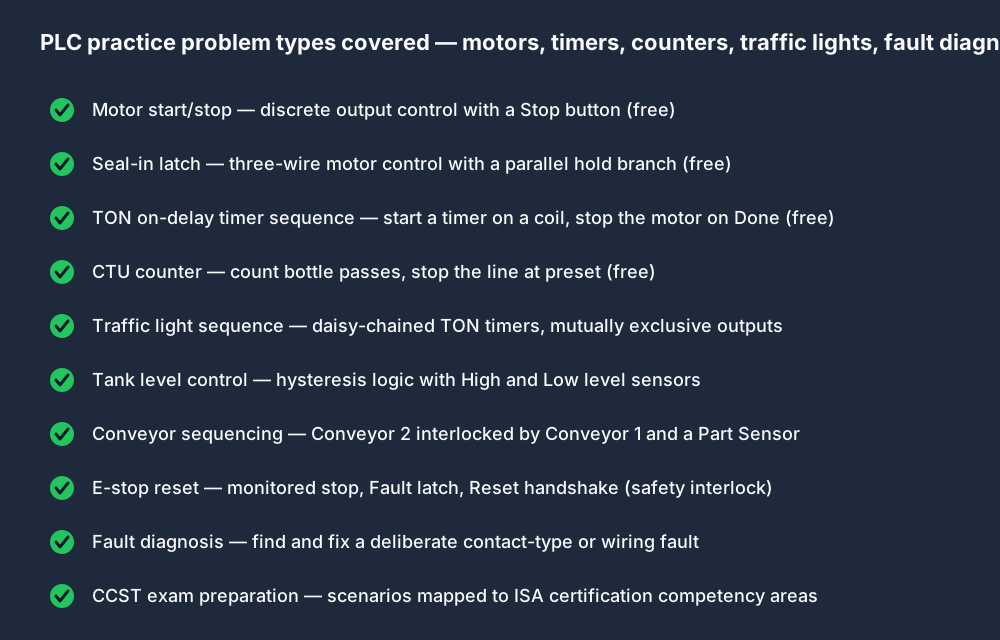
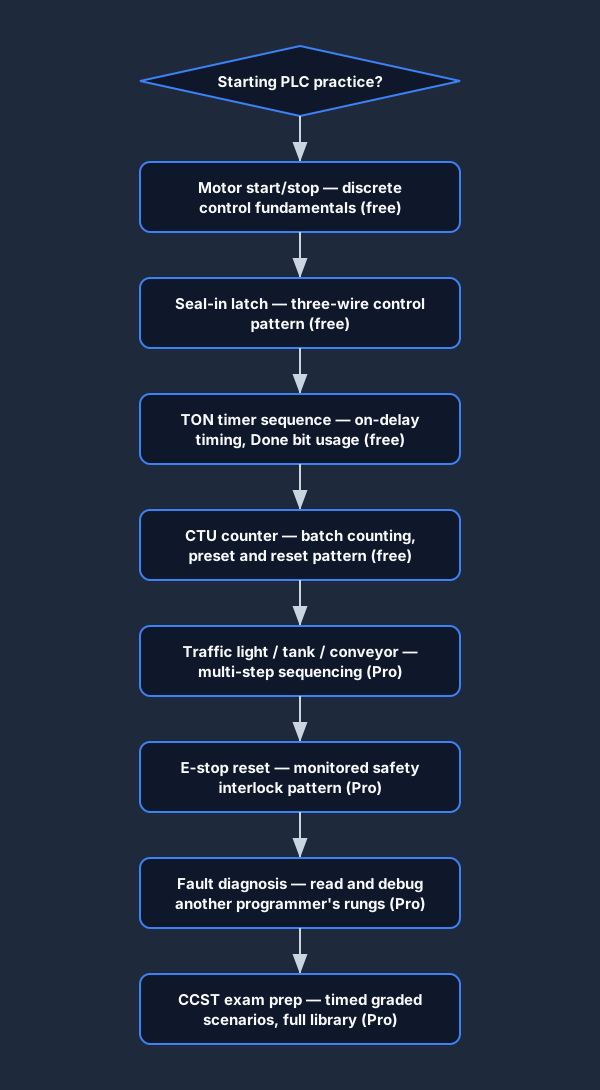
These four problems cover the core patterns every PLC programmer must know cold: basic discrete control, the seal-in latch, timer-controlled sequences, and event counting. All four are free to run — no account required, no email gate, no credit card.
Motor Start/Stop
Wire a Start and Stop button to control a motor output. No latch — the motor only runs while Start is held.
What to build:
One XIC Start contact, one XIO Stop contact, one OTE Motor coil.
Seal-In Latch
Add a seal-in branch so the motor holds itself on after Start is released.
What to build:
A parallel Motor XIC contact sealing around the Start button. Classic three-wire control.
TON Timer Sequence
Start the motor, then automatically stop it after 5 seconds using a TON on-delay timer.
What to build:
One TON with preset 5000 ms. Motor.DN contact opens the motor rung when the timer fires.
Counter — Bottle Passes
Count 10 bottles on a conveyor using a CTU instruction and stop the line when the batch is complete.
What to build:
CTU with preset 10. A Sensor XIC pulses the count input on each rising edge. QU bit stops the conveyor.
Problem 1 detail: Motor Start/Stop
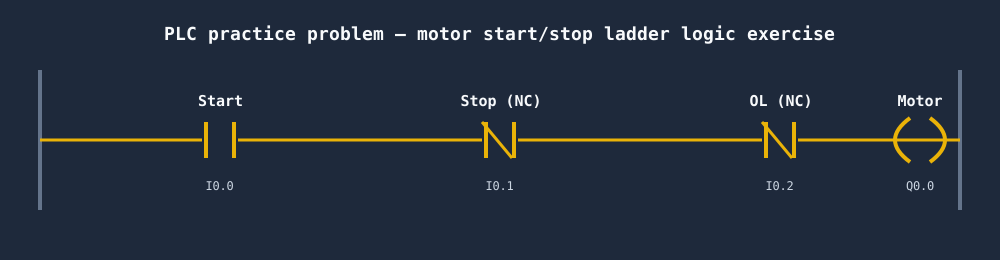
The motor start/stop circuit is the "hello world" of PLC programming. A normally-open Start contact in series with a normally-closed Stop contact drives a Motor output coil. When Start is momentarily pressed, the output energises — but only for as long as the button is held, because there is no latch. The next problem adds the seal-in branch that makes this circuit behave like a real motor control circuit.
This problem teaches you to read a problem statement, identify the inputs and outputs, assign I/O addresses, and place the correct contact types. It sounds simple — it trips up many beginners because the Stop contact must be normally-closed (fail-safe), not normally-open.
Problem 3 detail: TON Timer Sequence
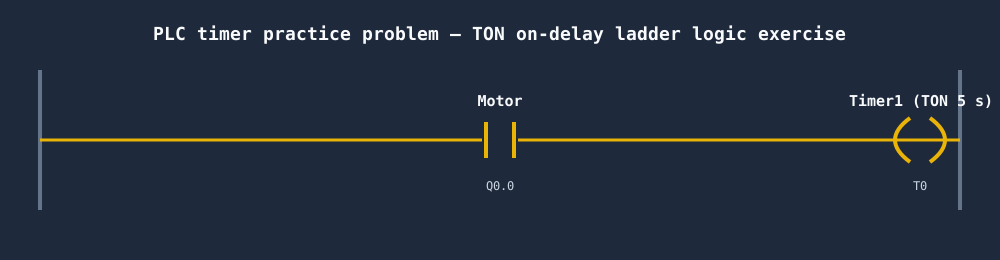
Timers appear in the majority of real PLC programs: motor run-up delays, conveyor hold times, recipe step durations, alarm annunciation delays. The TON (on-delay timer) is the most common. It starts timing when the enable rung goes true, accumulates time in milliseconds, and sets its Done bit when the accumulated time reaches the preset.
In this problem, the Motor starts on a seal-in rung (from Problem 2), then a TON begins timing from the moment the Motor output energises. When the timer's Done bit fires after 5 seconds, it breaks the Motor rung. This teaches the key pattern: using an output coil address as the enable for a timer, and using the timer's Done bit to trigger the next action.
Intermediate ladder logic exercises
Intermediate PLC practice problems
Once you can write a motor seal-in and a TON sequence without referring to notes, these problems introduce multi-step sequencing, interlocks, level control, and safety circuits. These are the problem types that appear in entry-level PLC technician interviews. Intermediate problems require a Pro account for graded access, but you can read the problem statement and attempt them on a free account.
Traffic Light Sequence
Implement a timed green/amber/red traffic light cycle using TON timers and sequential step bits.
What to build:
Three TON timers daisy-chained so each done bit activates the next phase. Reset at the end of the cycle.
Tank Level Control
Control a fill valve and drain pump based on high and low level sensor inputs with hysteresis.
What to build:
Low-level XIC opens the fill valve; High-level XIO holds it open. High-level NC contact enables the drain pump.
Conveyor Sequencing
Drive two conveyors in sequence: Conveyor 2 only runs while Conveyor 1 is running and a part is detected.
What to build:
Interlock rungs. Conveyor 1 seal-in. Conveyor 2 gated by Conveyor 1 and Part Sensor contacts in series.
Fault Detection and E-Stop
Implement a monitored E-stop with a reset handshake — the machine cannot restart without an operator reset after an E-stop event.
What to build:
E-stop XIO in series with every output rung. A latched Fault bit blocks restart until the Reset button is pressed.
Traffic light sequence — deep dive
The traffic light problem is a classic sequencing exercise because the solution forces you to think about mutually exclusive states and timed transitions. A naive approach uses a single timer and bitwise output logic. A better approach uses three separate TON timers daisy-chained: the green timer's Done bit enables the amber timer, the amber timer's Done bit enables the red timer, and the red timer's Done bit resets everything and restarts the green timer.
The key insight is that only one output can be on at a time — if your logic ever turns two outputs on simultaneously, the program is wrong even if the timing is right. The auto-grader tests this explicitly with cross-checks on all output combinations.
E-stop and fault detection — why this problem matters
Safety interlocks are not optional in real industrial systems — they are a regulatory requirement. The E-stop reset problem teaches the monitored stop pattern: the E-stop contact is wired normally-closed in series with every output rung (so a broken wire is a safe stop, not a stuck-on condition). A separate Fault latch captures the stop event. The machine cannot restart until an operator presses a Reset button while the E-stop is clear.
This pattern appears on the ISA CCST exam and in virtually every industrial PLC interview. Understanding why the E-stop must be normally-closed (fail-safe) and why the Reset must be a momentary-input-into-a-latch (not a held input) is the difference between a green PLC learner and someone who is ready to work on a real machine.
Fault diagnosis — the most underrated practice type
Most PLC practice problem resources focus on writing programs. Real PLC technicians spend the majority of their time reading programs that someone else wrote and finding out why a machine stopped. The fault diagnosis problems on this platform give you a pre-written ladder program with a deliberate fault — a normally-closed contact that should be normally-open, a timer preset that is too short, a missing seal-in branch. You have to identify the fault, fix it, and confirm the fix by running the grader.
Assessment
PLC practice test — assess your skills
Practice problems build skills; a structured practice test reveals gaps. The platform offers timed assessment scenarios that combine multiple-choice questions about instruction behaviour with rung interpretation and live coding exercises. Completing a practice test tells you exactly which topic areas to revisit before a job interview or certification exam.
Multiple-choice questions
Questions about instruction behaviour, contact types, timer and counter mechanics, and scan cycle order. The same question format used by the ISA CCST and other certification bodies.
Rung interpretation
Given a ladder rung and an I/O state, predict the output. This tests whether you can trace logic mentally — a skill every PLC technician needs at the control panel.
Live graded exercises
Write a ladder program that satisfies a set of requirements. The grader runs your program against the full test suite and scores it. Timed to simulate interview conditions.
How grading works
When you submit a ladder program, the grader builds an I/O truth table from the problem specification. It then runs your program through every row of that table: applying the input combination, executing the scan cycle, and comparing your output values to the expected values. A program that produces the correct output on 8 of 10 test cases scores 80%, and you see exactly which two cases failed.
This is harder to fool than most online exercises. You cannot write a program that turns every output on and "pass" — the grader tests combinations where specific outputs must be off. You cannot hardcode a single answer — the grader varies the inputs systematically. The only way to score 100% is to write logic that correctly handles all conditions.
For CCST exam preparation, the platform includes a set of scenarios that mirror the competency areas tested by the ISA certification: basic ladder logic, timer and counter applications, analog I/O concepts, and safety interlock patterns.
Allen-Bradley dialect
Allen-Bradley PLC practice problems
Allen-Bradley (Rockwell Automation) PLCs — ControlLogix, CompactLogix, MicroLogix — hold the largest market share in North American manufacturing. RSLogix 5000 and its successor Studio 5000 use a specific set of instruction mnemonics that differ from the IEC 61131-3 names: the normally-open contact is XIC (Examine If Closed), the normally-closed contact is XIO (Examine If Open), the standard output coil is OTE (Output Energise), and latching/unlatching instructions are OTL and OTU.
Practising with generic ladder logic diagrams does not prepare you for Studio 5000. You need to build muscle memory for the AB instruction names and the tag-based addressing model (Motor, not %Q0.0 or Q0.0 — symbolic tags like MotorRun, Timer1.DN, Counter1.ACC).
Every practice problem on this platform can be solved in Allen-Bradley dialect. Toggle the dialect selector on any scenario to switch to AB mode. The editor uses XIC, XIO, OTE, OTL, OTU, TON, CTU — the exact instruction names you will see in Studio 5000. The timer and counter member syntax (.DN, .EN, .ACC, .PRE) matches the Allen-Bradley convention.
Practising in AB dialect is also the fastest way to prepare for a job that requires RSLogix experience. You get the instruction-name recognition without needing a Studio 5000 licence (which runs several hundred dollars per seat per year) or a ControlLogix rack (which runs thousands of dollars for a training setup).
Motor Start/Stop (AB)
XIC Start, XIO Stop, OTE Motor — the seal-in rung in Allen-Bradley dialect.
Open scenario →Start/Stop No Latch (AB)
Verify you understand the difference between a momentary and a latching circuit in AB syntax.
Open scenario →Latch Start (AB)
Add the OTL / seal-in branch. The motor holds itself in after Start is released.
Open scenario →TON Delay Sequence (AB)
AB-style TON: Timer1.EN, Timer1.DN, Timer1.ACC — the member naming that Studio 5000 uses.
Open scenario →E-Stop Reset (AB)
OTL Fault latch, XIO E-Stop NC, XIC Reset — safety interlock in AB dialect.
Open scenario →Fault Diagnosis (AB)
A pre-written AB program with a contact-type fault. Find it, fix it, pass the grader.
Open scenario →Allen-Bradley, Rockwell Automation, Studio 5000, RSLogix, ControlLogix, CompactLogix, and MicroLogix are registered trademarks of Rockwell Automation, Inc. This site is not affiliated with or endorsed by Rockwell Automation, Inc.
Problem-solving technique
Tips for getting unstuck on a PLC practice problem
Read the I/O list before you draw a rung
Every problem statement includes an input/output table. Before touching the editor, write out your tag assignments on paper. Knowing that I0.0 is the Start PB (normally-open momentary) and I0.1 is the Stop PB (normally-closed) prevents you from placing the wrong contact type — the single most common beginner error.
Think in conditions, not instructions
Ask "what condition must be true for this output to turn on?" not "what instruction do I put here?" If the Motor output should be on whenever the Start button was pressed AND the Stop has not been pressed AND the overload has not tripped, write those three conditions in plain language. Converting each condition to a contact type is then mechanical.
Trace the scan cycle mentally
Before running the grader, simulate one scan in your head: inputs update the I/O table, the processor evaluates your rungs left-to-right top-to-bottom, outputs are written. What is the state of each output after one scan if Start is pressed? If Stop is pressed? If both are pressed? If you can answer these without running the program, you will catch most bugs before the grader sees them.
When a test case fails, trace that specific case
The grader shows you exactly which input combination failed. Do not start editing randomly — force those specific inputs manually using the I/O panel and trace your rungs one at a time. Find the rung that produces the wrong output for that input state. Fix only that rung. Re-run.
NC contact on Stop is almost always the answer
If your motor-control circuit fails the "Stop pressed" test case, your Stop contact is probably normally-open (XIC) instead of normally-closed (XIO). This is the most common mistake in motor-control problems. Normally-closed contacts on Stop and Overload inputs are a safety requirement — the circuit fails safe on a broken wire.
Timers need an enable rung, not a constant power rail
A TON timer only accumulates time while its enable rung is continuously TRUE. If you connect the TON directly to the power rail, it will count to its preset on the first scan and immediately fire its Done bit. The enable rung should be the condition that starts the timing — usually a coil address or a sensor contact. When the enable rung goes FALSE, the ACC resets to zero (for a TON).
How to read a PLC practice problem statement
Most problem statements are written in the style of a machine specification: "The motor shall start when the Start button is pressed and remain running until the Stop button is pressed or the overload trips." This is not a rung diagram — it is a behavioural specification that you need to translate into logic.
Underline the verbs: start when pressed, remain running, stop when pressed. Each verb-phrase maps to a rung or a contact type. "Start when pressed" means a normally-open contact. "Remain running" means a seal-in parallel branch. "Stop when pressed" means a normally-closed contact in series.
Look for the word "unless" or "except" — these indicate interlocks that must appear as normally-closed contacts in series with the output rung. "The motor shall run unless the overload has tripped" translates to an XIO Overload contact in series.
Look for "after" or "delay" — these indicate timers. "The motor shall stop after 30 seconds" translates to a TON with a 30,000 ms preset whose Done bit opens the motor rung. Look for "count" or "batch" — these indicate CTU counters.
Building toward a CCST certificate?
The ISA Certified Control Systems Technician (CCST) exam covers PLC programming, discrete and analog I/O, instrumentation, and safety systems. The graded scenarios on this platform include a dedicated CCST track with problems modelled on the competency areas the exam tests. Completing the CCST track problems before your exam gives you confidence in your ability to write and interpret ladder logic under timed conditions.
The CCST track includes motor control, timer and counter applications, analog scaling concepts, and E-stop/safety interlock patterns — the same topics the ISA study guide emphasises. Scores on the auto-graded scenarios give you a directional signal about which areas need more practice before exam day.
How to solve a PLC practice problem on this platform
Read the problem
Understand the machine: what inputs exist, what outputs are required, and what behavioural conditions the problem specifies.
Assign I/O
Map the inputs and outputs to the I/O table provided. Identify which contacts should be normally-open and which should be normally-closed.
Build the rungs
Use the visual ladder editor to place contacts and coils. Add branches, timer blocks, and counter blocks as the problem requires.
Run the scan
Press Run. The platform executes your program against the simulated I/O through every test case in the grader.
Check the grade
Review which test cases passed and which failed. Trace the failing case to the specific rung and fix it. Repeat until 100%.
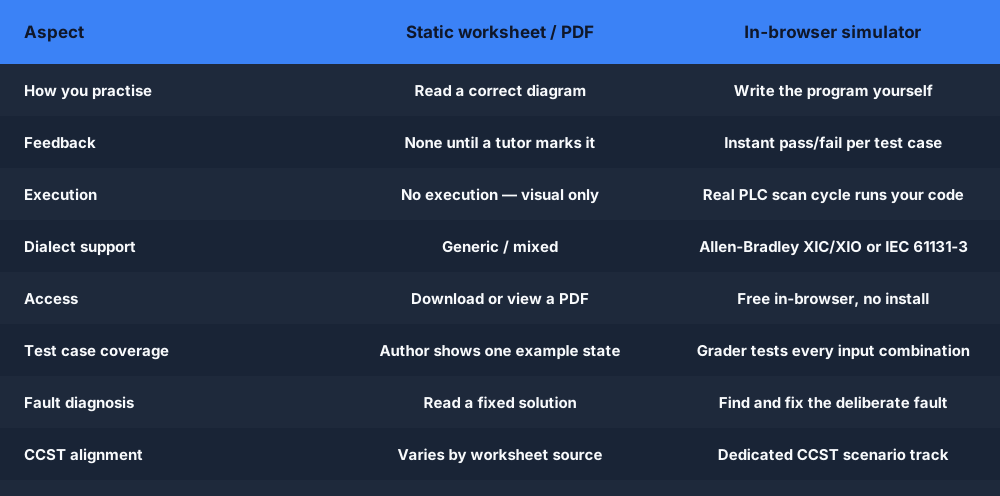
Why practice here vs a static worksheet
PLC practice problems — frequently asked questions
Building toward a certificate? See our free PLC training →
Build your skills — start practising now
Free beginner problems — no account required. Create an account to save progress. Pro for graded assessments, the full scenario library, and CCST prep.